Garmin G2000 Pilot’s Guide for the Cessna T240
190-01263-01 Rev. A534
AdditionAl FeAtures
sYsteM
oVerVieW
FliGHt
instruMents
eis
Audio PAnel
& Cns
FliGHt
MAnAGeMent
HAZArd
AVoidAnCe
AFCs
AdditionAl
FeAtures
APPendiCesindeX
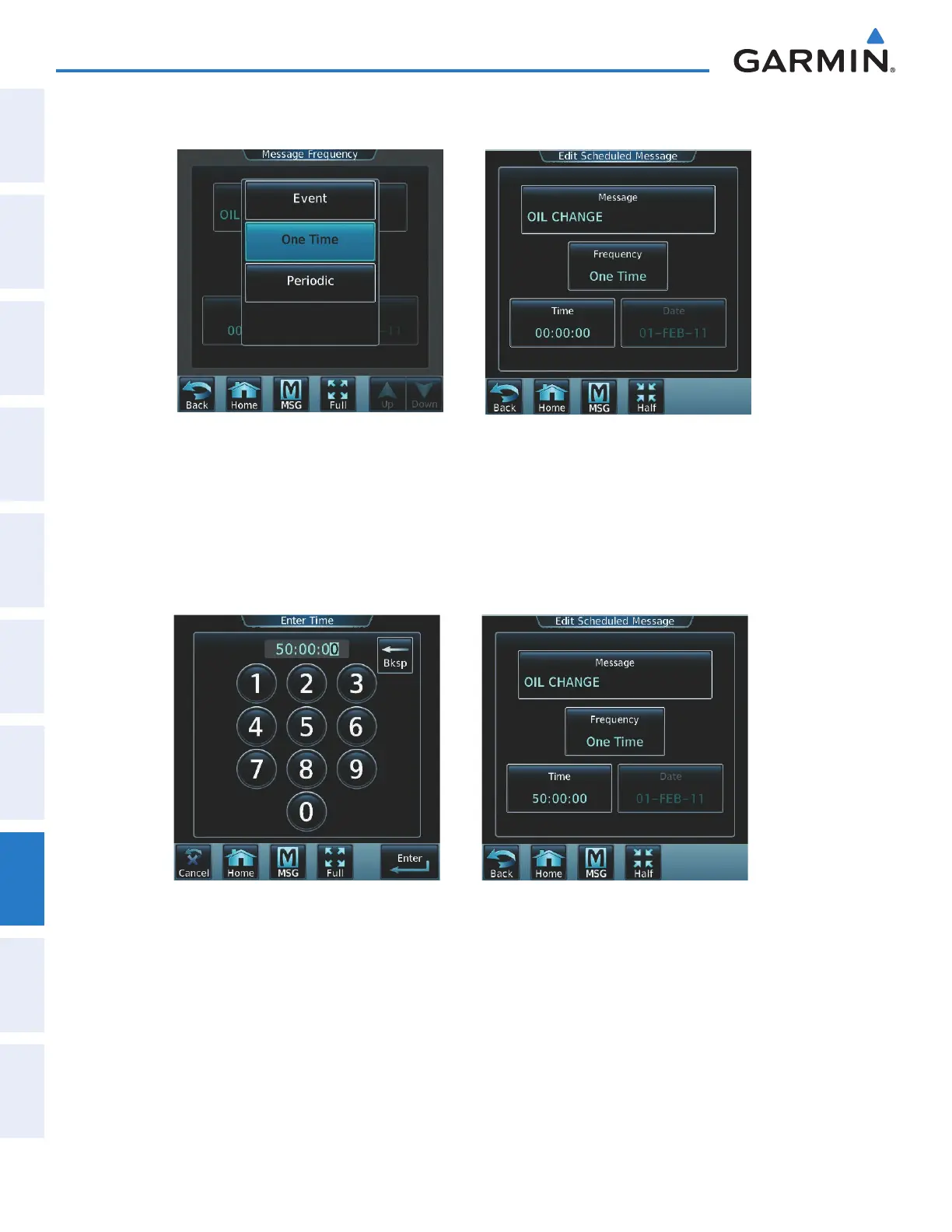
7) Touch Event, One Time, or Periodic. The selection is displayed on the Frequency Button as in Figure 8-95.
Figure 8-96 Touch Time ButtonFigure 8-95 Touch One Time Button
8) Touch the Time Button as seen in Figure 8-96.
9) The numeric keypad is displayed as in Figure 8-97. Enter the time value using the keypad. If One Time or
Periodic were selected in step 7, the time is entered in a HH:MM:SS format. If Event was selected in step 7,
time is entered in a clock format (HH:MM LcL) as local time.
10) Touch the Enter Button. The time is displayed on the Time Button.
Figure 8-98 Message Figure 8-97 Enter Time
11) If Event was selected in step 7, touch the Date Button. The Date Button is subdued and disabled when One
Time or Periodic were selected in step 7.
This manual downloaded from http://www.manualowl.com



 To Next Page