190-01263-01 Rev. A
Garmin G2000 Pilot’s Guide for the Cessna T240
535
AdditionAl FeAtures
sYsteM
oVerVieW
FliGHt
instruMents
eis
Audio PAnel
& Cns
FliGHt
MAnAGeMent
HAZArd
AVoidAnCe
AFCs
AdditionAl
FeAtures
APPendiCes indeX
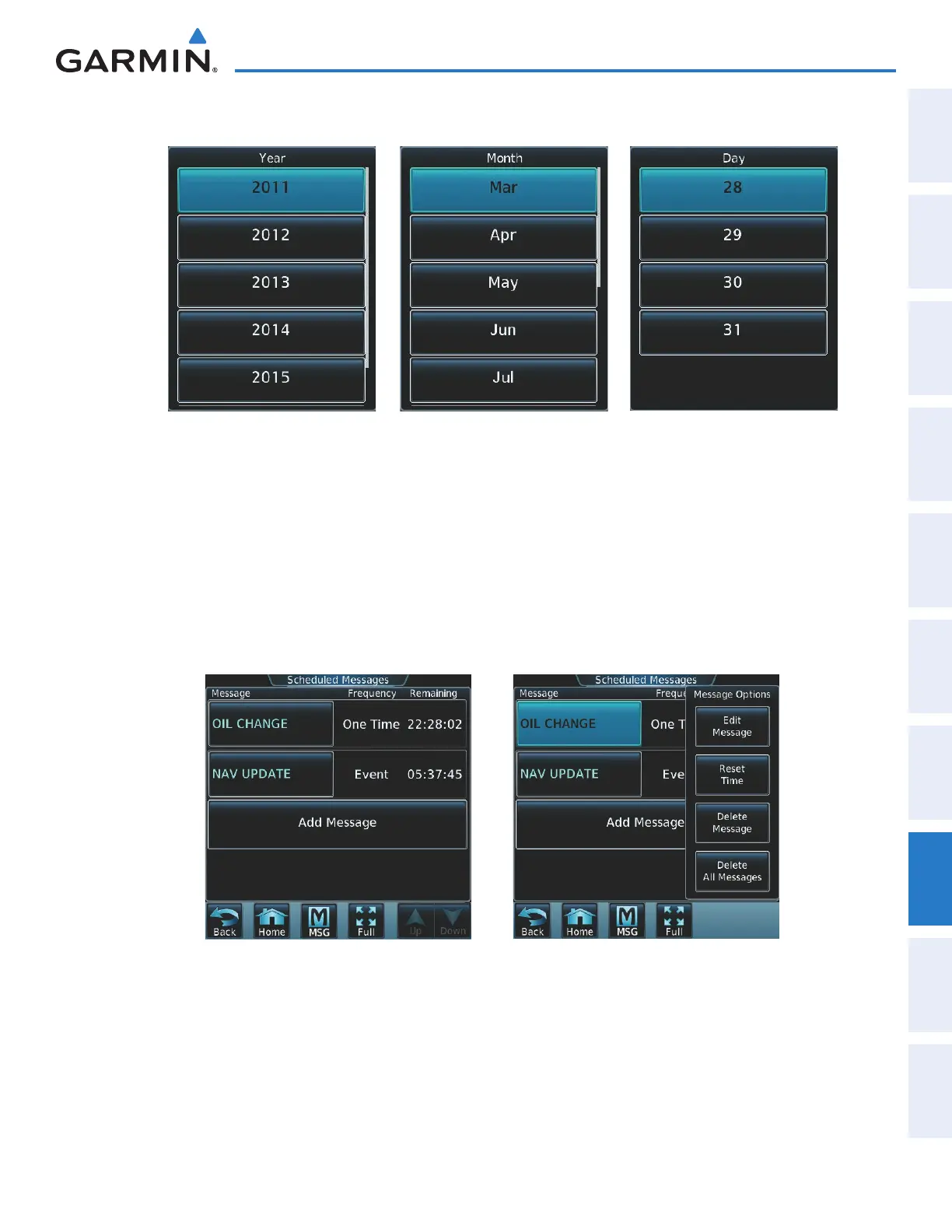
12) Touch the desired year, as in Figure 8-99, then the month followed by the day.
Figure 8-99 Event Date Entry
Touch Year
Touch Month Touch Day
Edit a scheduled message:
1) From the Home Screen, touch Utilities > Scheduled Messages.
2) Touch the name of the message to be edited. The Message Options Window is displayed as in Figure 8-101.
3) Touch the Edit Message Button.
4) Select the desired message parameter to be edited and perform the needed steps as discussed previously for
entering a scheduled message.
Figure 8-101 Select Edit Option Figure 8-100 Select Message for Editing
Deleting a scheduled message:
1) From the Home Screen, touch Utilities > Scheduled Messages.
2) Touch the name of the message to be deleted. The Message Options Window is displayed as in Figure 8-101.
3) Touch the Delete Message Button. Touch the Delete All Messages Button to delete all saved messages.
This manual downloaded from http://www.manualowl.com



 To Next Page