Garmin G2000 Pilot’s Guide for the Cessna T240
190-01263-01 Rev. A212
Flight ManageMent
SYSteM
OVeRVieW
Flight
inStRUMentS
eiS
aUDiO Panel
& CnS
Flight
ManageMent
haZaRD
aVOiDanCe
aFCS
aDDitiOnal
FeatUReS
aPPenDiCeSinDeX
runway length and/or surface type can be entered to prevent airports with small runways or runways that are
not appropriately surfaced from being displayed. Default settings are 0 feet (or meters) for runway length and
“HARD/SOFT” for runway surface type.
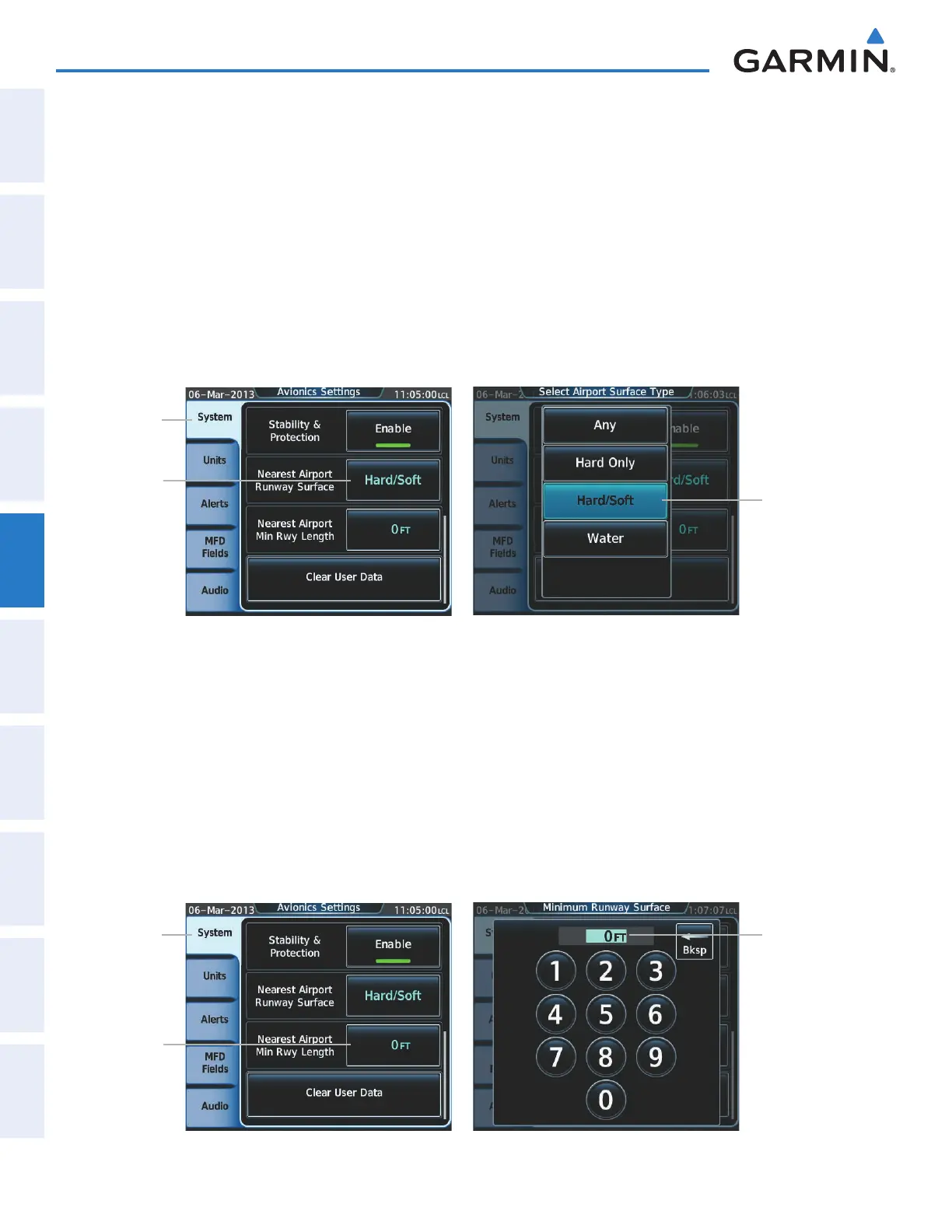
Selecting nearest airport surface matching criteria:
1) From Home, touch Utilities > Setup > Avionics Settings.
2) Touch the System Tab, if necessary.
3) Scroll the list to display the Nearest Airport Runway Surface Button.
4) Touch the Nearest Airport Runway Surface Button to display the surface choices.
5) Touch a surface selection button to set the surface criteria.
Nearest
Airport
Runway
Surface
Button
Figure 5-44 Nearest Airport Runway Surface Selection
Surface
Selection
Button
System
Tab
Selecting nearest airport minimum runway length matching criteria:
1) From Home, touch Utilities > Setup > Avionics Settings.
2) Touch the System Tab, if necessary.
3) Scroll the list to display the Nearest Airport Min Rwy Length Button.
4) Touch the Nearest Airport Min Rwy Length Button to display the keypad.
5) Use the keypad to enter the minimum length.
6) Touch the Enter Button to accept the length criteria.
Nearest
Airport
Min Rwy
Length
Button
Figure 5-45 Nearest Airport Runway Length Selection
Runway
Length
Entry
System
Tab
This manual downloaded from http://www.manualowl.com



 To Next Page