190-01263-01 Rev. A
Garmin G2000 Pilot’s Guide for the Cessna T240
165
Audio And CnS
SYSTEM
oVERViEW
FLiGHT
inSTRuMEnTS
EiS Audio & CnS
FLiGHT
MAnAGEMEnT
HAZARd
AVoidAnCE
AFCS
AddiTionAL
FEATuRES
APPEndiCES indEX
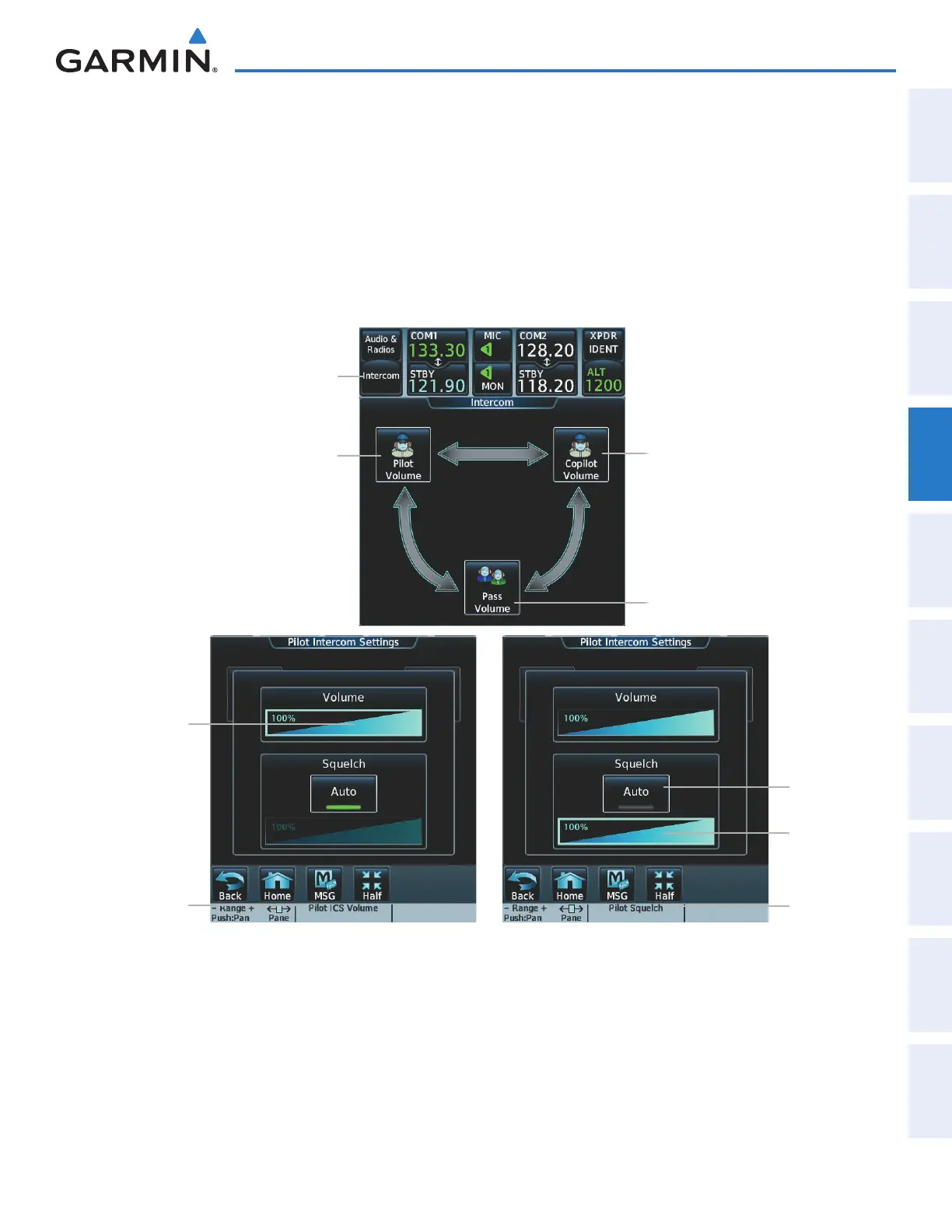
Adjusting intercom squelch:
1) Touch the Intercom Button to display the Intercom Screen.
2) Touch the Pilot Volume, Copilot Volume, or Passenger Volume button to display the Pilot, Copilot, or
Passenger Intercom Settings Screen.
3) Touch the Squelch Mode Button to turn off Auto Squelch.
4) Adjust the squelch by using the middle knob or by sliding your finger on the squelch slider.
Figure 4-55 Intercom Volume/Squelch Controls
Pilot Volume Button
Intercom Button
Copilot Volume Button
Passenger Volume
Button
Volume
Slider
Squelch
Button
Squelch
Slider
Volume
Knob Label
Squelch
Knob Label
This manual downloaded from http://www.manualowl.com



 To Next Page