Garmin G2000 Pilot’s Guide for the Cessna T240
190-01263-01 Rev. A546
AdditionAl FeAtures
sYsteM
oVerVieW
FliGHt
instruMents
eis
Audio PAnel
& Cns
FliGHt
MAnAGeMent
HAZArd
AVoidAnCe
AFCs
AdditionAl
FeAtures
APPendiCesindeX
Resetting A Specific Checklist:
1) From the Home Screen, touch Checklist.
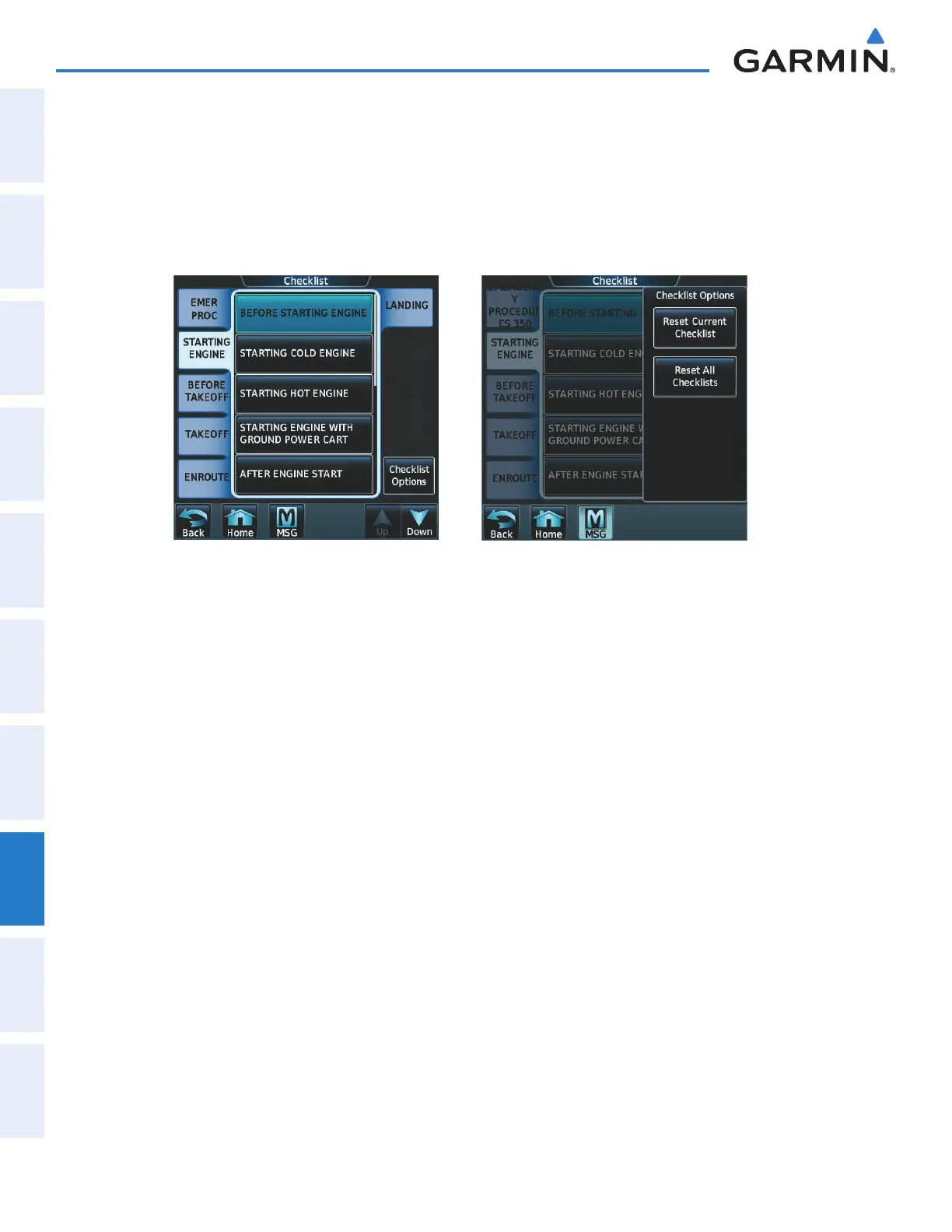
2) Touch the desired checklist to reset. BEFORE STARTING ENGINE is selected in Figure 8-126.
3) Touch the Checklist Options Button.
4) Touch Reset Current Checklist as seen in Figure 8-127.
Figure 8-127 Checklist OptionsFigure 8-126 Checklist Screen
Resetting All Checklists:
1) From the Home Screen, touch Checklist.
2) Touch the Checklist Options Button shown in Figure 8-126.
3) Touch Reset All Checklists as seen in Figure 8-127.
This manual downloaded from http://www.manualowl.com



 To Next Page