190-01263-01 Rev. A
Garmin G2000 Pilot’s Guide for the Cessna T240
129
Audio And CnS
SYSTEM
oVERViEW
FLiGHT
inSTRuMEnTS
EiS Audio & CnS
FLiGHT
MAnAGEMEnT
HAZARd
AVoidAnCE
AFCS
AddiTionAL
FEATuRES
APPEndiCES indEX
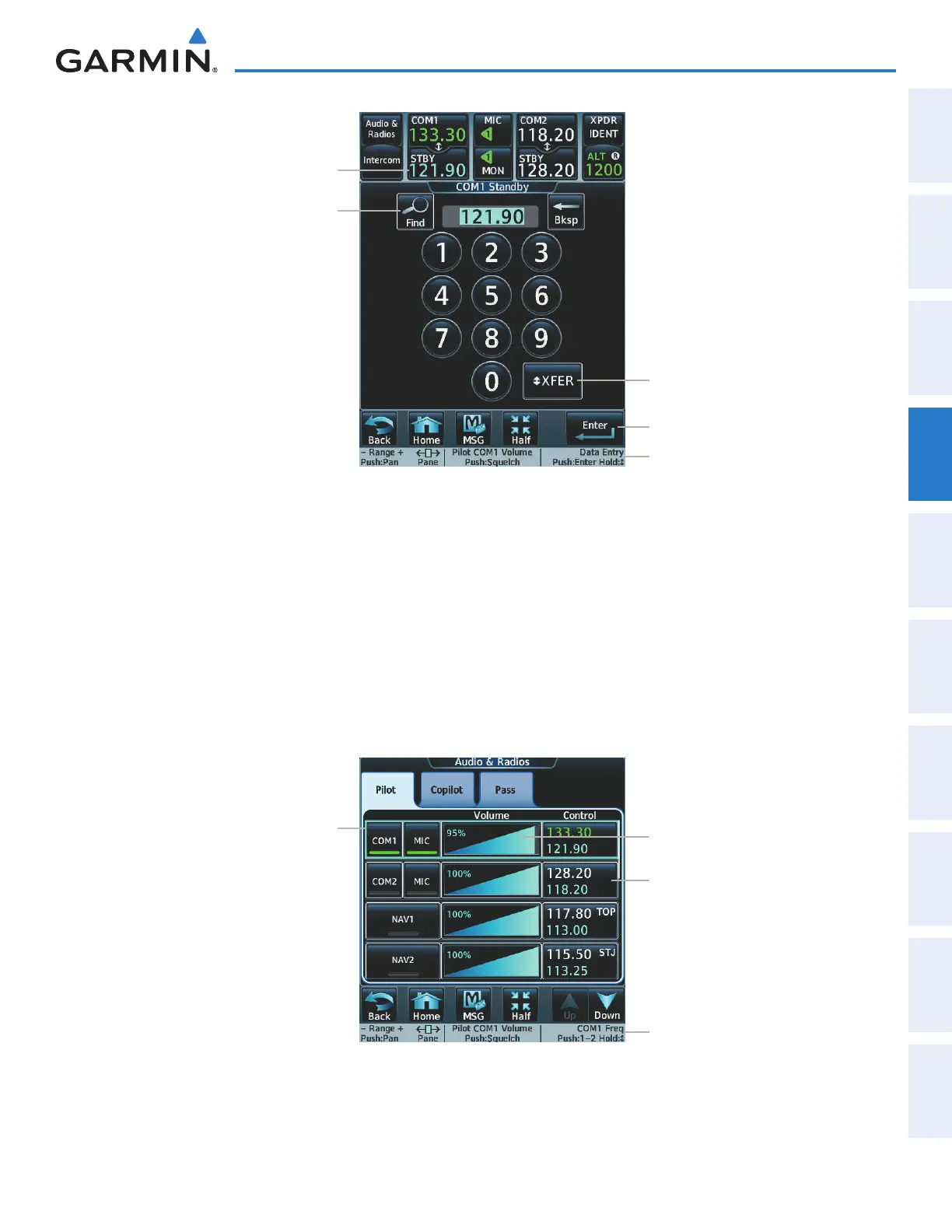
Figure 4-6 COM Frequency Tuning Keypad
Frequency selected
for tuning
Frequency Transfer (XFER) Button
Enter Button
Find Button
Knob function labels
Or:
1)
Touch the Audio & Radios Button to display the Audio & Radios Screen.
2) Touch the COM1/COM2 volume slider, or press the small right knob, to select COM1/COM2 for tuning.
3) Turn the large and small right knobs to select the frequency (Large knob increases/decreases MHz; Small knob
increases/decreases kHz).
4) Press the small right knob to accept the new frequency as the standby frequency; or press and hold the small
right knob to accept the new frequency as the COM1/COM2 active frequency and transfer the previously active
frequency to the standby frequency
Figure 4-7 Audio & Radios Screen - COM1/COM2 Frequency Tuning
COM selected for
tuning (light blue
border)
COM1 Volume Slider
Knob function labels
COM2 Frequency Button
Or:
This manual downloaded from http://www.manualowl.com



 To Next Page