190-01263-01 Rev. A
Garmin G2000 Pilot’s Guide for the Cessna T240
131
Audio And CnS
SYSTEM
oVERViEW
FLiGHT
inSTRuMEnTS
EiS Audio & CnS
FLiGHT
MAnAGEMEnT
HAZARd
AVoidAnCE
AFCS
AddiTionAL
FEATuRES
APPEndiCES indEX
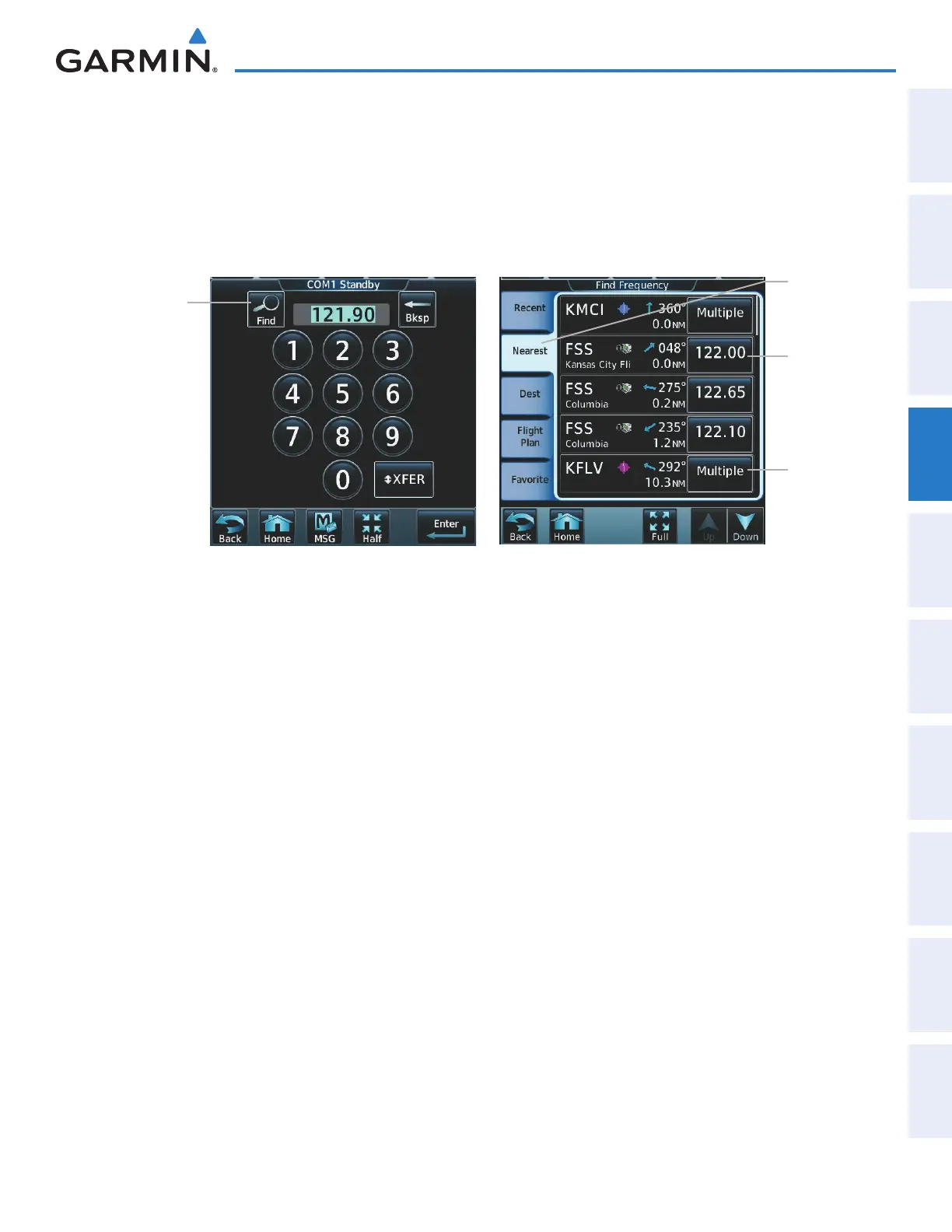
Finding and selecting a COM frequency from the CNS Bar:
1) Touch COM1 STBY or COM2 STBY (CNS Bar) > Find to display the Find Frequencies Screen.
2) Touch the tab for the desired type of frequency (Recent, Nearest, Dest, Flight Plan, or Favorite).
3) Scroll the list to find the desired frequency.
4) Touch the frequency button to accept the new frequency as the COM1/COM2 standby frequency.
Figure 4-9 Find Frequency Screen
Select a
tab for the
frequency
category
Selecting
Multiple
accesses
another
level with
selectable
frequencies
Select the
frequency
button to
tune the
standby
frequency
Find
Button
This manual downloaded from http://www.manualowl.com



 To Next Page