190-01263-01 Rev. A
Garmin G2000 Pilot’s Guide for the Cessna T240
146
Audio And cnS
SySteM
overview
FligHt
inStruMentS
eiSAudio & cnS
FligHt
MAnAgeMent
HAZArd
AvoidAnce
AFcS
AdditionAl
FeAtureS
AppendiceSindeX
VOLUME
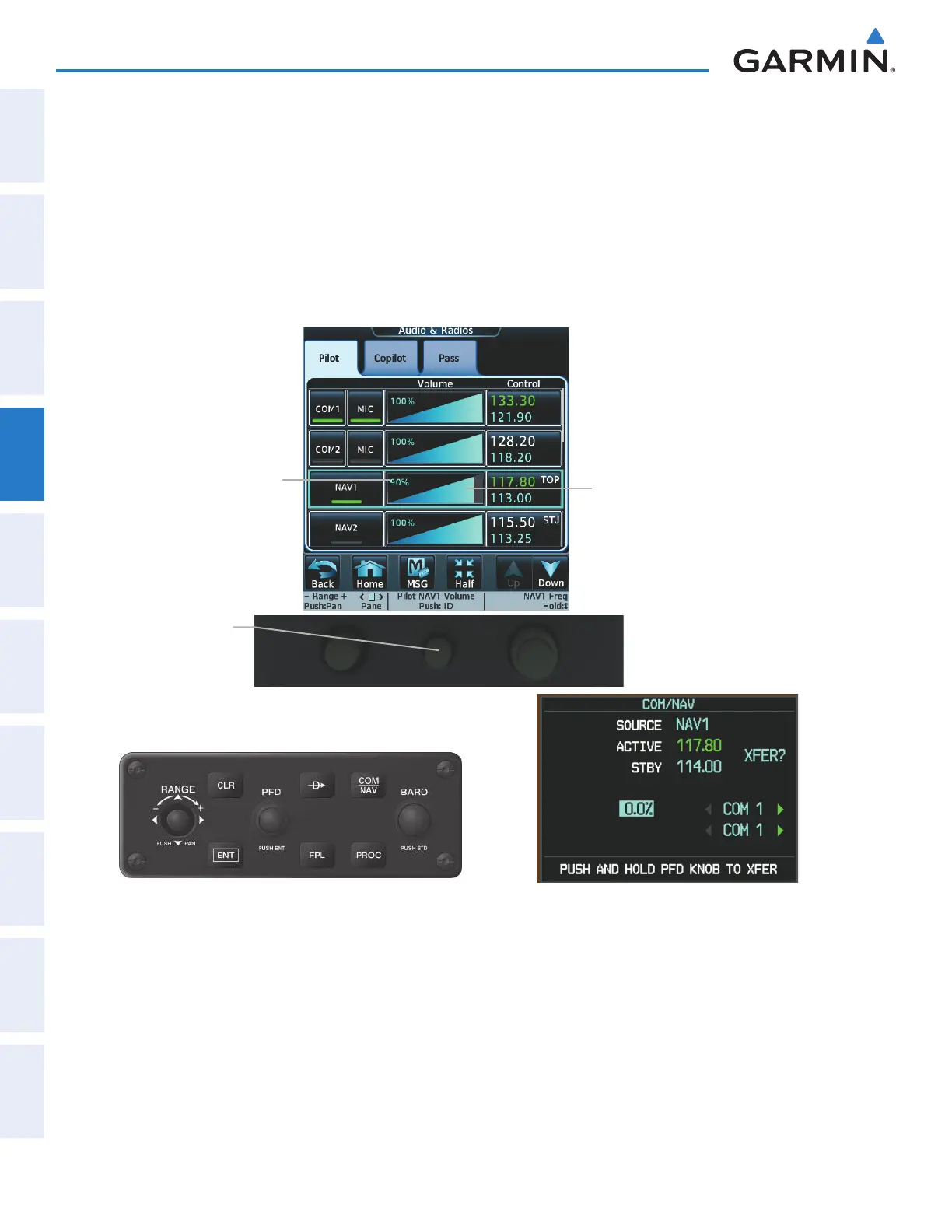
The selected NAV radio volume level can be adjusted from 0 to 100% on the touchscreen controller by turning
the middle knob or by sliding your fi nger right or left on the NAV volume slider. Turning the knob clockwise
increases volume, turning the knob counterclockwise decreases volume. Sliding to the right increases volume,
sliding to the left decreases volume.
The volume can also be adjusted on the PFD using the GDU Controller. With the COM/NAV Window
displayed, turn the large right knob to select the VOLUME fi eld. Turn the small right knob to adjust the volume
(Turning the knob clockwise increases volume, turning the knob counterclockwise decreases volume).
Figure 4-27 NAV Volume Level
NAV Volume
Slider
Middle knob -
Turn to adjust NAV
volume
Selected NAV
Volume
This manual downloaded from http://www.manualowl.com



 To Next Page