190-01263-01 Rev. A
Garmin G2000 Pilot’s Guide for the Cessna T240
183
Flight ManageMent
SYSteM
OVeRVieW
Flight
inStRUMentS
eiS
aUDiO Panel
& CnS
Flight
ManageMent
haZaRD
aVOiDanCe
aFCS
aDDitiOnal
FeatUReS
aPPenDiCeS inDeX
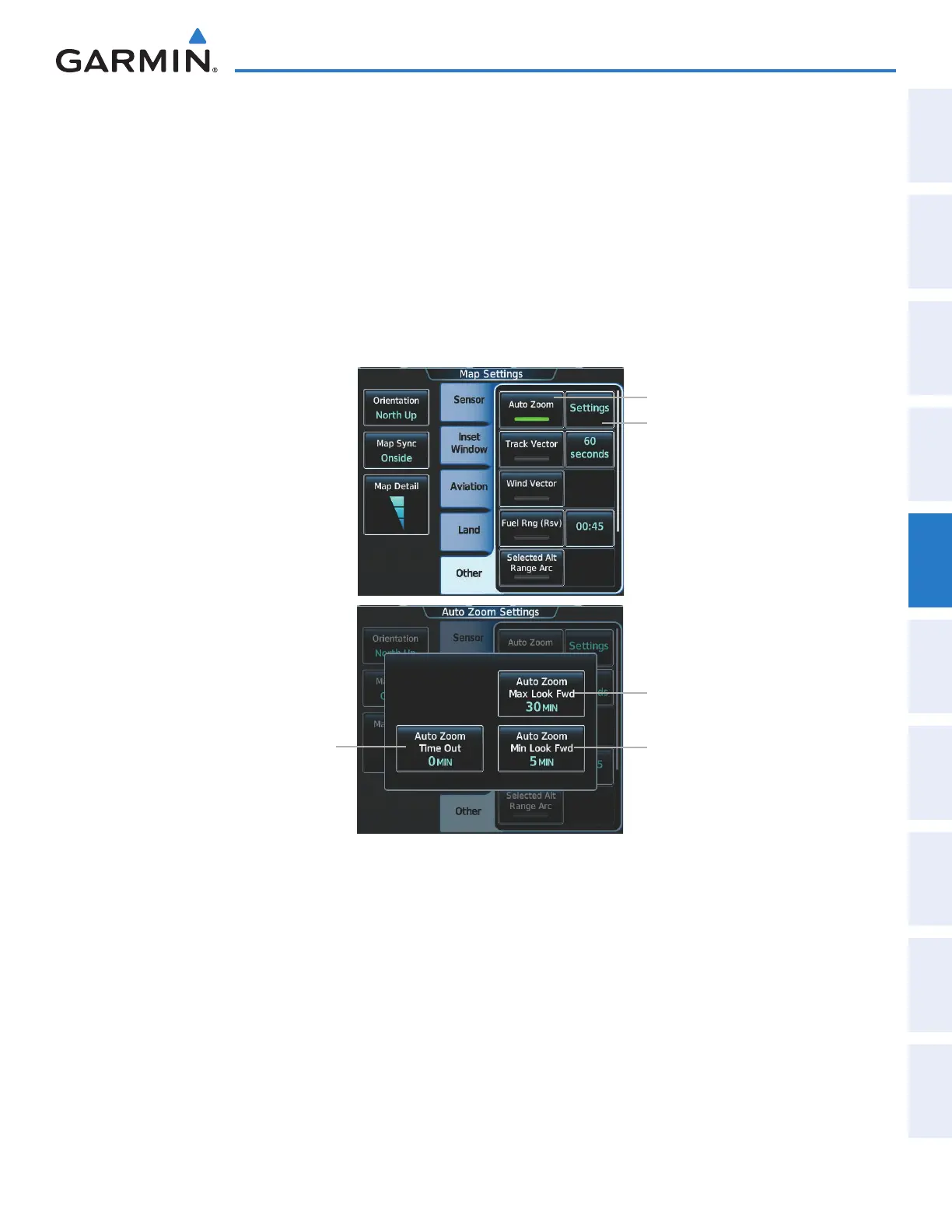
Configuring automatic zoom:
1) From Home, touch Map > Map Settings.
2) If necessary, touch the Other Tab to display the options list.
3) Touch the Auto Zoom Button to enable/disable auto zoom.
4) Touch the Auto Zoom Settings Button to display the Auto Zoom Settings Screen.
5) Touch the Auto Zoom Max Look Fwd Button to display the numeric keyboard.
6) Use the keypad to enter the maximum look forward time. Times are from zero to 999 minutes.
7) Repeat steps 5 and 6 for ‘Min Look Fwd’ (zero to 99 minutes) and ‘Time Out’ (zero to 99 minutes).
Figure 5-8 Auto Zoom Setup
Auto Zoom Button
Auto Zoom Settings Button
Auto Zoom Max Look Fwd
Button
Auto Zoom Min Look Fwd
Button
Auto Zoom Time Out Button
This manual downloaded from http://www.manualowl.com



 To Next Page