Garmin G2000 Pilot’s Guide for the Cessna T240
190-01263-01 Rev. A196
Flight ManageMent
SYSteM
OVeRVieW
Flight
inStRUMentS
eiS
aUDiO Panel
& CnS
Flight
ManageMent
haZaRD
aVOiDanCe
aFCS
aDDitiOnal
FeatUReS
aPPenDiCeSinDeX
MAP DETAIL
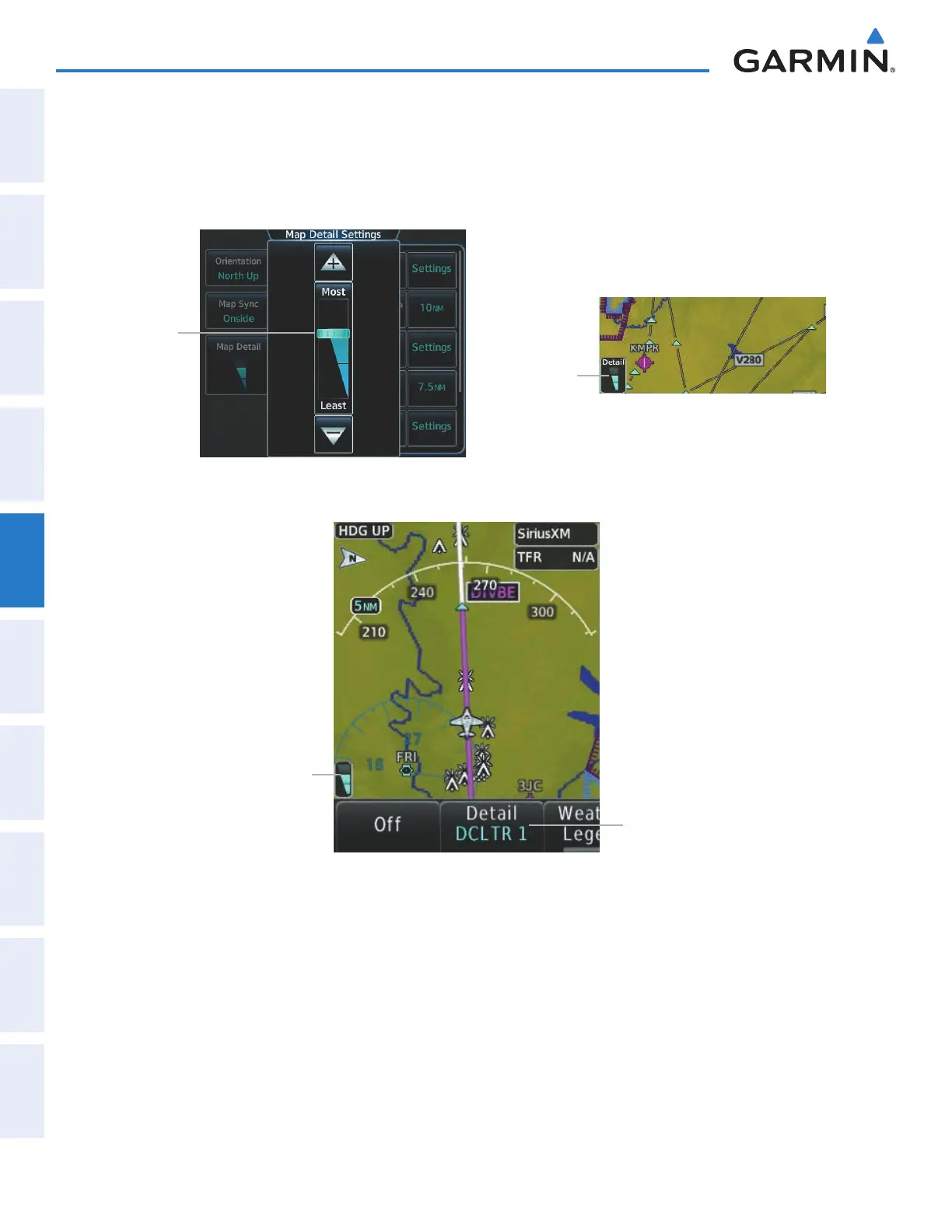
The declutter feature allows the pilot to progressively step through four levels of map detail. The navigation
map detail level is displayed on the Map Settings Screen on the Touchscreen Controller and on the navigation
map. The PFD Inset Map detail level is shown on the Inset Map and the Detail Softkey.
Figure 5-19 Navigation Map - Map Detail
Detail Indicator
Map Detail
Slider
Figure 5-20 Inset Map - Map Detail
Detail Indicator
Detail Softkey
Adjusting the navigation map detail:
1) From Home, touch Map > Map Settings > Map Detail.
2) Slide up or down on the Map Detail Slider to adjust the navigation map detail.
Adjusting the the PFD Inset Map detail:
1) Press the Inset Map Settings Softkey on the PFD.
2) Press the Detail Softkey as necessary to adjust the Inset Map detail.
This manual downloaded from http://www.manualowl.com



 To Next Page