Garmin G2000 Pilot’s Guide for the Cessna T240
190-01263-01 Rev. A274
Flight ManageMent
SYSteM
OVeRVieW
Flight
inStRUMentS
eiS
aUDiO Panel
& CnS
Flight
ManageMent
haZaRD
aVOiDanCe
aFCS
aDDitiOnal
FeatUReS
aPPenDiCeSinDeX
COLLAPSING AIRWAYS
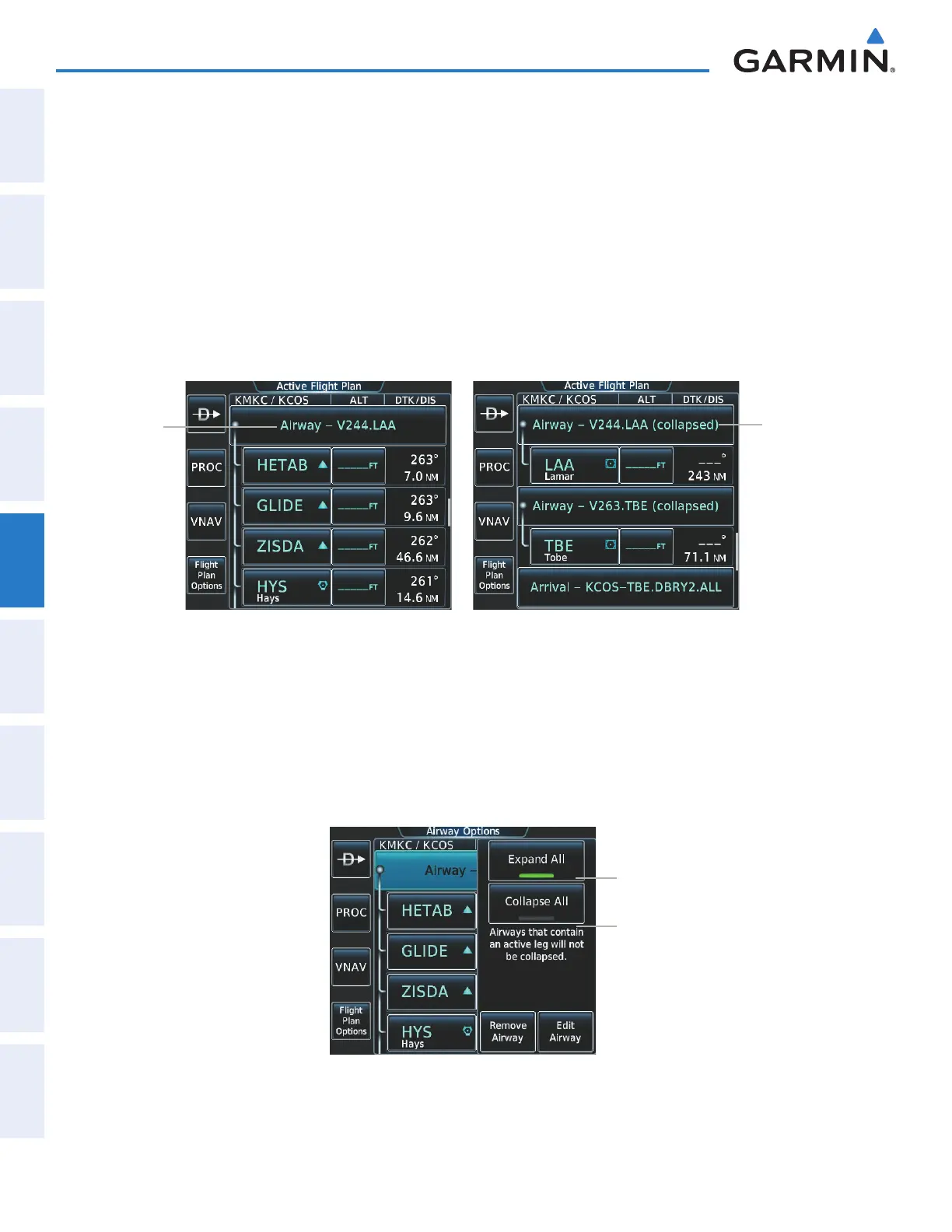
The system allows airways on the active flight plan to be collapsed or expanded from the Active Flight Plan
Page Screen. When airways have been collapsed, it is indicated on the airway heading.
When airways are collapsed, leg-to-leg computed values such as DIS or ETE shown for the exit waypoint
reflect the total of all the legs on the airway that have been hidden in the collapsed display. The DTK value is
inhibited because it is not usable in this context.
The Active Flight Plan Page always keeps the following three waypoints visible: “From” waypoint, “To”
waypoint, and the “Next” waypoint. To prevent one or more of these waypoints from being hidden in a collapsed
airway segment, the airway segment that contains either the “To” or the “Next” waypoint is automatically
expanded. When an airway is loaded, airways are automatically expanded to facilitate flight plan review.
Airway
Expanded
Figure 5-123 Expanded/Collapsed Airways
Airway
Collapsed
Collapsing/expanding the airways in the active flight plan:
1) From Home, touch Flight Plan
3) Scroll the list if necessary and touch an airway selection button to display the Airway Options Window.
4) Touch the Collapse All Button or the Expand All Button to collapse/expand all airways and return to the
Active Flight Plan Screen.
Figure 5-124 Active Flight Plan Screen -Collapsing Expanding Airways
Expand All Button
Collapse All Button
This manual downloaded from http://www.manualowl.com



 To Next Page