Garmin G2000 Pilot’s Guide for the Cessna T240
190-01263-01 Rev. A316
Flight ManageMent
SYSteM
OVeRVieW
Flight
inStRUMentS
eiS
aUDiO Panel
& CnS
Flight
ManageMent
haZaRD
aVOiDanCe
aFCS
aDDitiOnal
FeatUReS
aPPenDiCeSinDeX
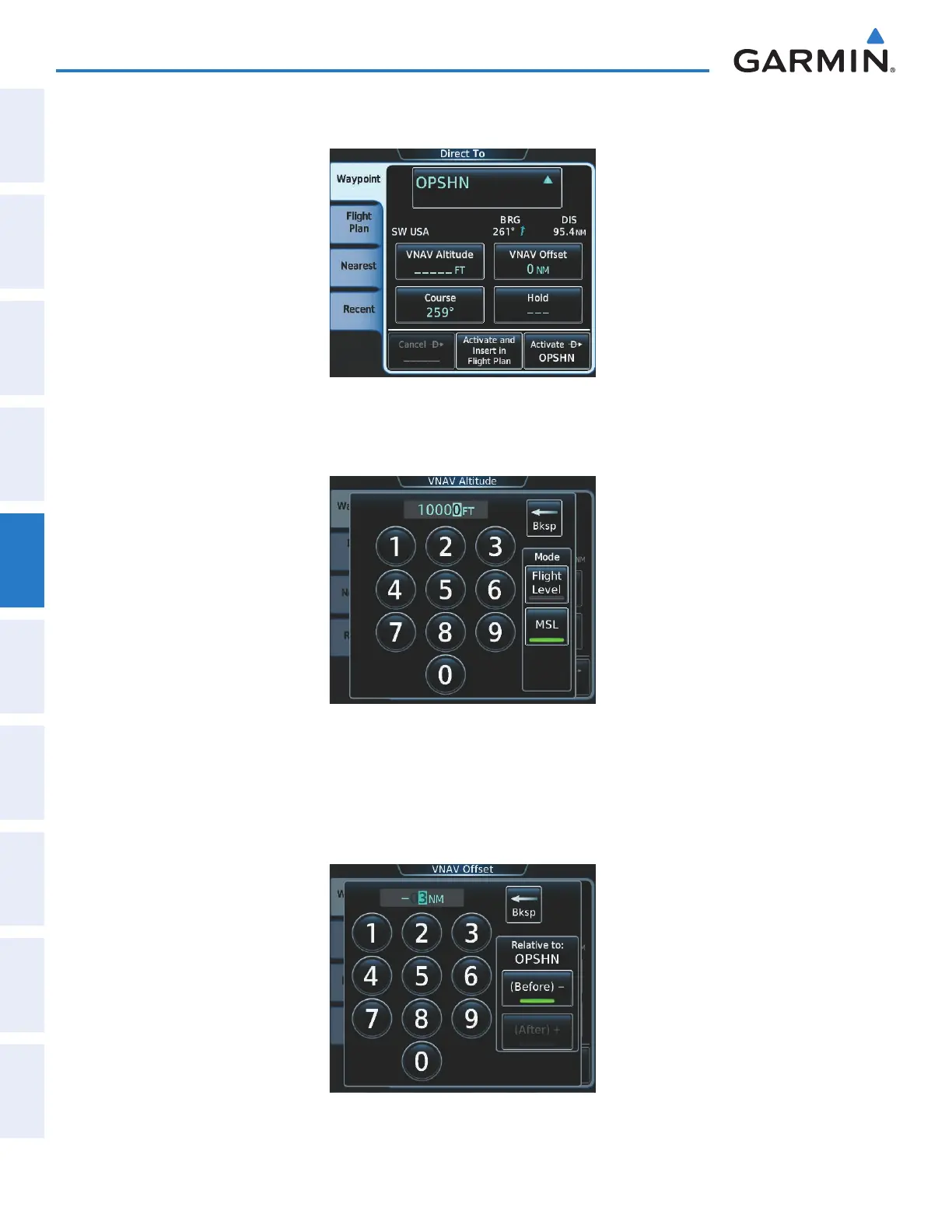
c) Touch the OPSHN Button. The Direct To Screen is now displayed as shown in Figure 5-176.
Figure 5-176 Direct To OPSHN
d) Touch the VNAV Altitude Button to display the keypad to select the VNAV altitude as shown in Figure 5-177.
Figure 5-177 Enter VNAV Altitude
e) An altitude of 10,000 feet is selected as requested by ATC.
f) Touch the Enter Button to accept the altitude value and return to the Direct To Screen.
g) Touch the VNAV Offset Button to display the keypad to select the offset distance as shown in Figure 5-178.
Figure 5-178 Enter VNV Offset Distance
This manual downloaded from http://www.manualowl.com



 To Next Page