Garmin G2000 Pilot’s Guide for the Cessna T240
190-01263-01 Rev. A
344
HAZARD AVOIDANCE
SYSTEM
OVERVIEW
FLIGHT
INSTRUMENTS
EIS
AUDIO & CNS
FLIGHT
MANAGEMENT
HAZARD
AVOIDANCE
AFCS
ADDITIONAL
FEATURES
APPENDICESINDEX
Showing NEXRAD weather information (PFD Inset Navigation Map)
1) Press the Inset Map Settings Softkey.
2) Press the NEXRAD Softkey to select one of the following coverage options: Off (disables NEXRAD data), USA,
Canada (softkey label changes to indicate the selected coverage option with each softkey press).
3) Press the Back Softkey to return to the top-level PFD Softkeys.
Displaying NEXRAD weather information (Navigation Map panes)
1) From Home, Touch Map > Map Settings.
2) If necessary, touch the Sensor Tab.
3) Scroll as needed and touch the NEXRAD Data Button in the Overlays window to enable/disable the display of
the NEXRAD weather product.
4) To change the coverage area of the NEXRAD weather product displayed on the selected Navigation Map pane,
touch the NEXRAD Data Settings Button. The NEXRAD Data Coverage Button displays the currently selected
coverage area in light blue text (‘USA’ or ‘Canada’).
a) Touch the NEXRAD Data Coverage Button.
b) Touch either the USA or Canada Button to select radar information from the selected region.
5) When fi nished changing NEXRAD settings for the Navigation Maps, touch Back or Home.
Displaying NEXRAD weather information (SiriusXM Weather Pane)
1) From Home, touch Weather > Weather Selection > SiriusXM Weather > SiriusXM Settings.
2) Find the Nexrad Button in the Background window. Light blue text inside the button indicates the currently
selected coverage source.
3 To change the selected coverage source, touch the Nexrad Button, then touch one of the following buttons:
Off (removes NEXRAD data from the display), United States, or Canada.
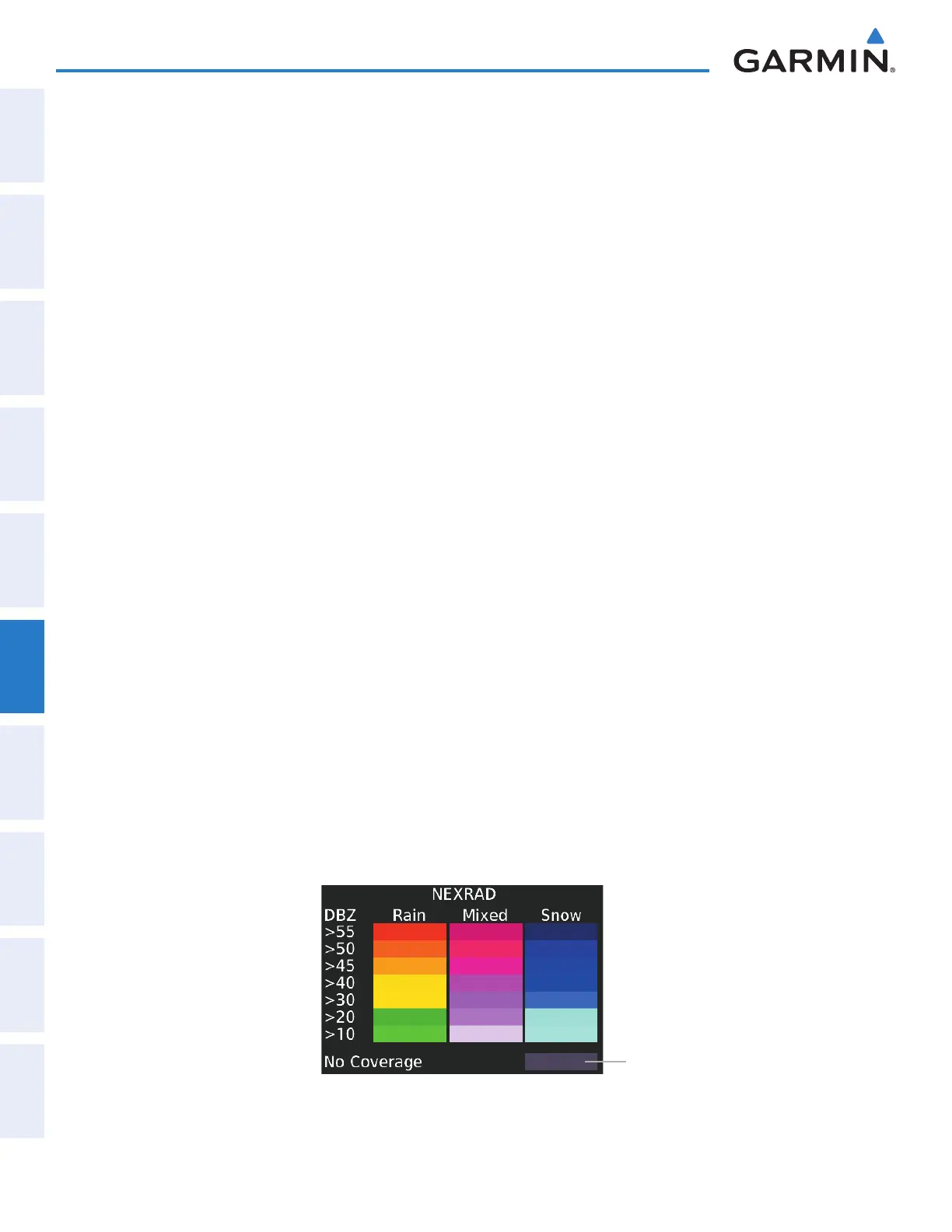
The system shows composite data from all available NEXRAD radar sites in the selected coverage area
(either United States or Canada.) This data is composed of the maximum refl ectivity from the individual
radar sweeps. The display of the information is color-coded to indicate the strength of the radar returns. All
weather product legends can be viewed on the Touchscreen Controller. For the NEXRAD legend (Figure 6-6),
touch the Legend Button when NEXRAD is enabled for display on the SiriusXM Weather Settings Screen.
No Radar Coverage
Figure 6-6 NEXRAD Legend
This manual downloaded from http://www.manualowl.com



 To Next Page