190-01263-01 Rev. A
Garmin G2000 Pilot’s Guide for the Cessna T240
357
Hazard avoidance
SYSTeM
overvieW
FLiGHT
inSTrUMenTS
eiS aUdio & cnS
FLiGHT
ManaGeMenT
Hazard
avoidance
aFcS
addiTionaL
FeaTUreS
aPPendiceS indeX
Headwind
Symbol
Tailwind
Symbol
Headwind/Tailwind
Component
None None Less than 5 knots
5 knots
10 knots
50 knots
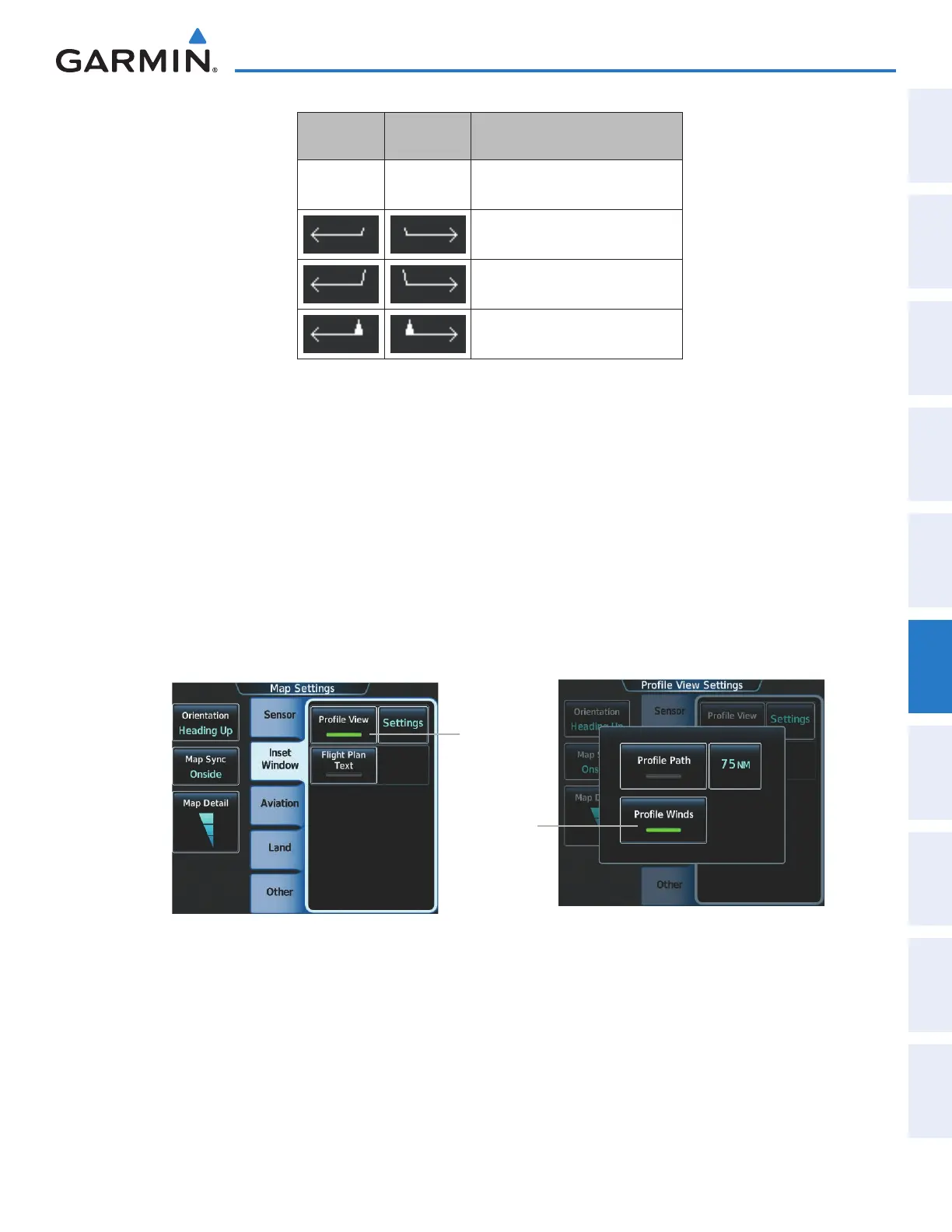
Table 6-4 Profile View Headwind/Tailwind Component Symbols
Enabling/Disabling Profile View (containing winds aloft data)
1) From Home, touch Map > Map Settings.
2) If necessary, touch the Inset Window Tab.
3) Touch the Profile View Button to enable/disable the profile view inset window. If the winds aloft weather
product icon does not appear in the inset window, continue with this procedure to enable winds aloft information
in the profile view.
4) Touch the Profile View Settings Button.
5) Touch the Profile Winds Button. When enabled, the system displays the winds aloft weather product inside
the profile view inset window.
Enables/
Disables
Profile Inset
Window
Enables/
Disables
Winds Aloft
Product
when Profile
View is
enabled
Figure 6-28 Controlling the display of Winds Aloft information for Profile View Inset
This manual downloaded from http://www.manualowl.com



 To Next Page