190-01263-01 Rev. A
Garmin G2000 Pilot’s Guide for the Cessna T240
399
Hazard avoidance
SYSTeM
overvieW
FLiGHT
inSTrUMenTS
eiS aUdio & cnS
FLiGHT
ManaGeMenT
Hazard
avoidance
aFcS
addiTionaL
FeaTUreS
aPPendiceS indeX
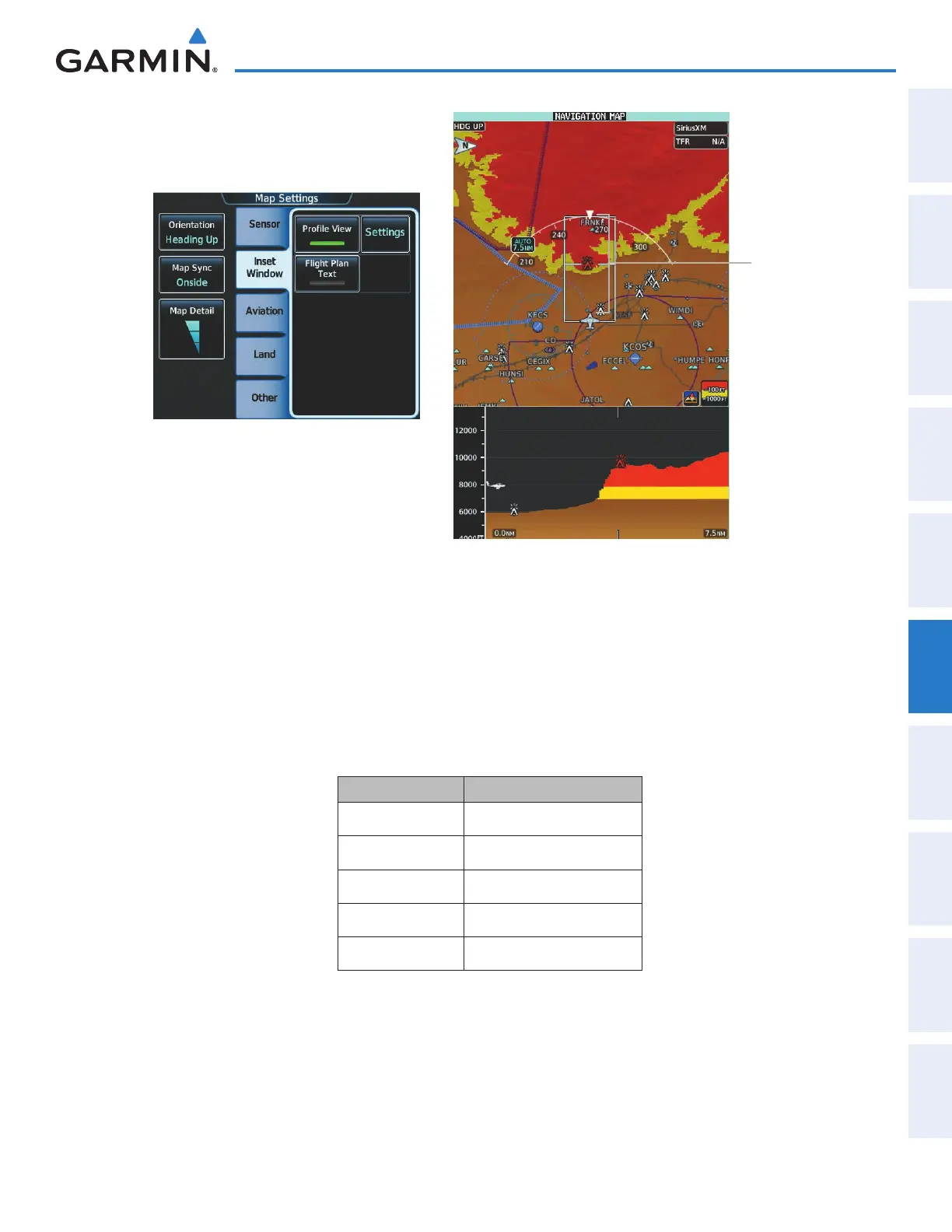
Figure 6-80 Navigation Map Pane with Profile View Terrain and
Topographic Data Enabled
Figure 6-79 Enabling Profile View on the Map
Settings Screen
Profile Path
Enabled
The Profile View is based on the current aircraft track (or heading if track is unavailable) and shows the highest
known terrain or obstacles within a predetermined width from the present aircraft position to the end of the
profile range. The width of the Profile View (Table 6-11) is determined by the phase of flight, as annunciated
on the HSI. Refer to the Flight Instruments section for more information about flight phases.
Flight Phase Total Profile View Width
Approach 0.6 nm
Departure 0.6 nm
Terminal 2.0 nm
Enroute 4.0 nm
Oceanic 4.0 nm
Table 6-11 Profile View Width Scale
This manual downloaded from http://www.manualowl.com



 To Next Page