190-01263-01 Rev. A
Garmin G2000 Pilot’s Guide for the Cessna T240
451
AutomAtic Flight control SyStem
SyStem
oVerVieW
Flight
inStrumentS
eiS
AuDio PAnel
& cnS
Flight
mAnAgement
hAZArD
AVoiDAnce
AFcS
ADDitionAl
FeAtureS
APPenDiceS inDeX
Prior to descent path interception, the Selected Altitude must be set below the current aircraft altitude
by at least 75 feet. For the flight director to transition from Altitude Hold to Vertical Path Tracking Mode,
acknowledgment is required within 5 minutes of descent path interception by:
• Pressing the VNV Key
• Adjusting the Selected Altitude
If acknowledgment is not received within 1 minute of descent path interception, the white ‘VPTH’
annunciation starts to flash. Flashing continues until acknowledged or the descent path is intercepted. If
the descent is not confirmed by the time of interception, Vertical Path Tracking Mode remains armed and the
descent is not captured.
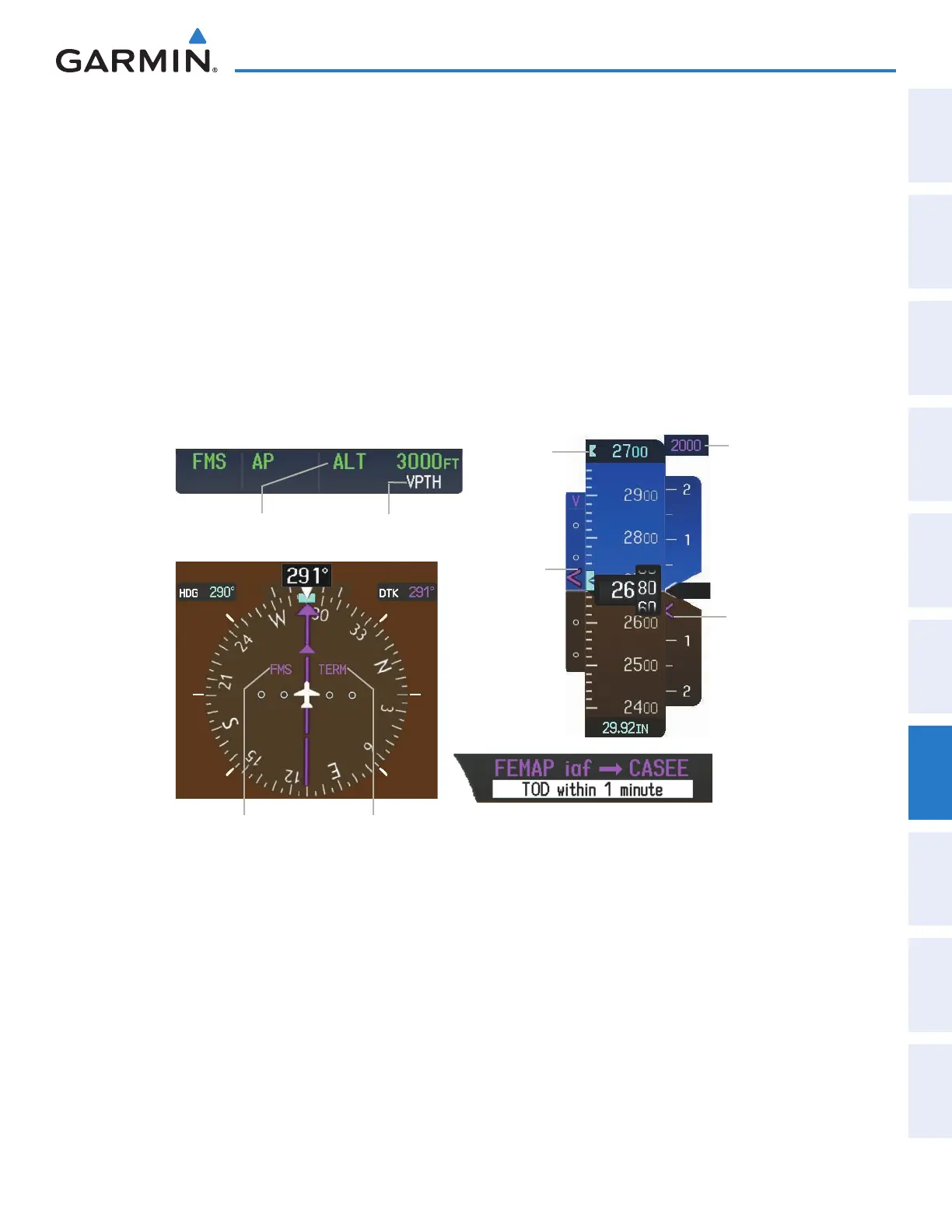
In conjunction with the “TOD [top of descent] within 1 minute” annunciation in the Navigation Status
Box and the “Vertical track” voice message, VNAV indications (VNAV Target Altitude, vertical deviation, and
vertical speed required) appear on the PFD in magenta (Figure 7-11).
Figure 7-11 Vertical Path Capture
Vertical Path Tracking
Armed and flashing
Altitude Hold
Mode Active
Terminal
Phase
of Flight
FMS is
Selected
Navigation
Source
Selected
Altitude
VNAV Target
Altitude
Vertical
Deviation
Indicator
Required
Vertical
Speed
Indicator
When a descent leg is captured (i.e., vertical deviation becomes valid), Vertical Path Tracking becomes
active and tracks the descent profile (Figure 7-12). An altitude capture mode (‘ALTS’ or ‘ALTV’) is armed as
appropriate.
This manual downloaded from http://www.manualowl.com



 To Next Page