190-01263-01 Rev. A
Garmin G2000 Pilot’s Guide for the Cessna T240
473
AutomAtic Flight control SyStem
SyStem
oVerVieW
Flight
inStrumentS
eiS
AuDio PAnel
& cnS
Flight
mAnAgement
hAZArD
AVoiDAnce
AFcS
ADDitionAl
FeAtureS
APPenDiceS inDeX
• Non-path descent in a VNAV scenario – A VNAV flight plan is entered and enabled, however Pitch Hold,
Vertical Speed, or Flight Level Change Mode can be used to descend to the VNAV Target Altitude prior to
reaching the planned TOD. Flight Level Change Mode is used in the example.
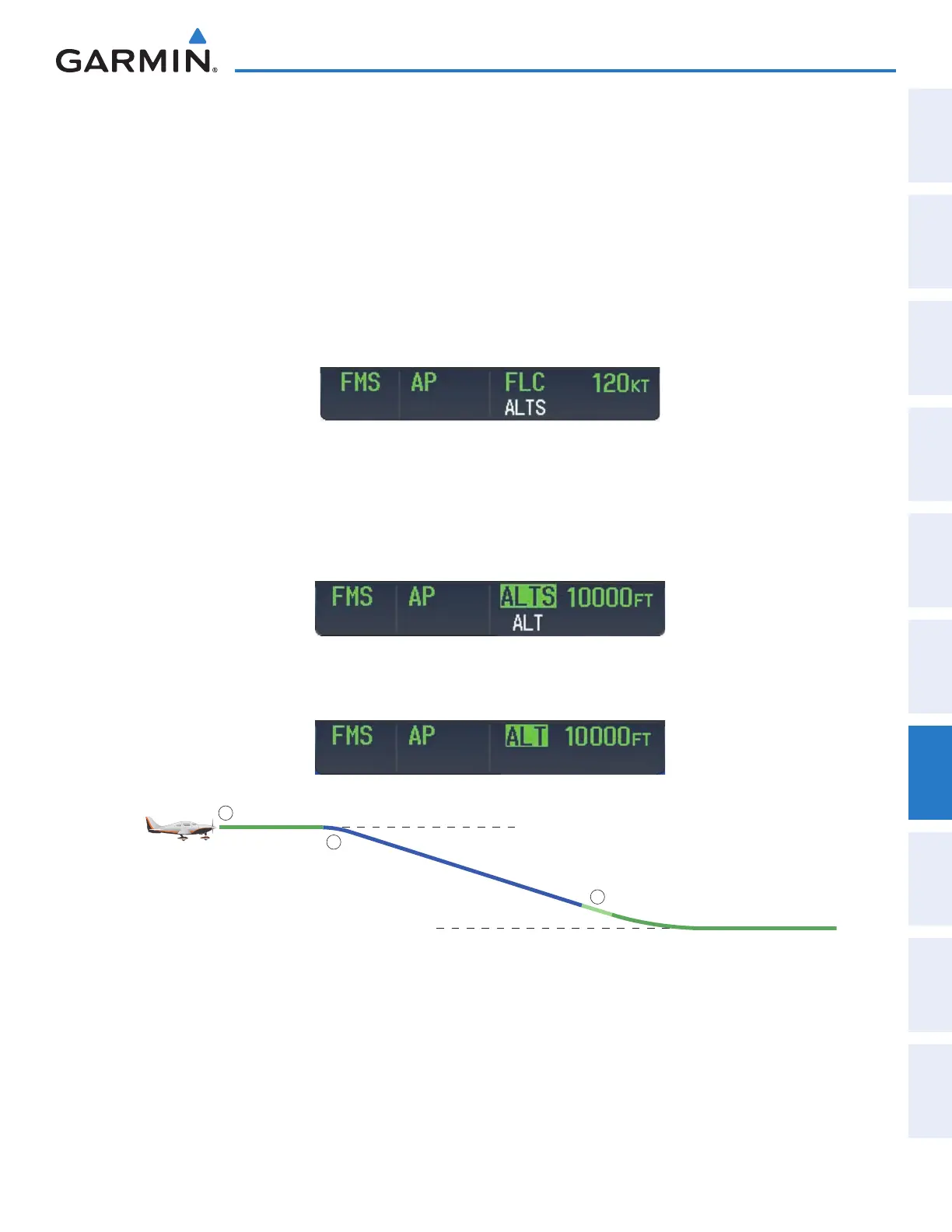
Flight Level Change descent:
1) Select Flight Level Change Mode:
a) Using the ALT Knob, set the Selected Altitude to 10,000 feet.
b) Press the
FLC
Key to activate Flight Level Change Mode. The annunciation ‘FLC’ appears next to the
Airspeed Reference, which defaults to the current aircraft airspeed. Selected Altitude Capture Mode is armed
automatically.
2) Use the UP/DN Wheel or push the CWS Button while hand-flying the aircraft to adjust the commanded airspeed
while maintaining the same power, or reduce power to allow descent in Flight Level Change Mode while the
autopilot maintains the current airspeed.
3) As the aircraft nears the Selected Altitude, the flight director transitions to Selected Altitude Capture Mode,
indicated by the green ‘ALTS’ annunciation flashing for up to 10 seconds.
The green ‘ALT’ annunciation flashes for up to 10 seconds upon reaching 50 feet from the Selected Altitude; the
autopilot transitions to Altitude Hold Mode and levels the aircraft.
Figure 7-34 FLC Descent
Cruise Altitude of 12,000 MSL
Selected Altitude of 10,000 MSL
ALT Mode
FLC Mode
ALT Mode
1
2
3
This manual downloaded from http://www.manualowl.com



 To Next Page