Garmin G2000 Pilot’s Guide for the Cessna T240
190-01263-01 Rev. A
478
AutomAtic Flight control SyStem
SyStem
oVerVieW
Flight
inStrumentS
eiS
AuDio PAnel
& cnS
Flight
mAnAgement
hAZArD
AVoiDAnce
AFcS
ADDitionAl
FeAtureS
APPenDiceSinDeX
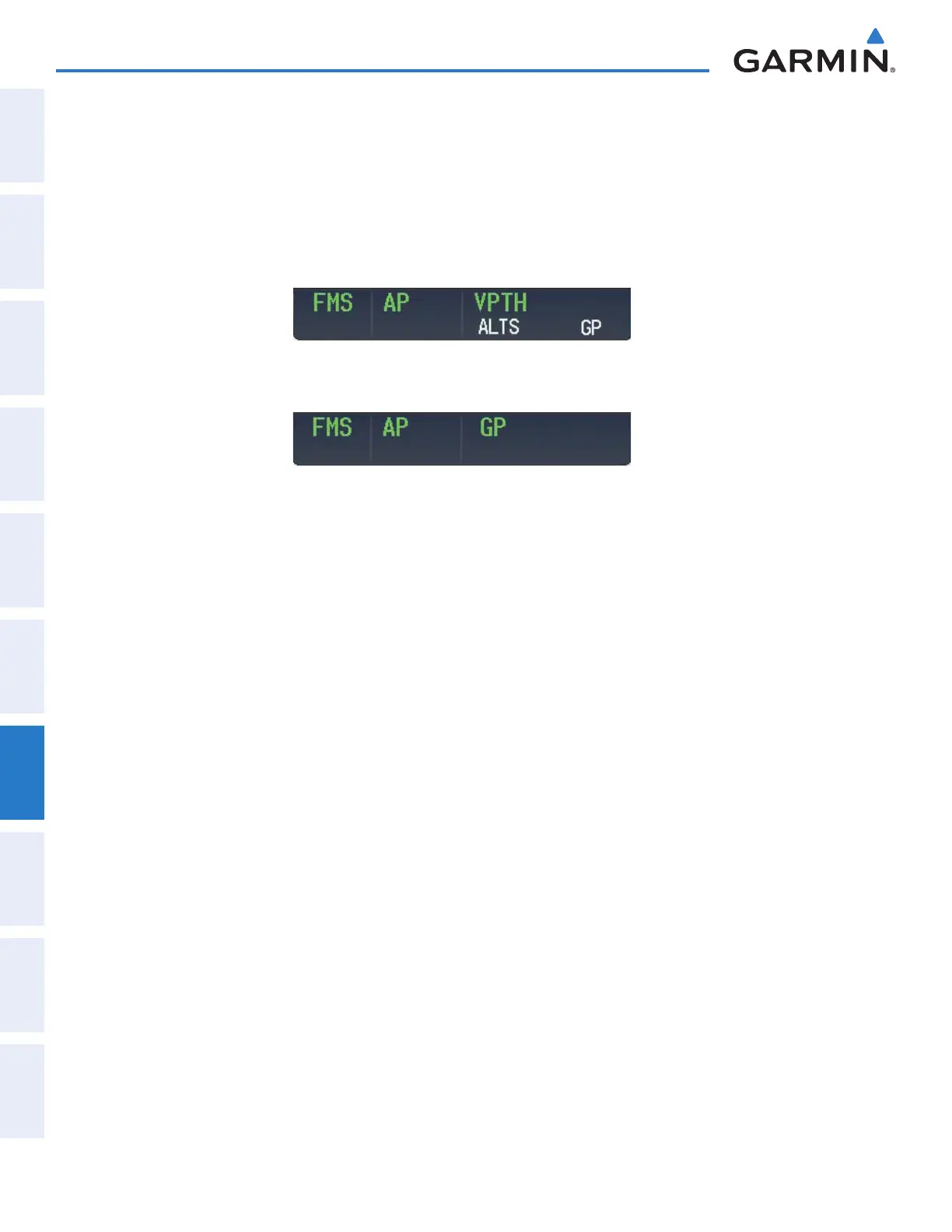
Flying a RNAV FMS approach with vertical guidance:
1) Arm flight director modes for a RNAV FMS approach with vertical guidance:
a) Make sure the navigation source is set to FMS (use Active Nav Softkey to change navigation source).
b) Select the Runway 35R LPV approach for KCOS. Load and activate the approach into the flight plan.
2) Press the APR Key once clearance for approach has been received. FMS Approach Mode is activated and
Glidepath Mode is armed.
3) Once the glidepath is captured, Glidepath Mode becomes active. The flight director now provides guidance to
the missed approach point.
4) There are two options available at this point, as the autopilot flies the approach:
• Push the AP DISC Switch at the Decision height and land the aircraft.
• Use the
GA Switch
to execute a missed approach.
This manual downloaded from http://www.manualowl.com



 To Next Page