Garmin G2000 Pilot’s Guide for the Cessna T240
190-01263-01 Rev. A502
AdditionAl FeAtures
sYsteM
oVerVieW
FliGHt
instruMents
eis
Audio PAnel
& Cns
FliGHt
MAnAGeMent
HAZArd
AVoidAnCe
AFCs
AdditionAl
FeAtures
APPendiCesindeX
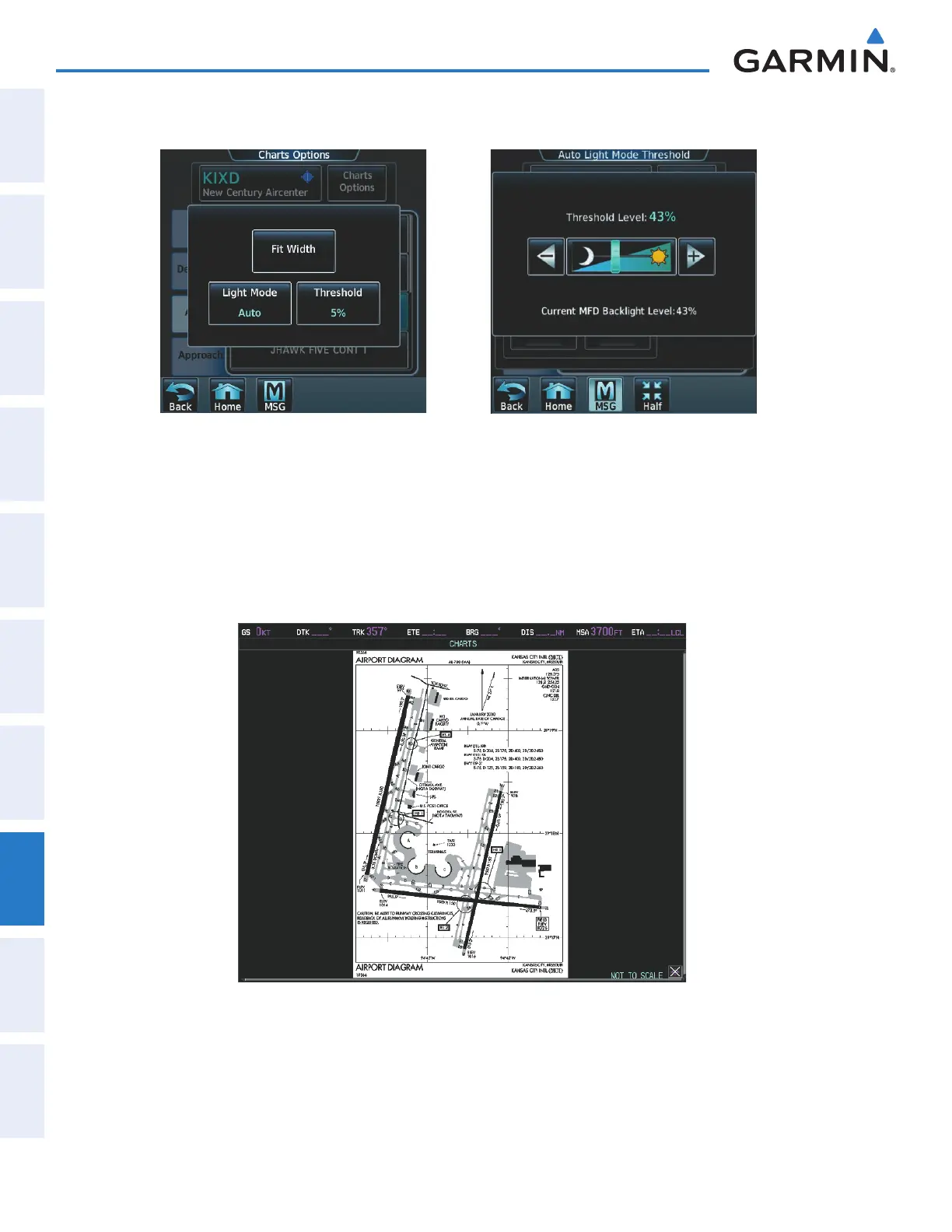
4) Touch the Threshold button (Figure 8-28). The Auto Light Mode Threshold window is displayed.
Select Chart Options Adjust Threshold Setting
Figure 8-28 Setting Day/Night Switching Threshold
5) Move the slider left or right to set the desired threshold. Setting the Threshold Level percentage to the same
percentage shown as the Current MFD Backlight Level will cause the Day/Night view to switch at the current
backlight setting. Adjusting the Threshold Level setting larger than the Current MFD Backlight Level will cause
the display to remain in Night Mode longer. Adjusting the Threshold Level setting smaller than the Current MFD
Backlight Level will cause the display to change to Day Mode sooner.
Figure 8-29 Airport Diagram, Day View
This manual downloaded from http://www.manualowl.com



 To Next Page