Garmin G2000 Pilot’s Guide for the Cessna T240
190-01263-01 Rev. A510
AdditionAl FeAtures
sYsteM
oVerVieW
FliGHt
instruMents
eis
Audio PAnel
& Cns
FliGHt
MAnAGeMent
HAZArd
AVoidAnCe
AFCs
AdditionAl
FeAtures
APPendiCesindeX
NOTE
: The LOCK Button on the XM Information Screen is used to save GDL 69A activation data when
the SiriusXM services are initially set up. It is not used during normal SiriusXM Radio operation, but there
should be no adverse effects if inadvertently selected during flight.
Activating SiriusXM Satellite services on the G2000:
1) From the Home Screen, touch Utilities > Setup > SiriusXM Info.
2) Verify the Data Radio and/or Audio Radio show a signal strength, indicating the system is communicating with
the satellite.
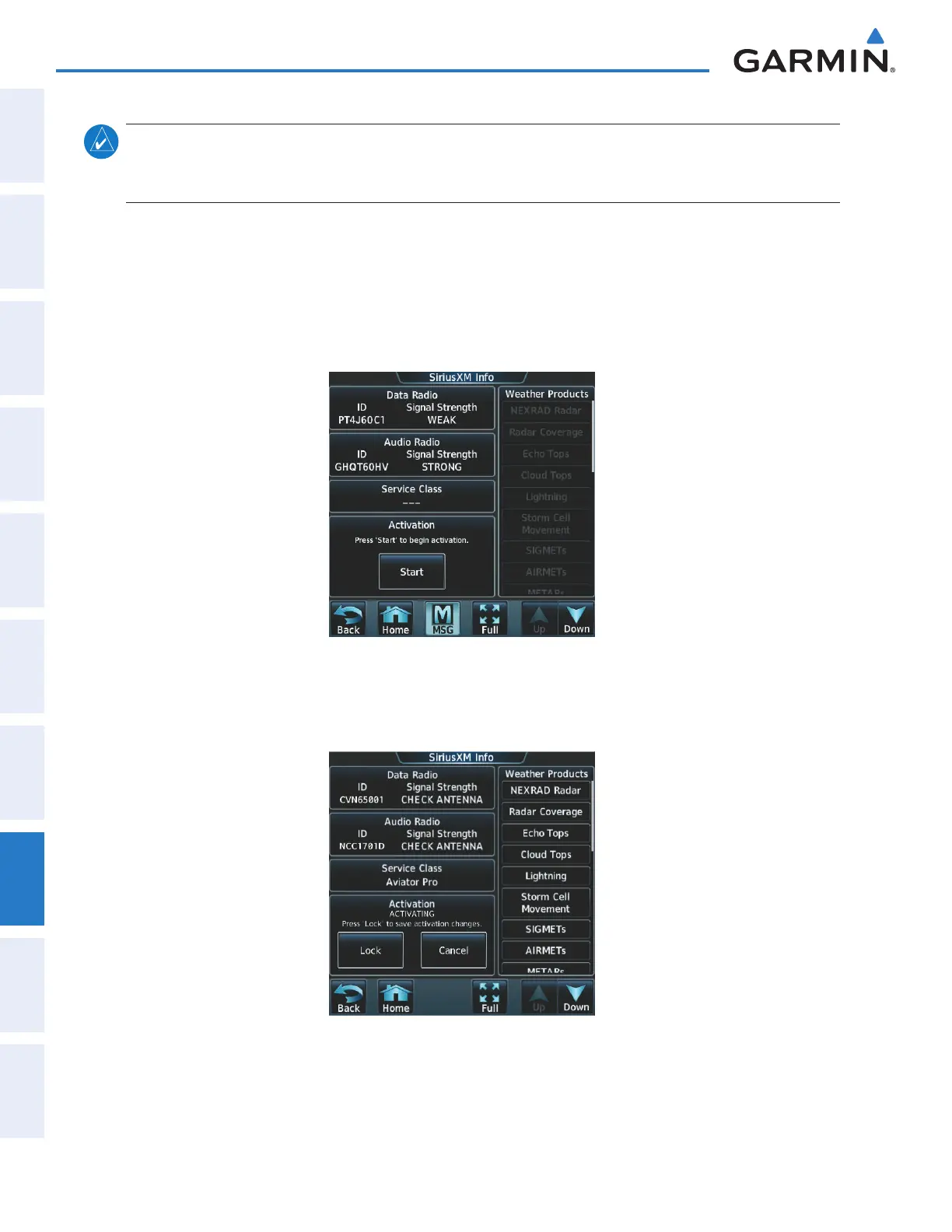
3) Touch the Start Button in the Activation field (Figure 8-40).
Figure 8-40 Activating Radios
4) Touch the LOCK Button in the Activation field as seen in Figure 8-41. The system is now activated and ready
for use.
Figure 8-41 Locking Activation Settings
This manual downloaded from http://www.manualowl.com



 To Next Page