Garmin G2000 Pilot’s Guide for the Cessna T240
190-01263-01 Rev. A
SYSTEM
OVERVIEW
FLIGHT
INSTRUMENTS
EIS
AUDIO
& CNS
FLIGHT
MANAGEMENT
HAZARD
AVOIDANCE
AFCS
ADDITIONAL
FEATURES
APPENDICESINDEX
580
Appendix B
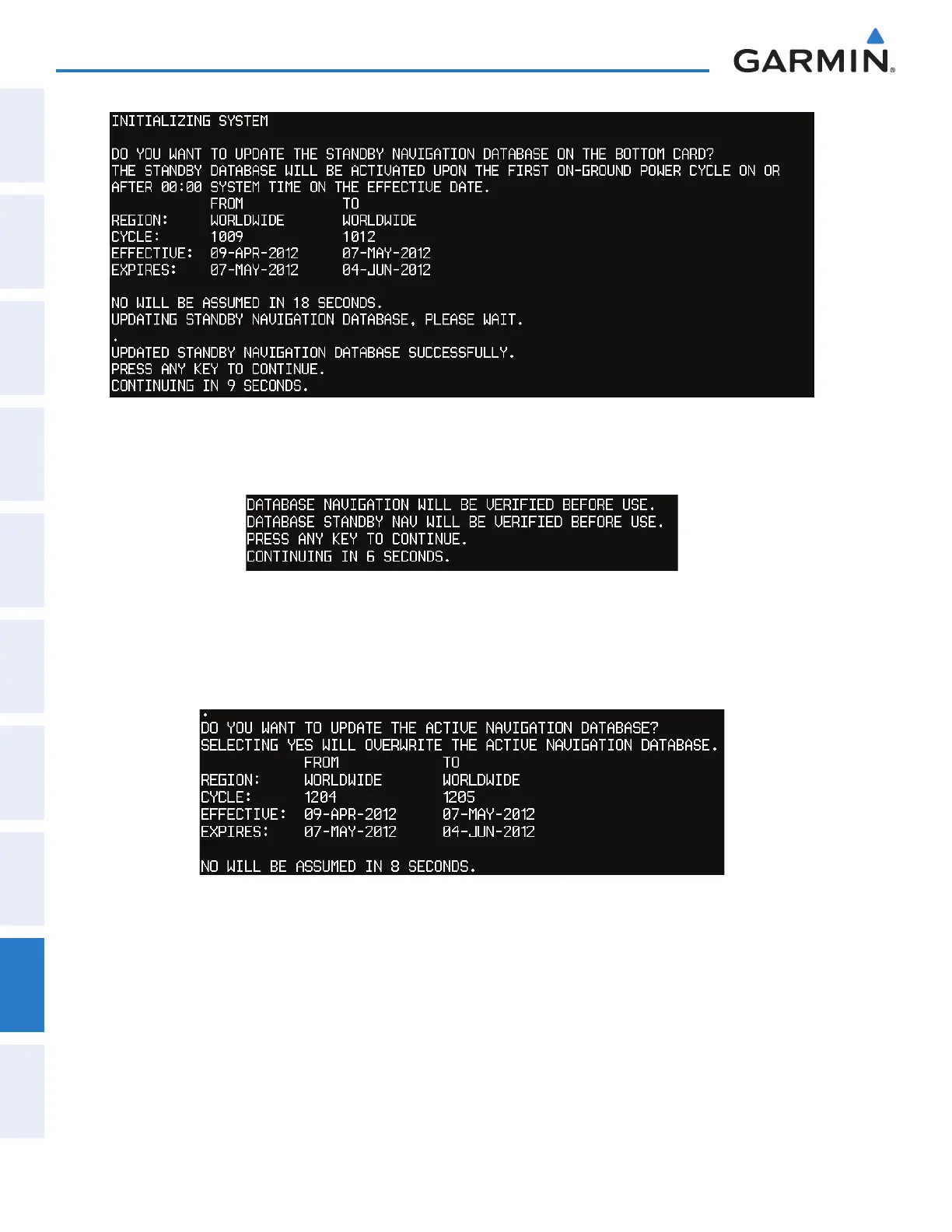
Figure B-4 Standby Navigation Database Update Complete
6) Again, press any key to continue as instructed on the display.
Figure B-5 Navigation Database Verification Prompt
7) Press the NO Softkey. The display now starts in normal mode. Since the database effective date is not yet valid, it
should not be loaded as the active database. The display now starts in normal mode. Do not remove power while
the display is starting.
Figure B-6 Active Navigation Database Prompt
8) Press the right most softkey to acknowledge the Power-Up display.
9) From the Home Screen on the Touchscreen Controller, touch Utilities > Setup > Avionics Status.
10) Touch the Database Tab.
11) Touch the PFD1 Button. Verify the PFD1 Database screen indicates the standby navigation database is synchronizing.
When synchronization has finished, ‘Complete’ is displayed. Check the standby navigation database information
to verify database have been updated.
12) Touch the Back Button.
This manual downloaded from http://www.manualowl.com



 To Next Page