Measuring
Adapting to the transducer
160 A0534-30.0 HBM: public MGCplus
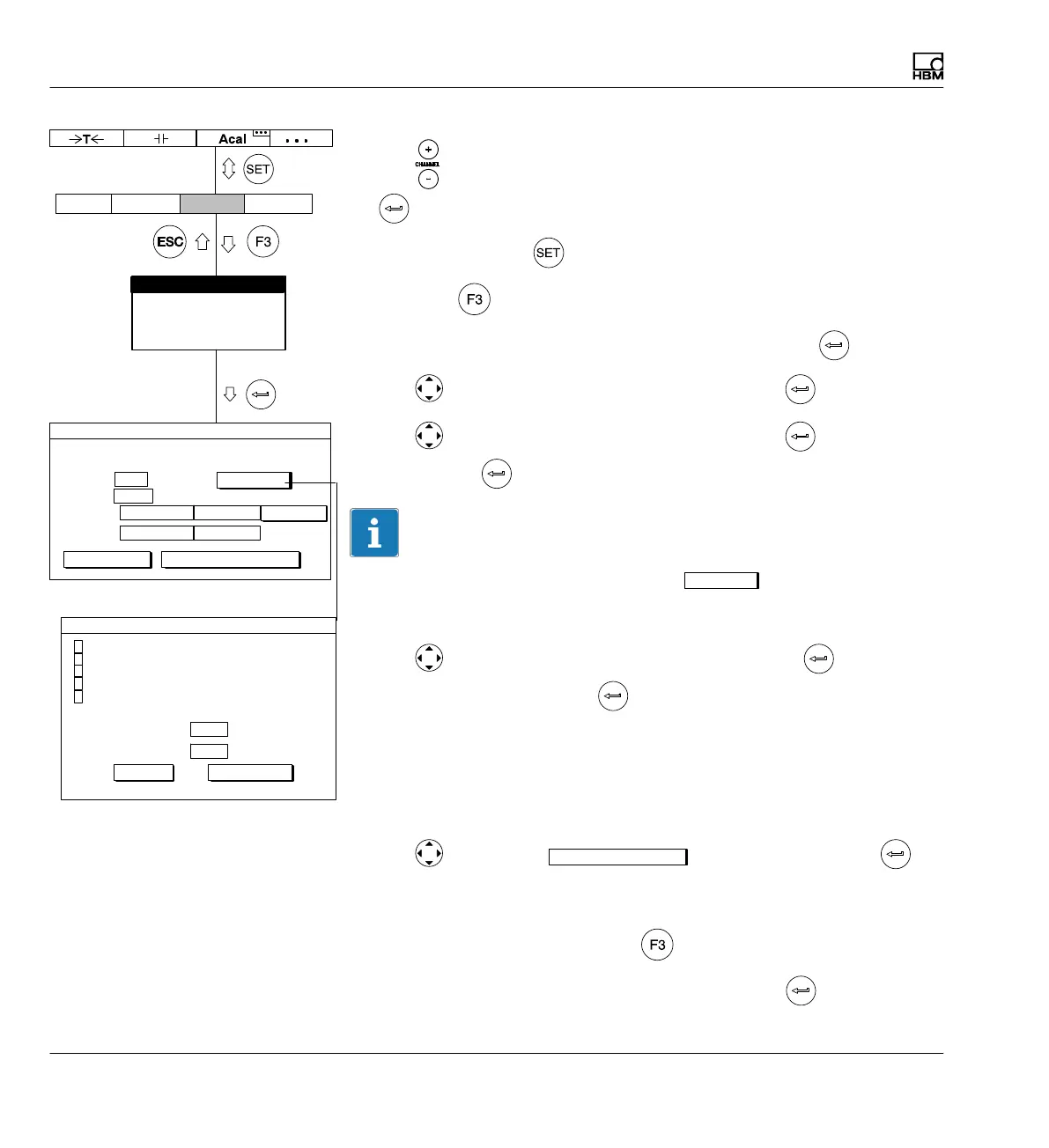
1. Use or a direct entry to choose the desired channel (for example 3.2
).
2. Use the Switch key
to switch to Setup mode.
3. Press the
function key.
4. In the pull-up menu select Transducer and confirm with
.
5. Use
to select Freq.0...200kHz and confirm with .
6. Use
to switch to the Level selection field, press and select 5V.
Confirm with
.
Information
Information about the extended functions (
Ext.fct...
) can be found on
è page 158.
7. Use to switch to the Unit selection field and press . Select rpm
as the unit and confirm with
.
8. In the Zero point edit field enter the value 0 (left column rpm and right
column kHz).
9. In the left edit field Nominal (rated) value enter the value 3000.
10. In the right edit field Nominal (rated) value enter the value 18.
11. Use
to select the
Adjust amplifier
button and confirm with . If
you do not want to make any more changes to the display, you can now
continue with step 16..
12. Go back to the pull-up menu with
.
13. In the pull-up menu select Display and confirm with
.
Type: Freq.0..200kHz
Level:
Unit: kHz
Zero pt.:
Nom. val.:
Ext.fct...
AmplifierSystem Display Options
Transducer
Signal conditioning
Display
Analog outputs
Switch
18,000 ...
TRANSDUCER CHANNEL1
rpm
0.0000 ... 0.0000 ...
3000.0 ...
calibrate... Adjust amplifier
5V
measure
Switch output LV1:
Switch output LV2:
Enhanced functions
Off
OK
Glitch filter (min. pulse width 1.6s)
Frequency quadrupling
Analyze F2 signal
Zero index input active
Transducer error input active
Off
Cancel



 To Next Page