System
Save/load
246 A0534-30.0 HBM: public MGCplus
Factory settings
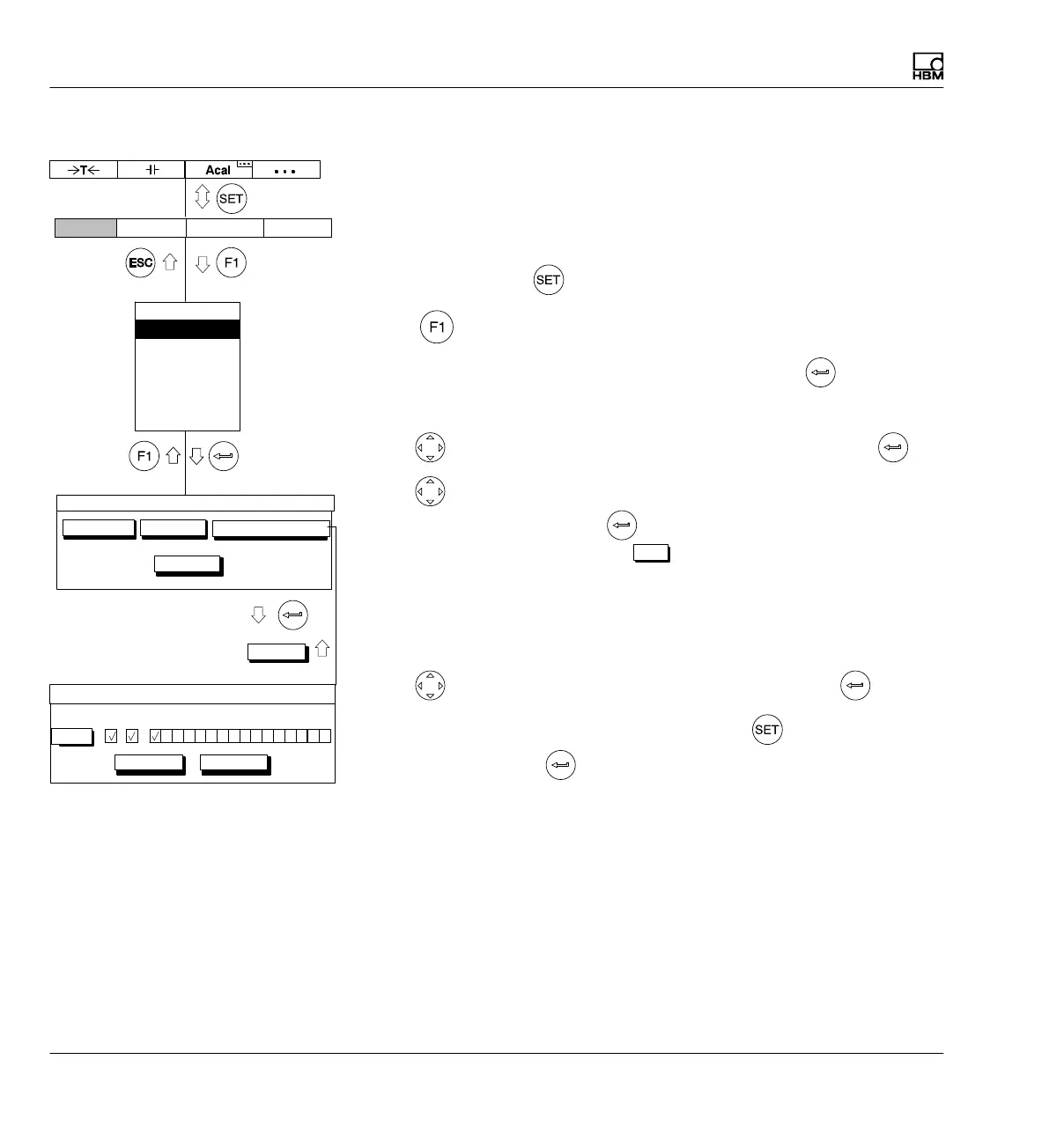
A new window opens under Factory settings where you can define
whether all or only certain amplifiers should be set to factory settings. You
can also load the factory settings of the display and control unit (AB) and the
communication processor (CP).
1. Use the Switch key
to switch to Setup mode.
2. Print
3. In the pull‐up menu select Save/load and confirm with .
You will then be in the Save/load settings setup window.
4. Use
to select the Factory settings button and confirm with .
5. Use
to select the desired channels (or AB, CP as well) in control
fields 1...16 and confirm with
(a check mark appears in the
selection field). You can use the
All
button to mark all control fields at
once.
6. For multi-channel modules, two dots appear under the channel number.
When you select this type of module a window opens in which you can
select individual subchannels or all of them.
7. Use
to select the "OK" button symbol and confirm with .
To return to measuring mode, press the Switch key
and confirm the
confirmation prompt with
.
Save/Load setup
Factory settings…
Load…Save…
Copy…
Display Amplifier OptionsSystem
OK
101112131415161 23456789
Load factory settings
AB
OK Cancel
CP
All
Password
Save/load
Recording
Interface
Print
Language
Time



 To Next Page