81
Setting Application Settings
(3) Setting measurement conditions on a single screen
Screen display method (For more information, see p. 24):
AC measurement: (SET screen) BASIC tab>LIST key
DCmeasurement: (SETscreen) Rdc tab>LIST key
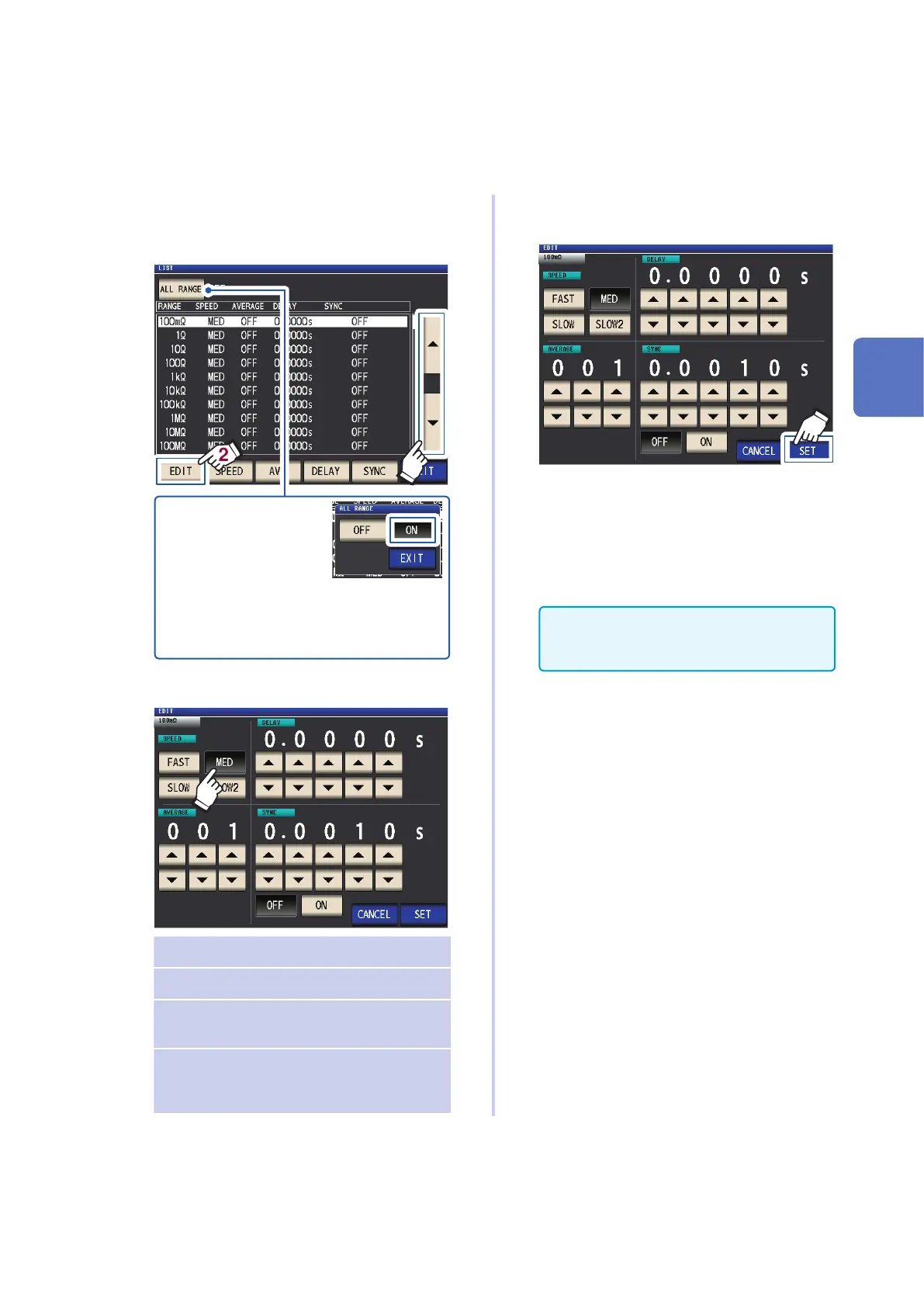
1
Select the measurement range you wish
to congure with key, and touch
the EDIT key.
1
2
To apply the settings to all
measurement ranges, set
ALL RANGE to ON, then
congure each settings.
(To congure settings for
an individual measurement
range, set to OFF)
Touch the EXIT key to re
-
turn to the previous screen.
2
Set conditions.
SPEED Set measurement speed (p. 54).
AVERAGE Congures averaging (p. 56).
DELAY Sets the trigger delay (p. 63).
(BASIC tab screen only)
SYNC Congures the trigger synchro-
nous output (p. 64)
(BASIC tab screen only)
3
Touch the SET key to accept the set-
tings.
Touch the CANCEL key to cancel the set-
tings and close the dialog box.
4
Touch the EXIT key twice.
Displays the measurement screen.
Settings are the same as those described
in"3.4 Setting Measurement Conditions (basic
settings)" (p. 43).
3
Performing Measurements in LCR Mode



 To Next Page