D1 Servo Drive User Manual Servo Drive Configuration
HIWIN MIKROSYSTEM CORP. 5-71
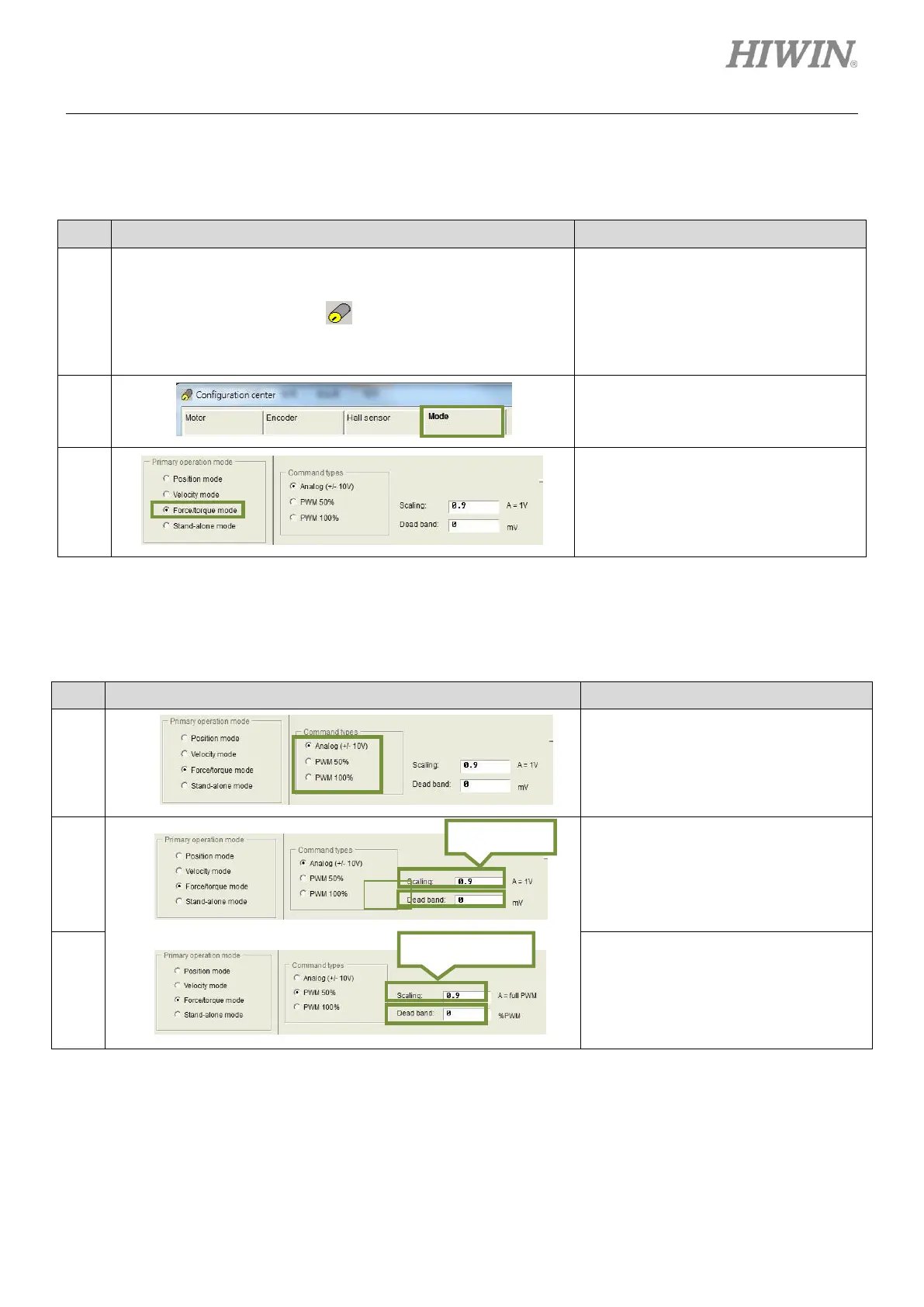
(1) Mode selection
For mode selection, please refer to below.
Table5.8.3.1
After Lightening is opened, click on the
icon of Configuration center on the
toolbar. Or click on Conf./Tune on the
menu bar and select Configuration
center.
In Configuration center, click on Mode
tab.
In the setting page of Mode, select
Force/torque mode.
(2) Format setting of command input
For format setting of command input, please refer to below.
Table5.8.3.2
In the setting page of Mode, set
command type in the setting area of
Command types.
In the setting page of Mode, set the
ratio (scaling) between external
command and current. Set 1 V equals
what current in ampere (A). Or set the
corresponding maximum current of full
PWM command.
Set dead band in the setting page of
Mode. For the definition of dead band,
please refer to figure 5.2.4.3.



 To Next Page