Servo Drive Configuration D1 Servo Drive User Manual
5-8 HIWIN MIKROSYSTEM CORP.
5.2 Configuration center
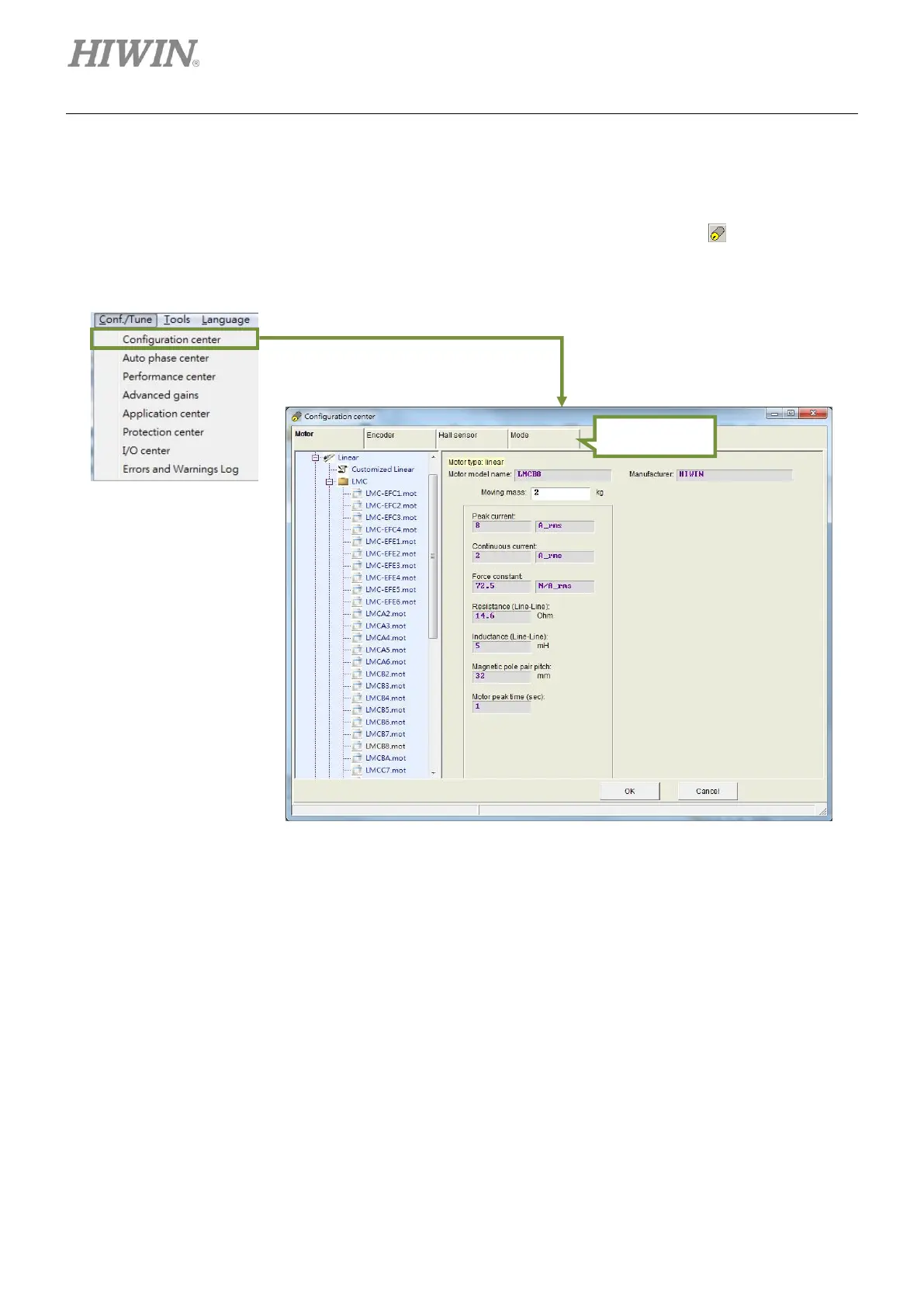
While using a new servo drive or new hardware component such as motor or optical scale, related
parameters must be set in Configuration center based on actual application. Click on on the toolbar or
select Configuration center from the submenu of Conf./Tune to open Configuration center.
Figure5.2.1
The following settings must be completed to drive motor by D1 servo drive.
(1) Motor: Set motor type and related parameters.
(2) Encoder: Set encoder type and encoder resolution.
(3) Hall sensor: Set Hall sensor type.
(4) Mode: Set operation mode.
Refer to sections 5.2.1~5.2.5 for the detailed instructions of the above settings.
Note:
(1) If HIWIN torque motor is used, encoder parameters of the torque motor will be automatically set after the
model is selected. If HIWIN linear motor is used, linear digital 1 um encoder will be automatically selected.
(2) If a servo drive has not been initialized before, the OK button in Configuration center will be grayed out first.
After motor parameters, encoder parameters and operation mode are set, the OK button becomes clickable.



 To Next Page