Tuning D1 Servo Drive User Manual
6-52 HIWIN MIKROSYSTEM CORP.
6.9.4 Changing the start position of error map function
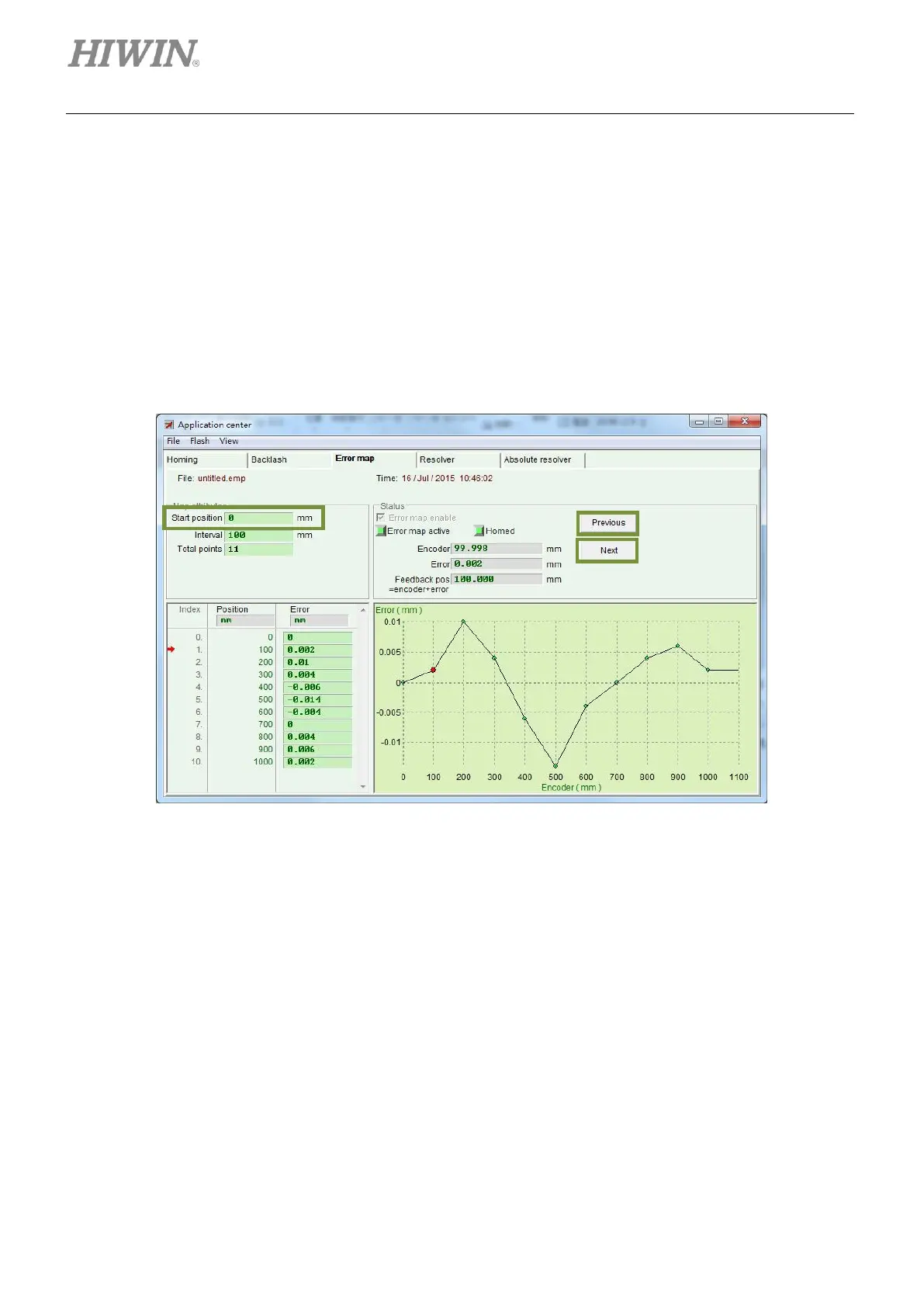
To change the start point of Error map function, click on View on the menu bar and select Advanced from
the submenu. The setting page shown in figure 6.9.4.1 will appear. Input the desired start position into the
field of Start position. Click on Next button and the motor will move for one interval in positive direction.
Click on Previous button and the motor will move for one interval in negative direction. The value of Error
in Status area will be updated to the corresponding error compensation value. The red dot on error
compensation curve represents the value of Encoder. The value of Feedback pos equals the sum of
Encoder and Error values.
Figure6.9.4.1
Note:
To compensate the errors in negative direction, input the stop point in Start position field and set the interval in
Interval field. For instance, input -1000 in Start position field, 100 in Interval field and 11 in Total points field.
Then the compensation positions will be -1000, -900, -800, …, -100, 0, starting from index 0.



 To Next Page