Parameter Comparison D1 Servo Drive User Manual
13-2 HIWIN MIKROSYSTEM CORP.
13.1 Comparing the parameters in RAM and Flash
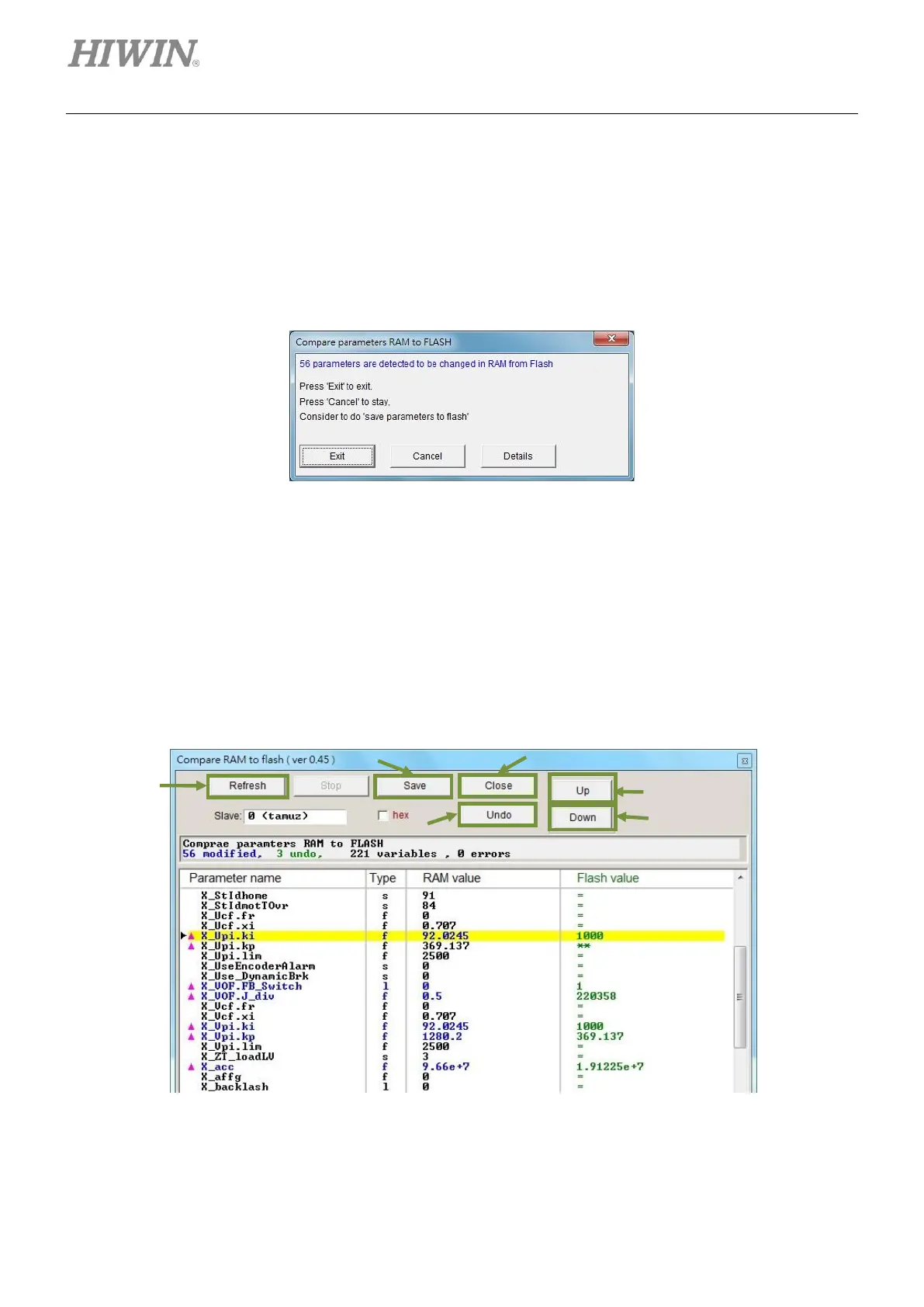
When motor parameters are modified but have not been saved to Flash, Compare parameters RAM to
FLASH window appears as user is closing Lightening or saving error map parameters to Flash (Refer to
section 6.9.1.), as figure 13.1.1. This window is to remind user that parameters are modified but have not
been saved to Flash.
Figure13.1.1 Compare parameters RAM to FLASH window
Click on Details button to do further comparison. User is allowed to check which parameter has different
settings in RAM and Flash. If the settings in RAM and Flash are not identical, the parameter and its value
will be shown in blue.
The following two symbols may also appear in Flash value column.
(1) =: The value saved in Flash is the same as the one in RAM.
(2) **: User undid the parameter before. The value in RAM is changed to the one saved in Flash.
Figure13.1.2 Compare RAM to flash window



 To Next Page