Tuning D1 Servo Drive User Manual
6-8 HIWIN MIKROSYSTEM CORP.
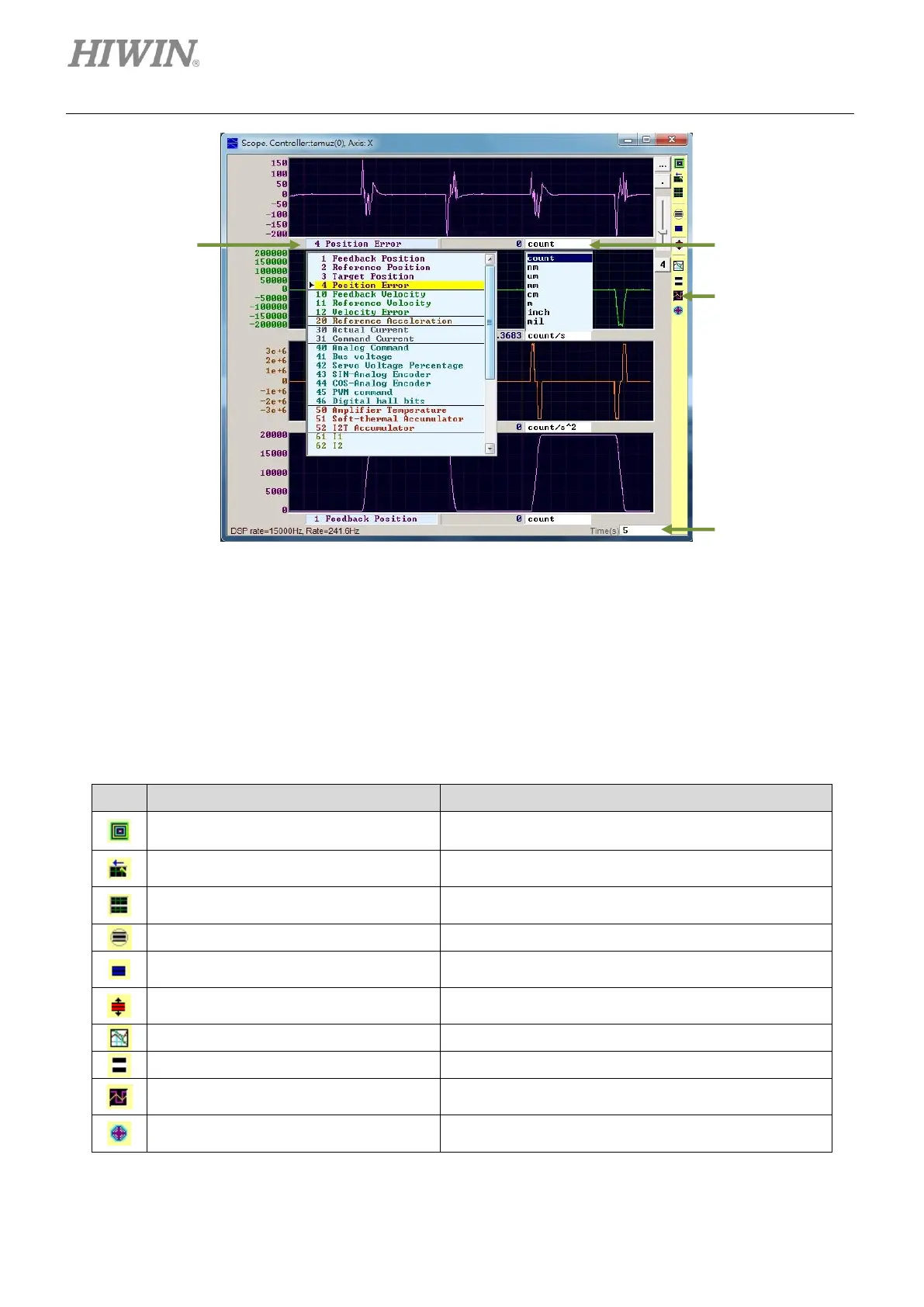
Figure6.3.1 Scope
① Physical quantity: Select the desired physical quantity to be observed. (Refer to section 3.11.)
② Unit: Select the unit for the selected physical quantity.
③ Channel: Select to display how many channels at the same time.(1 to 8)
④ Time range: Set the time length of horizontal axis. (Unit: second)
Table6.3.1
Open/Close Scope. When Scope is closed and opened
again, Scope will recapture data.
View in paper mode (Ctrl+T)
Change display mode. The supported modes are
Normal mode and Paper mode.
Toggle scopes window (PageUp)
Display all the selected physical quantities in one
screen. Click to switch among physical quantities.
Adjust all physical quantities to appropriate scales.
Fit graph to window dynamically
Adjust all physical quantities to appropriate scales
dynamically.
Fit graph to window dynamically + clip
The function is the same as above, but only the range of
vertical axis will be extended.
Show last data with plot view tool
Display the data of Scope with Plot view tools.
Show all plots in same window
Display all the selected physical quantities in one screen
and they share the same vertical axis.
Set the physical quantities in Scope for Data collection.



 To Next Page