L-INX User Manual 222 LOYTEC
Version 4.0 LOYTEC electronics GmbH
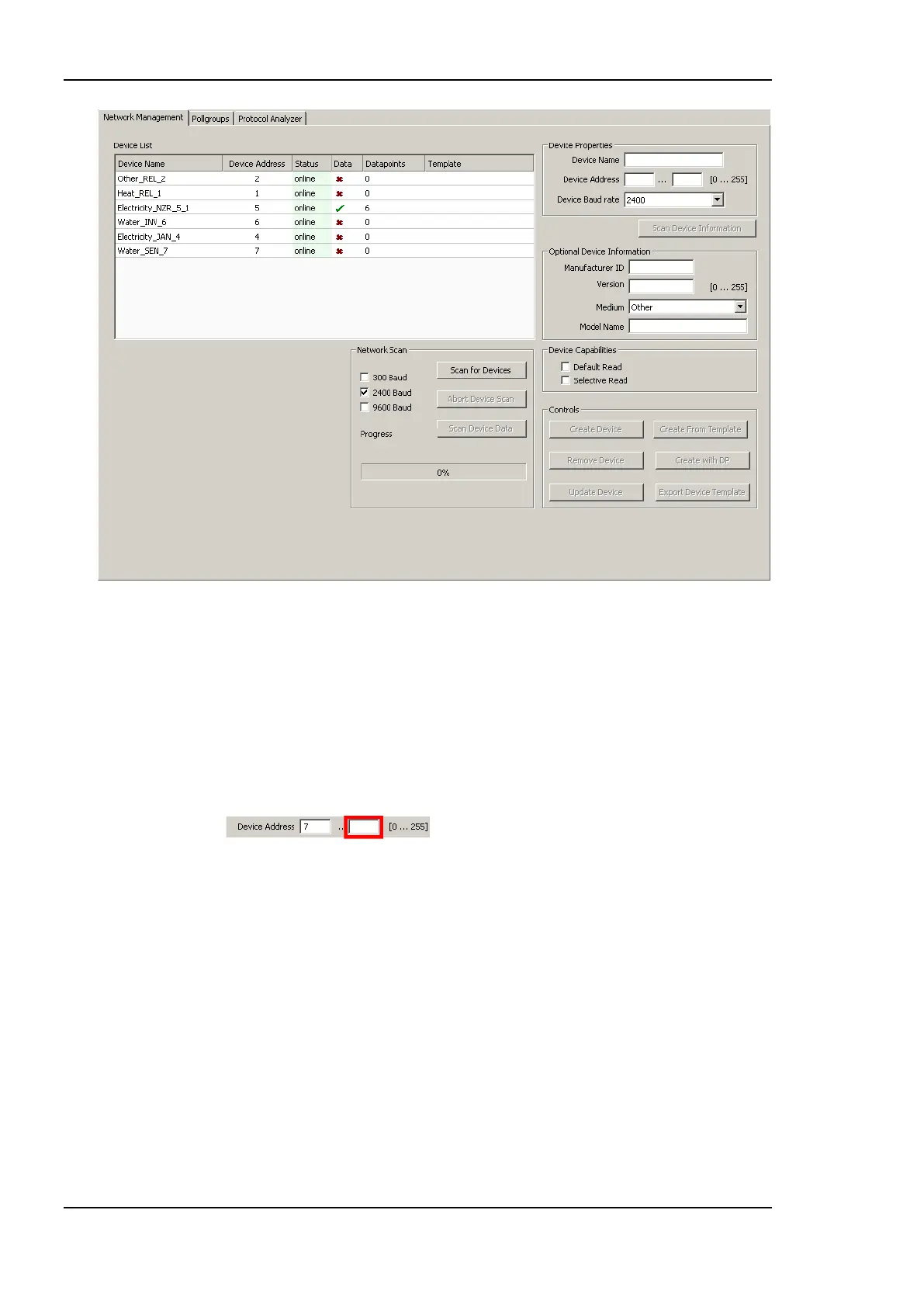
Figure 173: M-Bus network management dialog.
To Add an M-Bus Device Manually Without Scanning
1. Fill in the Device Address and select a Device Baudrate from the drop down box.
2. A Device Name can be specified. If more devices with the same properties have to be
created using subsequent addresses, the end address can be specified in the input field
on the right hand side of the Device Address field.
3. The device capabilities specify, what kind of M-Bus read requests the device is able to
process. If nothing is specified here, Default Read is used. Default read usually means
that the M-Bus device transfers all its data during a read. Selective read means that the
data point which is to be read can be selected during the read request. If the device is
able to perform such a request, Selective Read should be checked.
4. The optional device information just represents manufacturer details and model details.
This information is used in two cases:
a. The device name is not specified – in this case a device name is automatically
created from the optional device information. The name is concatenated to
MAN_Medium_address, where MAN is the 3 character manufacturer code,
Medium is the M-Bus medium (e.g. ―Heat‖) and address is the specified
address.
b. Device templates can be created from the M-Bus devices. The device
templates store the device information in order to identify a device.



 To Next Page