L-INX User Manual 258 LOYTEC
Version 4.0 LOYTEC electronics GmbH
To be able to use the L-INX with logiCAD, a predefined project template for the L-INX
must be used. Hence, when creating a new project, select the project template ―Project for
LINX-110‖, see Figure 14. For additional information how to create, delete and manage
projects please refer to the logiCAD online help.
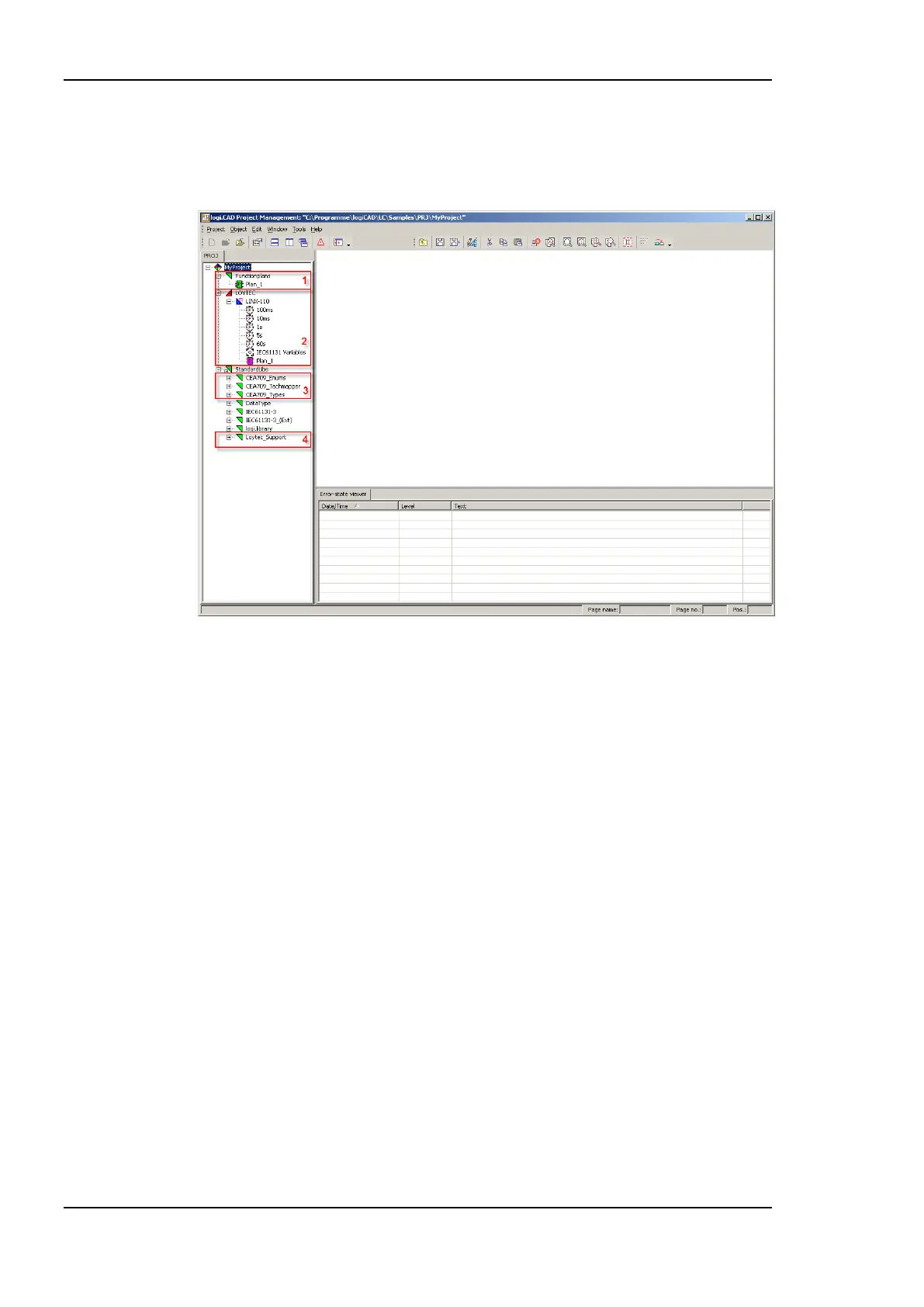
Figure 204: L-INX specific extensions
Figure 204 shows the standard project for the L-INX including all LINX-specific extensions
for logiCAD. It shows the structure window showing the project structure on the left, an
empty working area top right and the Error-state viewer on the bottom right side.
The structure window offers interfaces to the following features:
1. The folder Functionplans holds all the program types created within logiCAD.
‗Plan_1‘ is the default plan to start with.
2. The folder LOYTEC/LINX-110 represents the LINX-110 device. The folder
LOYTEC represents a configuration containing one LINX-110 resource; please refer
to the logiCAD online help for details. To run a program, located in the folder
Functionplans, a program instance of the corresponding function plan must be created.
In the standard LINX-110 template a program instance of the ‗Plan_1‘ is already
defined. To be able to transfer IEC61131 variables from the L-INX device to the
IEC61131 program a global variables object within the LINX-110 folder is required,
see Section 12.4.1 for details.
3. LogiCAD operates on variable types standardized in the IEC61131 standard. Look for
―Elementary and Generic Data Types‖ within the logiCAD online help to get
information about the available data types. For those L-INX devices, which are
intended to operate on structured NVs, appropriate type definitions for the NVs are
required. These definitions are inside the folder CEA-709_Types. Additional NVs
must be converted to data types that can be processed by logiCAD. Therefore
Technology Converters are supplied with the L-INX project, which perform this
conversion. See Section 12.4.3 for details.



 To Next Page