214683 219 Revision A
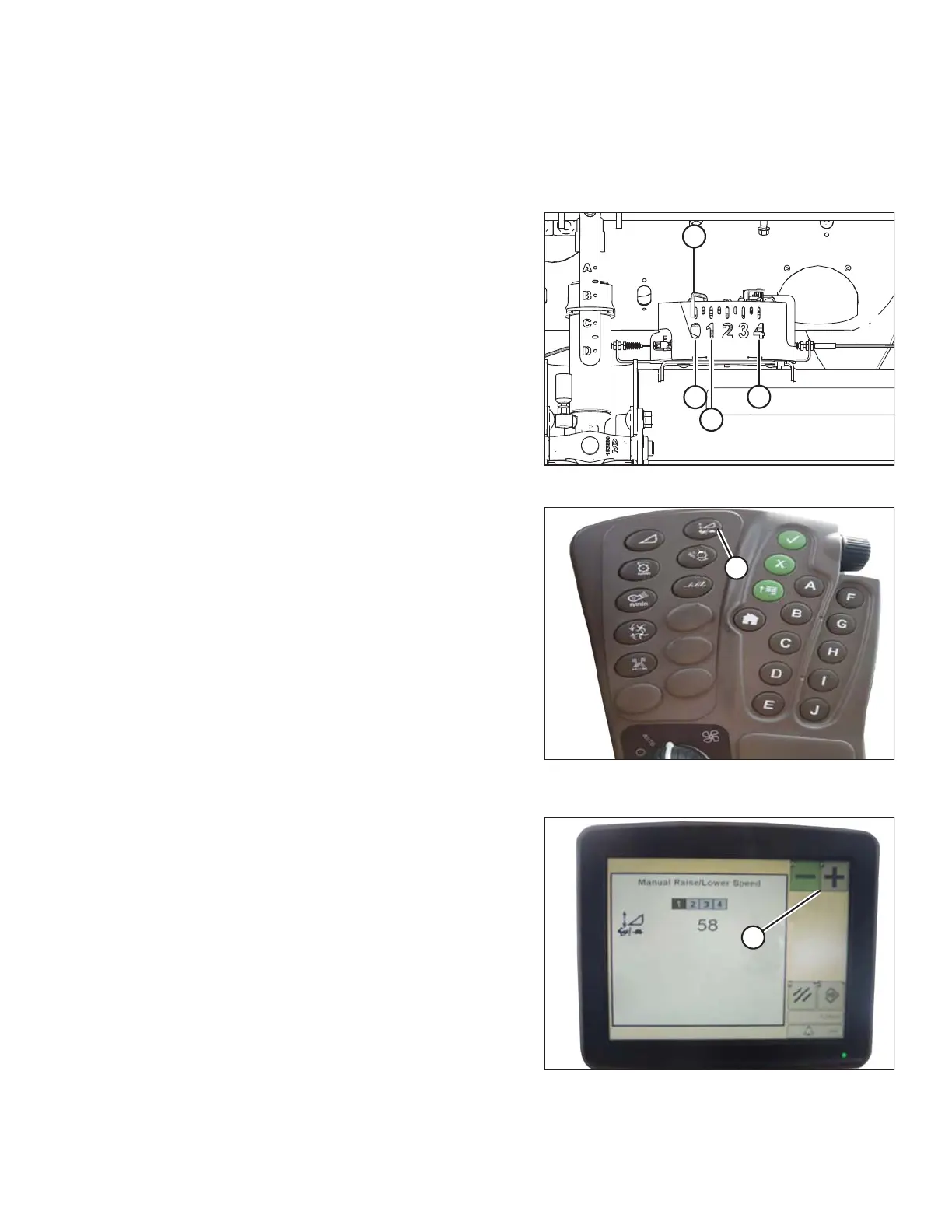
Adjusting the Manual Header Raise/Lower Rate (John Deere S and T Series)
NOTE:
Changes may have been made to the combine controls or display since this document was published. Refer to the
combine operator’s manual for updates.
Figure 3.356: Float Indicator Box
NOTE:
The indicator (A) should be at position 0 (B) with the header
152 mm (6 in.) off the ground. If not, the float sensor output
voltage should be checked. Refer to Step 4, page 128.
When the header is on the ground, the indicator should be
at position 1 (C) for low ground pressure, and at position
4 (D) for high ground pressure. Crop and soil conditions
determine the amount of float to use. The ideal setting is as
light as possible without header bouncing or missing crop.
Operating with heavy settings prematurely wears the
cutterbar wearplates.
Figure 3.357: John Deere Combine
Command Center
1. Press button (A) and the current sensitivity setting will
appear on the monitor.
Figure 3.358: John Deere Combine Display
2. Press the – or + icon (A) to adjust rates.
NOTE:
The numbers depicted on the displays in these
illustrations are for reference purposes only; they are
not intended to represent the specific settings for your
equipment.
OPERATION








 To Next Page