214683 535 Revision A
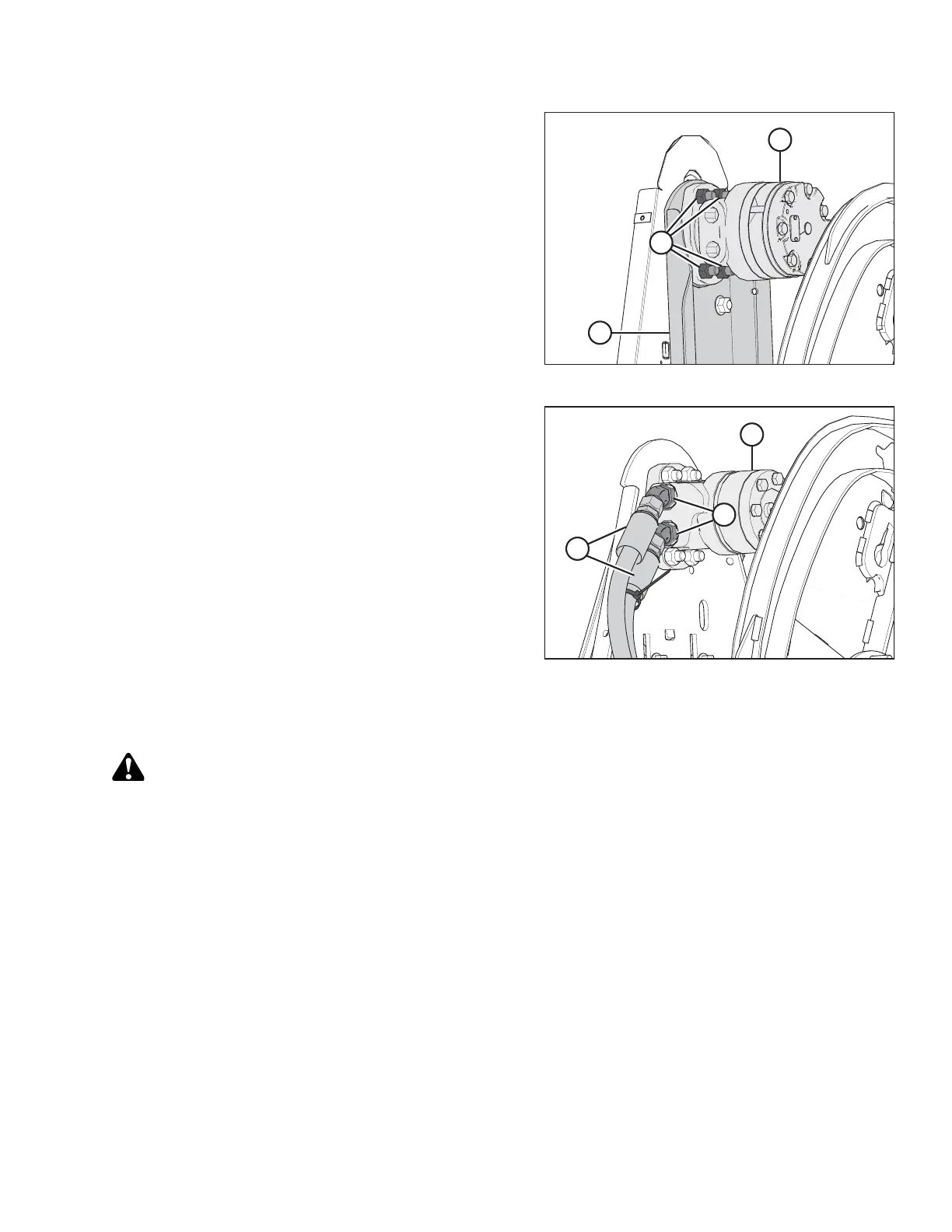
Figure 5.294: Reel Drive Motor
2. Attach motor (A) (and spacer if previously removed) to
motor mount (B) with four 1/2 x 1-3/4 in. countersunk
bolts and nuts (C).
3. Torque nuts (C) to 73 Nm (54 lbf∙ft).
4. If installing a new motor, install the hydraulic fittings (not
shown) from the original motor and torque to
110–120 Nm (81–89 lbf·ft).
Figure 5.295: Reel Motor and Hoses
5. Remove the caps or plugs from the ports and lines and
connect hydraulic lines (A) to hydraulic fittings (B) on
motor (C).
NOTE:
Ensure hydraulic lines (A) are installed in their original
locations.
6. Install the drive sprocket. Refer to Installing Reel Drive
Sprocket, page 531.
7. Tighten the drive chain. Refer to Tightening Reel Drive
Chain, page 528.
5.16.6 Replacing Drive Chain on Double Reel
WARNING
To avoid bodily injury or death from unexpected startup of machine, always stop engine and remove key
before making adjustments to machine.
1. Shut down the engine, and remove the key from the ignition.
2. Remove drive reel drive cover. Refer to Removing Reel Drive Cover, page 526.
3. Loosen the drive chain. Refer to Loosening Reel Drive Chain, page 528.
MAINTENANCE AND SERVICING








 To Next Page