214683 283 Revision A
Setting Maximum Work Height (New Holland CR Series)
NOTE:
This section applies only to 2015 and later CR models (6.80, 6.90, 7.90, 8.90, 9.90, and 10.90). For other pre-2015
New Holland combine models, refer to 3.8.15 New Holland Combines (CR/CX Series—Pre-2015 Model Year),
page 261.
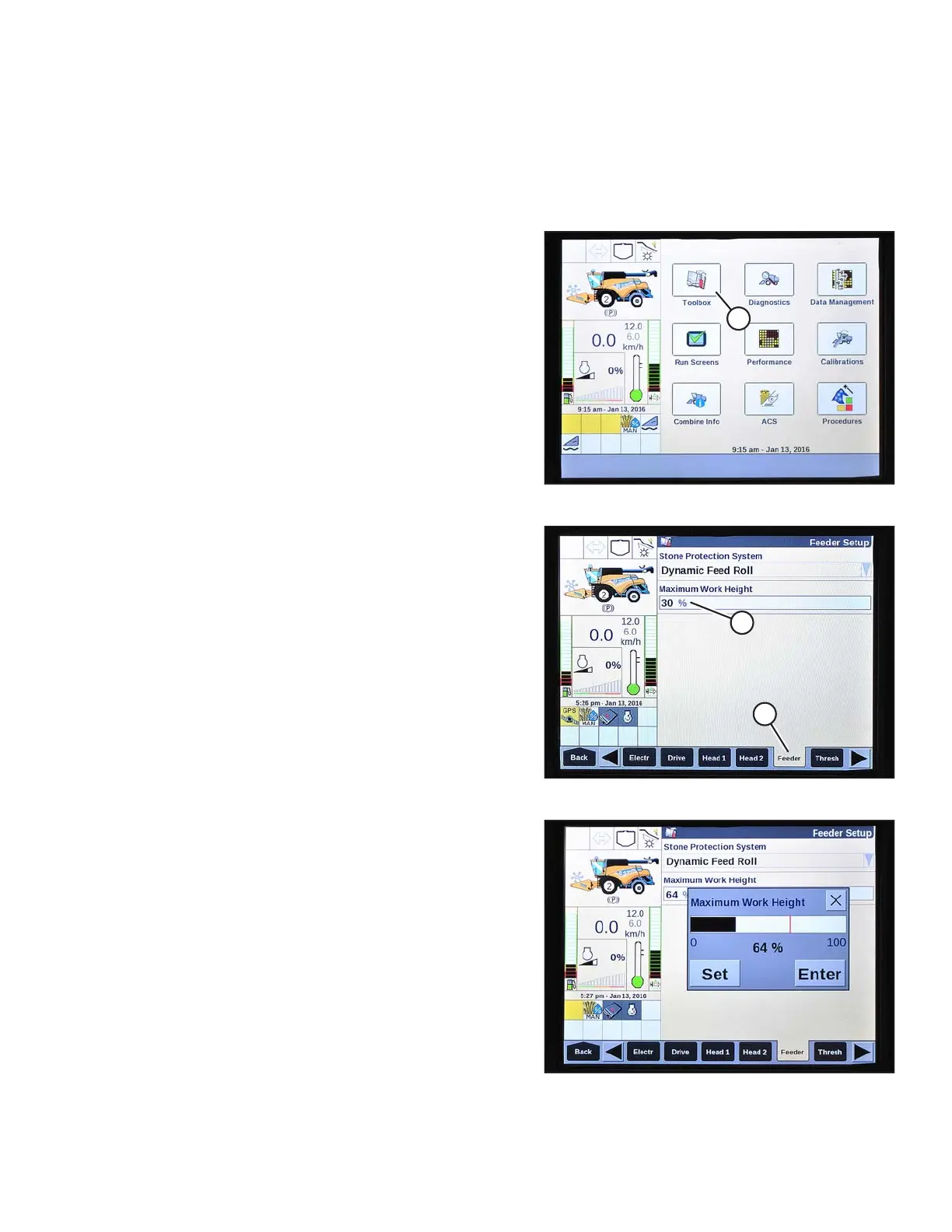
Figure 3.504: New Holland Combine Display
1. Select TOOLBOX (A) on the main screen. The
TOOLBOX screen displays.
Figure 3.505: New Holland Combine Display
2. Select FEEDER (A). The FEEDER SETUP screen
displays.
3. Select the MAXIMUM WORK HEIGHT field (B).
Figure 3.506: New Holland Combine Display
4. Set MAXIMUM WORK HEIGHT to desired value.
5. Press SET and then press ENTER.
OPERATION








 To Next Page