214683 135 Revision A
Replacing Float Indicator Cable
If the float indicator cable is damaged, replace it following these instructions. You will need to order one float
indicator cable (MD #187658) from your MacDon Dealer.
NOTE:
Some parts have been removed for illustration purposes.
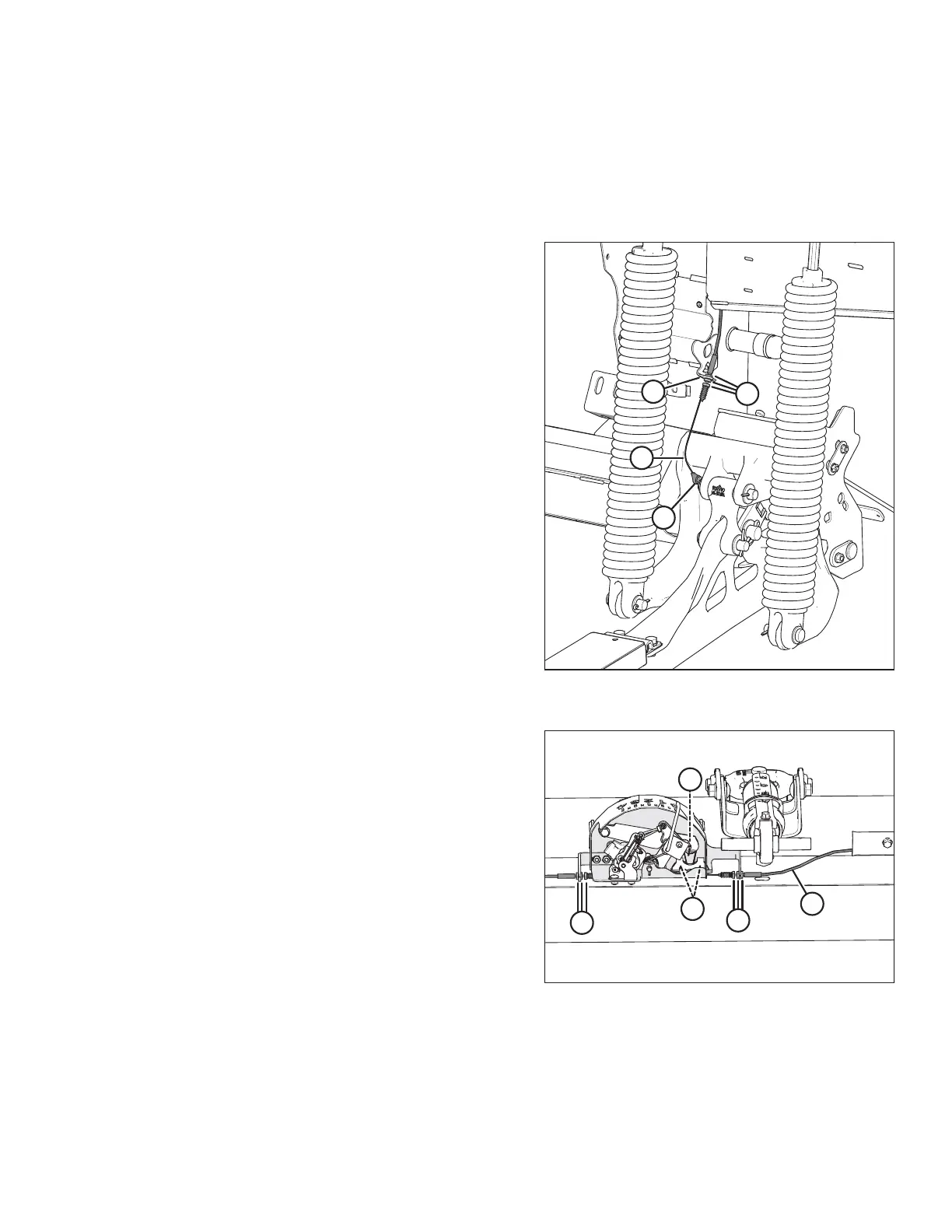
Figure 3.174: Left Front Side of Float Adapter –
Right Side is Opposite
1. On the left front side of the float module, remove nut,
washer, and bolt (A) securing the cable eye on the end
of float indicator cable (B) to the float lever. Retain
hardware for reinstallation.
2. Loosen jam nuts (C) on float indicator cable (B), and
then disconnect the cable from cable stop support (D).
3. Repeat steps on right front side of the float module.
Figure 3.175: Float Indicator Box
4. Loosen jam nuts (A) securing float indicator cable (B) to
both sides of the float indicator bottom support, and
then disconnect the cable from the support.
5. Float indicator cable (B) is routed around three
pulleys (C) in the float indicator box. Remove the cable
and discard.
NOTE:
Pulleys are hidden by other parts in the illustration.
Their approximate location is identified.
OPERATION








 To Next Page