214683 111 Revision A
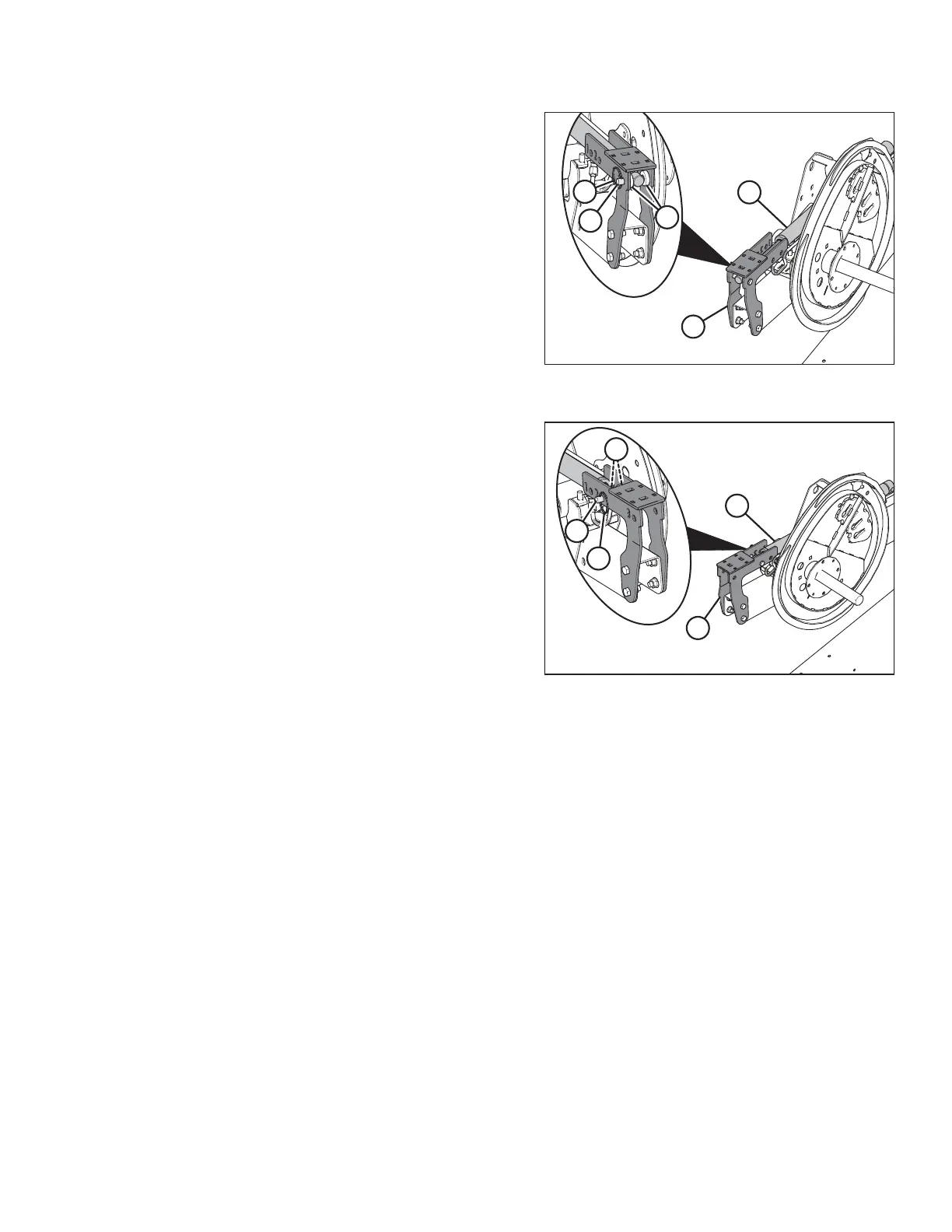
Figure 3.127: Right Reel Arm in Forward
Position
1. Remove ring (A), clevis pin (B), and washers (C) from
bracket (D). Retain ring, clevis pin, and washers.
2. Push the reel back until end of cylinder (E) lines up with
reel position 2 hole on bracket (D).
NOTE:
Washers inside center arm support bracket not shown
in illustration at right.
3. Reinstall clevis pin (B) at the new position and secure
with ring (A).
Figure 3.128: Right Reel Arm in Aft Position
3.7.12 Reel Tine Pitch
IMPORTANT:
The following describes the conceptual and operational guidelines of the pick-up reel. Please read carefully before
operating the machine.
The pick-up reel is designed to pick up flattened and severely lodged crops. Because the cam setting is mainly
used to determine how the crop gets delivered onto the drapers, it is not always necessary to increase the tine pitch
(select a higher cam setting) to pick up lodged crops.
The positioning of the fingers relative to the ground (tine pitch) is not significantly affected by the cam setting. For
example, with the cam position range at 33°, the corresponding finger pitch range is only 5° at the lowest point of
the reel’s rotation.
For the best results, use the minimum cam setting that delivers the crop past the rear edge of the cutterbar and
onto the drapers. Refer to 3.6.2 Header Settings, page 43.
Reel Cam Settings
The following outlines the function of each cam setting and provides set-up guidelines for various crop conditions.
The setting numbers are visible above the slots on the cam disc. Refer to Adjusting Reel Cam, page 113.
OPERATION








 To Next Page