214683 367 Revision A
4.7.2 Detaching Header from New Holland CR/CX Combine
DANGER
To avoid bodily injury or death from unexpected start-up or fall of raised machine, always stop engine,
remove key, and engage safety props before going under header for any reason.
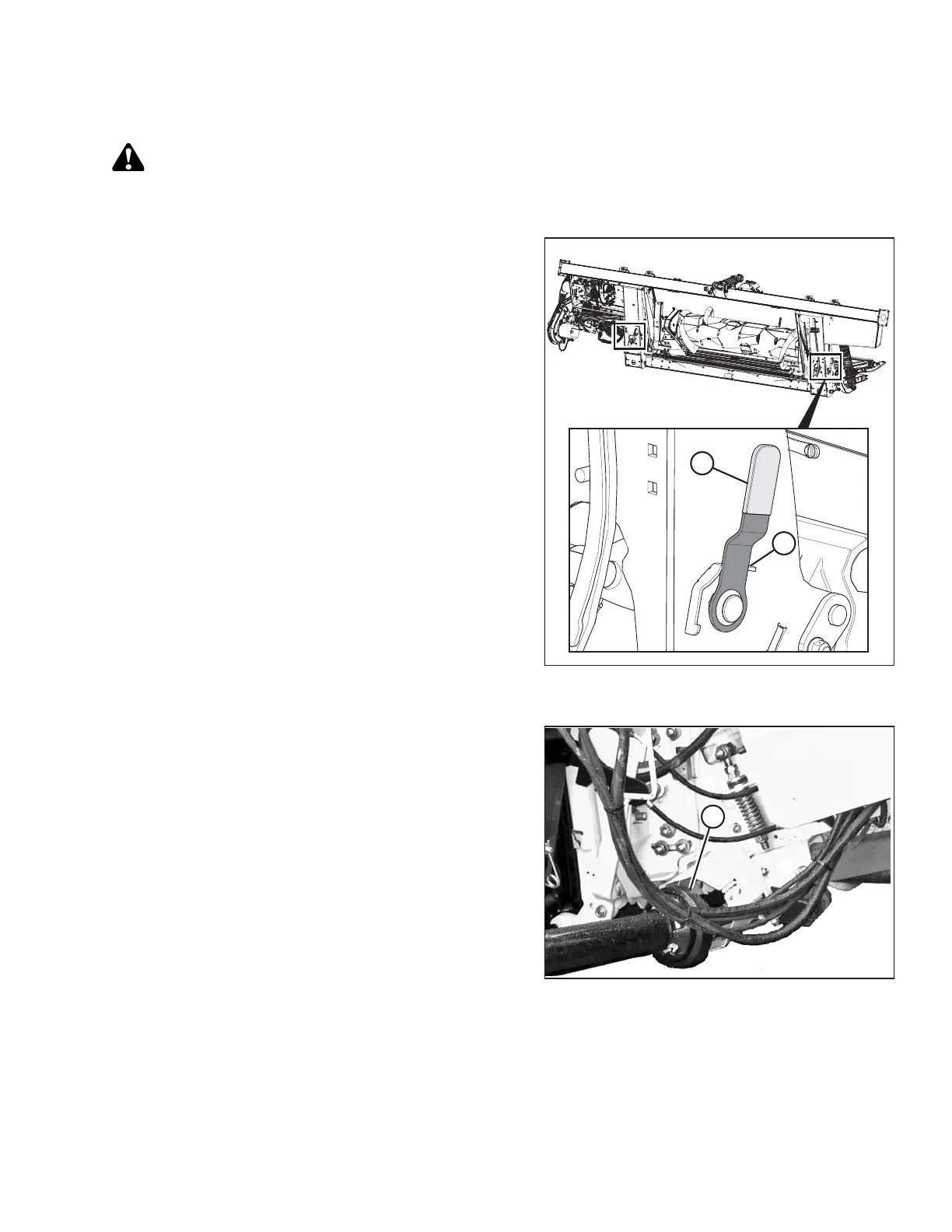
Figure 4.129: Float Lock Handle (Right Side
Shown in Detail, Left Side Opposite)
1. Choose a level area and position the header slightly
above the ground.
2. Stop the engine and remove the key from the ignition.
IMPORTANT:
If slow speed transport wheels are installed, the header
may be detached in either transport or field mode. If
detaching with the wheels in field mode, set the wheels
to the storage or uppermost working position, otherwise
the header may tilt forward, making reattachment
difficult. Refer to Adjusting Stabilizer / Slow Speed
Transport Wheels, page 59.
IMPORTANT:
If stabilizer wheels are installed, set the wheels to the
storage or uppermost working position, otherwise the
header may tilt forward, making reattachment difficult.
Refer to Adjusting Stabilizer Wheels, page 60.
3. Engage the float locks by pulling each float lock
handle (A) away from the float module and setting it in
the locked position (B).
Figure 4.130: Driveline
4. Disconnect the driveline (A) from the combine.
HEADER ATTACHMENT/DETACHMENT








 To Next Page