214683 221 Revision A
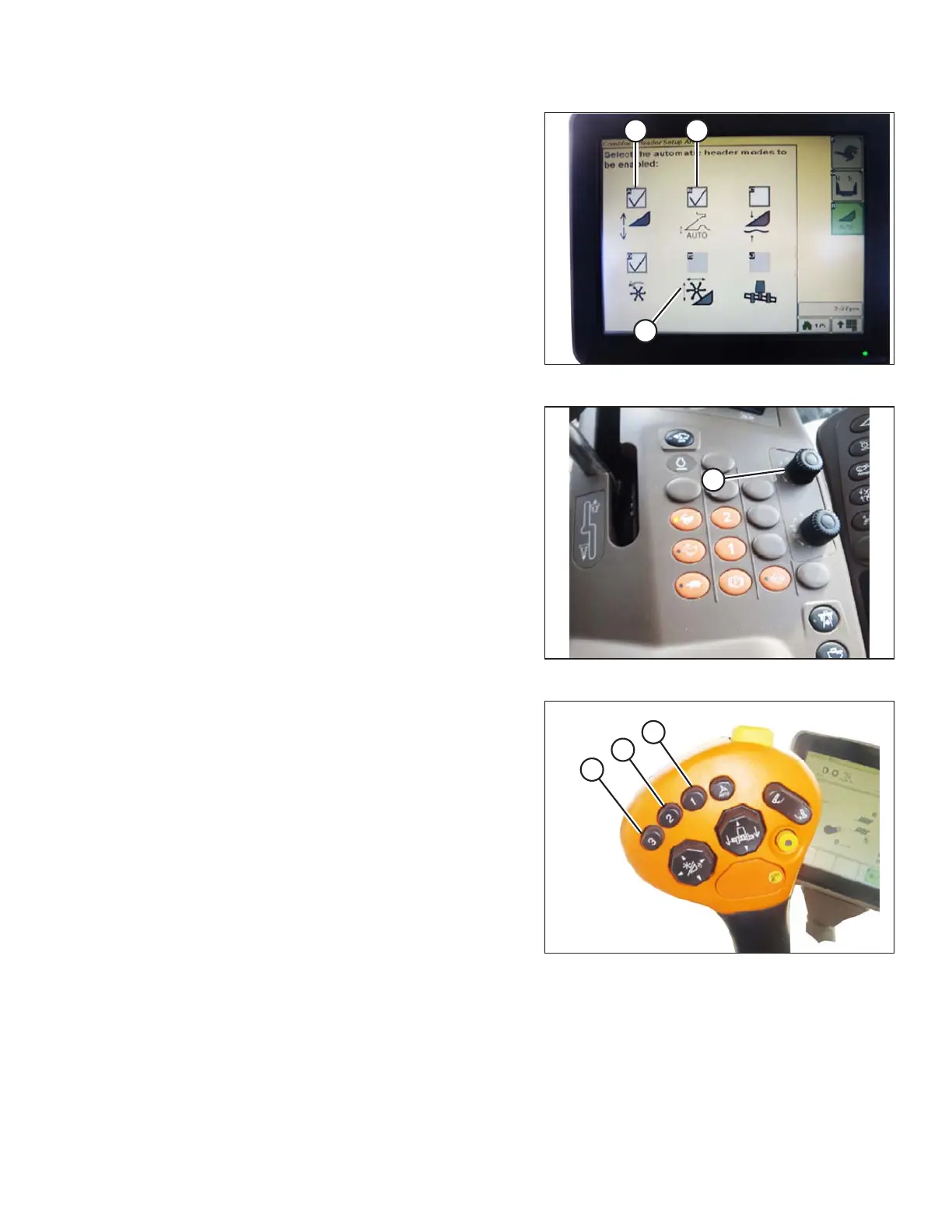
Figure 3.362: Combine Display
3. Select AUTO HEIGHT SENSING (A), RETURN TO
CUT (B), and REEL POSITION (C) icons.
NOTE:
If REEL POSITION icon (C) cannot be selected (no
check mark), the reel height sensor requires calibration.
Refer to Calibrating Reel Height Sensor (John Deere S
and T Series), page 227.
Figure 3.363: Combine Control Console
4. Engage the header.
5. Move header to desired position and use knob (A) to
fine tune position.
6. Move reel to desired position.
Figure 3.364: Control Handle Buttons
7. Press and hold preset switch 2 (B) until 1 reel height
icon flashes on monitor.
8. Repeat previous three steps for preset switch 3 (C).
9. Select an appropriate ground pressure setting. Use
preset button 2 (B) on the control handle for a low
ground pressure setting in muddy or soft soil conditions,
and preset 3 (C) for a high ground pressure setting in
firm soil conditions and a higher ground speed.
NOTE:
Preset button 1 (A) is reserved for header lift on the
headland and is not used for cutting on ground.
OPERATION








 To Next Page