214683 457 Revision A
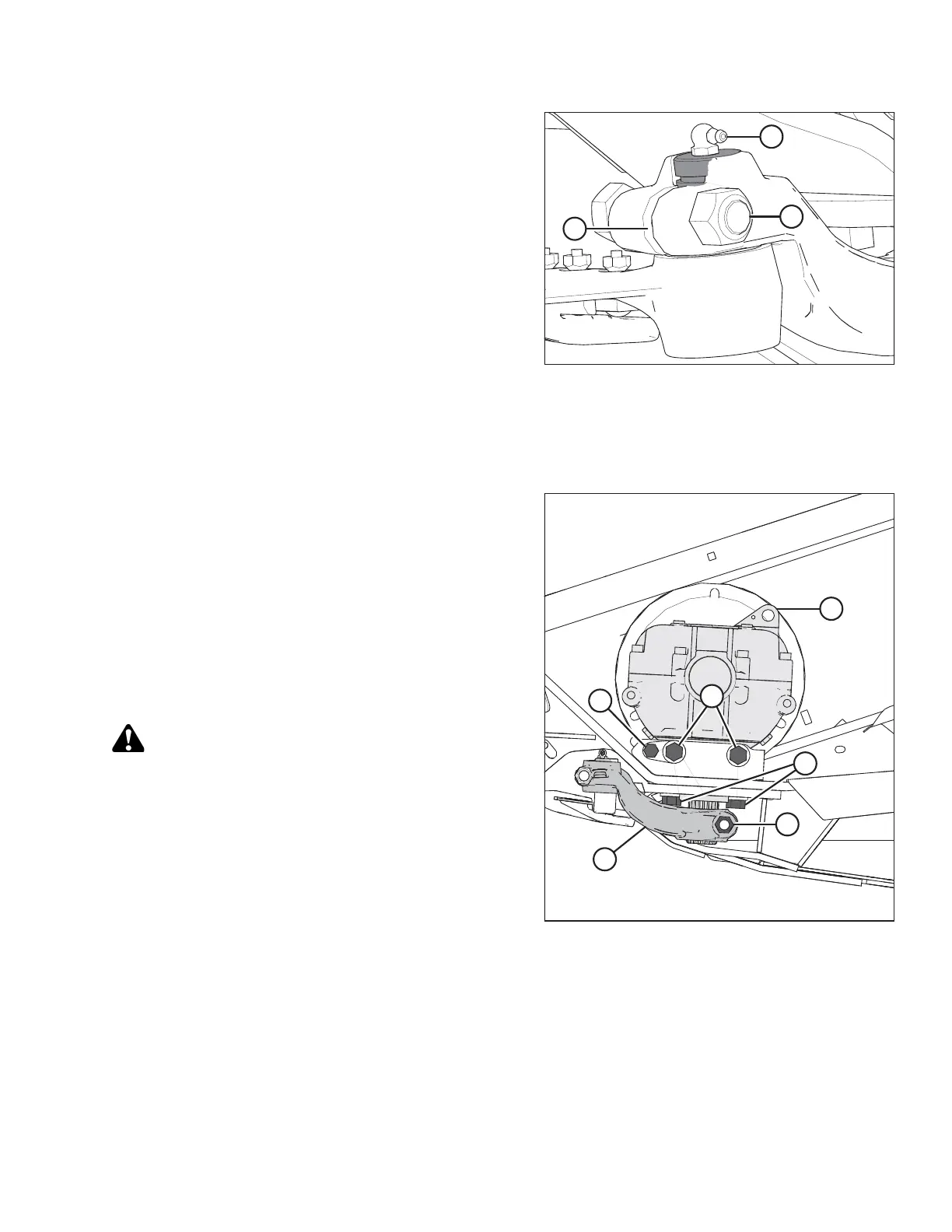
Figure 5.121: Knifehead
8. Manually stroke the knife to its outer limit.
9. Clean the area around the knifehead.
10. Remove grease fitting (B) from the pin.
NOTE:
Removing the grease fitting will make it easier to
reinstall the knifehead pin later.
11. Remove bolt and nut (A).
12. Use a screwdriver or chisel in slot (C) to release the
load on the knifehead pin.
13. Use a screwdriver or chisel to pry the pin upwards in the
pin groove until the pin is clear of the knifehead.
14. Push the knife assembly inboard until it is clear of the
output arm.
15. Seal the knifehead bearing with plastic or tape to keep
out dirt and debris unless it is being replaced.
Figure 5.122: Knife Drive Box
16. Remove bolt (A) that clamps the knife drive arm (B) to
the knife drive box output shaft.
17. Remove knife drive arm (B) from the knife drive box
output shaft.
18. Remove the four knife drive box mounting bolts (C)
and (D).
NOTE:
Do NOT remove bolt (E); it is factory-set to properly
position the knife drive box in the correct fore-aft
position.
CAUTION
The knife drive box and pulley weigh over 35 kg (65 lb.)
Use care when removing or installing. Lug (L) can be
used for lifting.
19. Remove the knife drive box from the header and
set aside.
MAINTENANCE AND SERVICING








 To Next Page