214683 61 Revision A
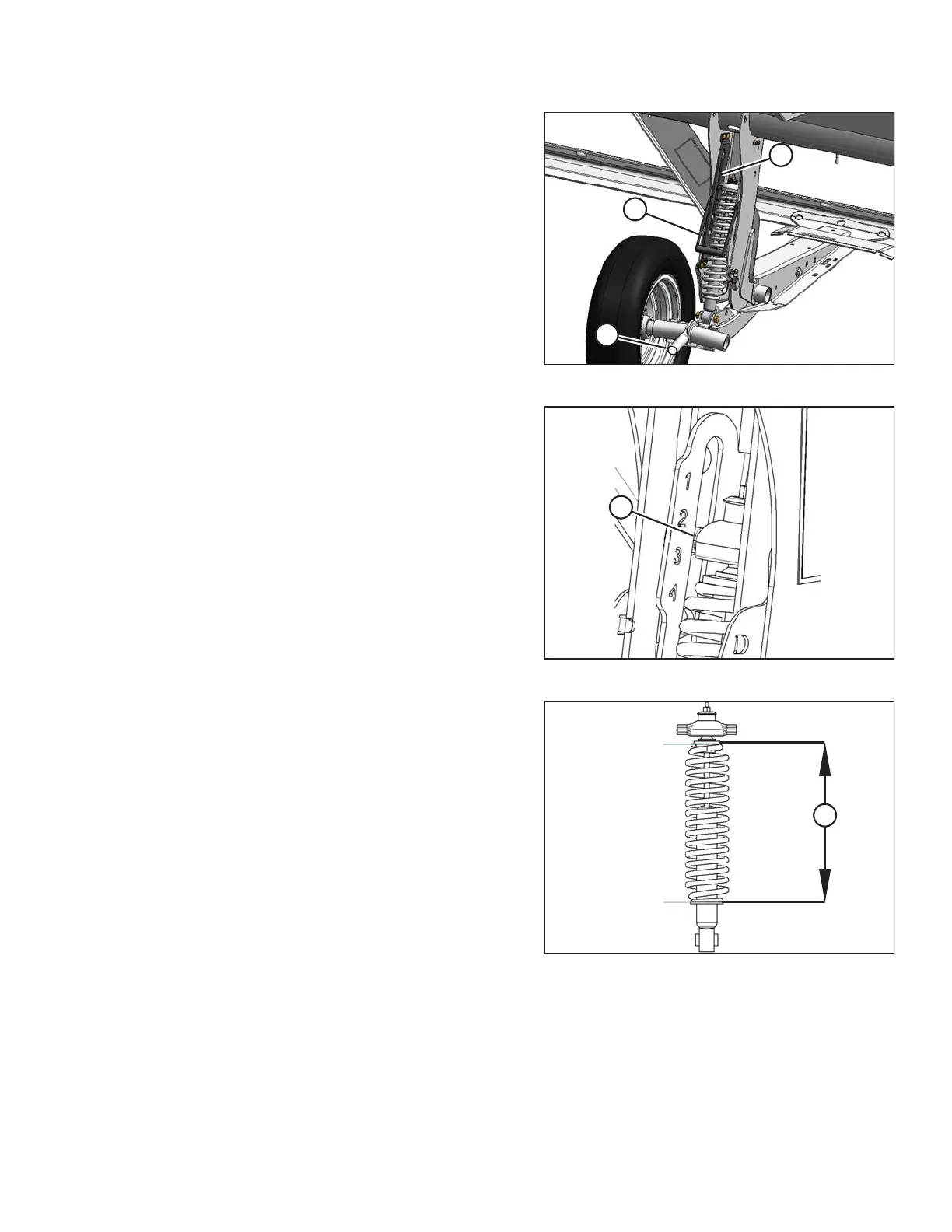
Figure 3.29: Stabilizer Wheel
2. Support the wheel weight by lifting slightly with one
hand on handle (B), and pull up on the handle (A) to
release the lock.
3. Lift the wheel using handle (B), and engage the support
channel into the center slot (C) in the upper support.
4. Push down on the handle (A) to lock.
Figure 3.30: Load Indicator
5. Lower the header to the desired cutting height using the
combine controls and check the load indicator (A).
Figure 3.31: Spring Compression
6. Adjust the header angle to the desired working angle
with the machine’s header angle controls. If header
angle is not critical, set it to mid-position.
IMPORTANT:
Continuous operation with excessive spring
compression (i.e., load indicator reading greater than 4
or a compressed length less than 295 mm
[11-5/8 in.]) (A) can result in damage to the suspension
system.
7. Use the combine’s Auto Header Height Control (AHHC)
to automatically maintain cutting height. Refer to 3.8
Auto Header Height Control (AHHC), page 124 and
your combine operator’s manual for details.
NOTE:
The height sensor on the FM100 Float Module must be
connected to the combine height control system in
the cab.
OPERATION








 To Next Page