R&S
®
ZVA / R&S
®
ZVB / R&S
®
ZVT GUI Reference
System Menu
Operating Manual 1145.1084.12 – 30 535
SYSTem:COMMunicate:RDEVice:GENerator<gen_no>:DEFine
SYSTem:COMMunicate:RDEVice:GENerator<gen_no>:DELete
SYSTem:COMMunicate:RDEVice:GENerator<gen_no>:CATalog?
SYSTem:COMMunicate:RDEVice:GENerator<gen_no>:COUNt?
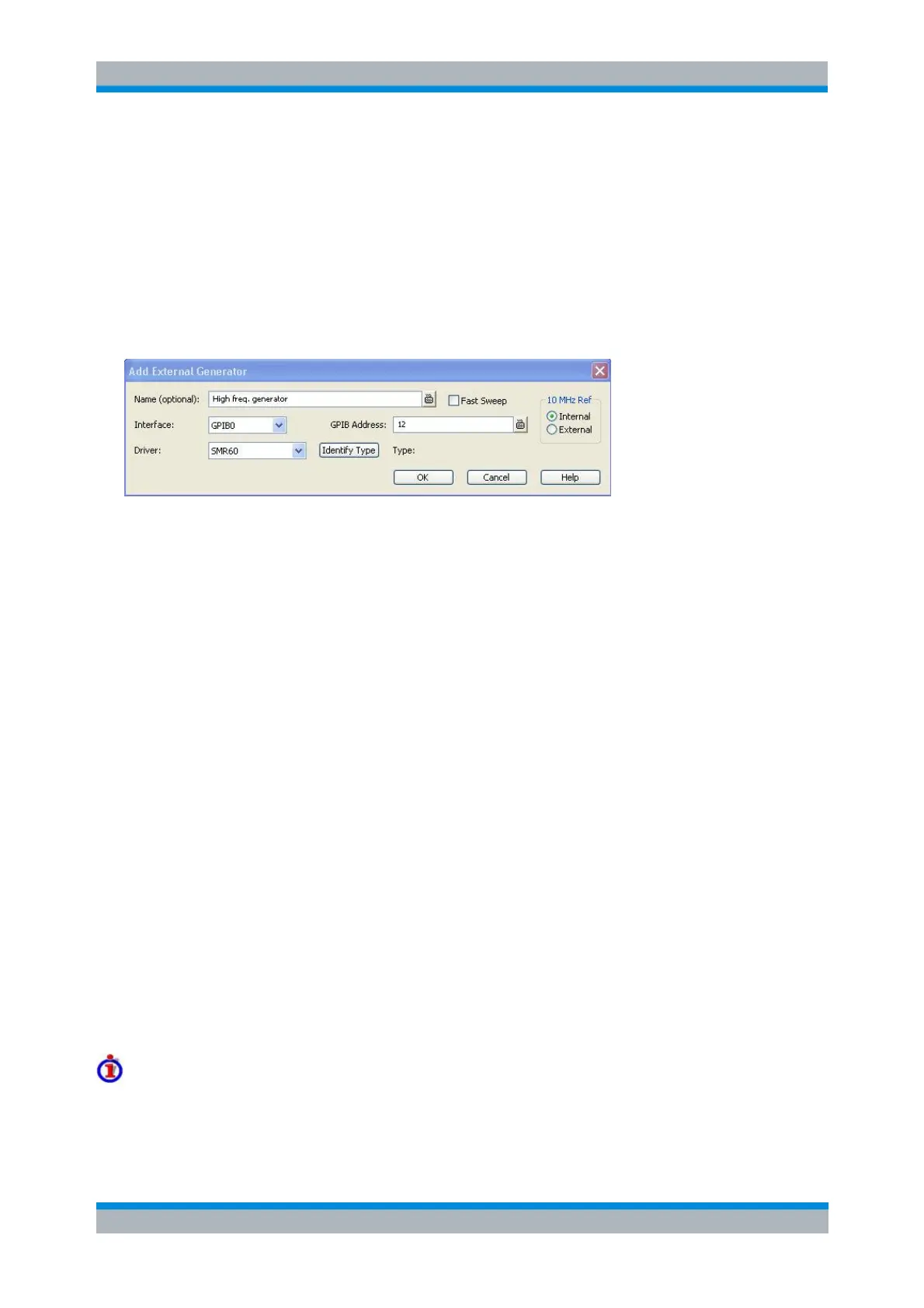
Add/Modify External Generator
Selects and configures an external generator.
The following control elements select the generator type and its connection:
Name is an optional, arbitrary name associated with the generator. Names appear in the
generator lists in the External Generators tab and in the selection dialogs for source signals
(measurements and power calibration). If no name is specified, the generators are listed as Gen
1, Gen 2...
Interface selects an interface type for the connection. In addition to the GPIB0 and VXI-11
interface types (for devices connected to the IEC Bus or LAN1/2 connectors on the rear panel of
the analyzer, respectively), the analyzer supports any Other interface supported by the installed
VISA library.
GPIB Address or Hostname or IP Address (depending on the Interface selection) contains the
address for the current interface type. GPIB addresses must be unique for all devices connected
to the GPIB bus (range: 0 to 30), GPIB and IP addresses must agree with the entries in the VISA
library. For an Other interface type, the input field contains the Resource String from the installed
VISA library.
Driver contains a list of all supported generator types. The names in the list are identical with the
name of the generator configuration files (*.gen) stored in the Resources\ExtDev subdirectory
of the analyzer's program directory. For detailed information about the configuration files refer to
section Configuration Files.
Identify Type sends an identification query (IDN?) to the specified device address in order to
identify the generator type and select an appropriate configuration file. An error message is
displayed if the identification fails.
The following control elements provide hardware-related settings:
Fast Sweep enables or disables the fast sweep mode for external generators that support a
frequency and level list mode (triggered mode).
10 MHz Ref switches the analyzer to either internal or external frequency reference.
Fast sweep mode and conditions
In the list mode the external generator steps through a predefined list of frequencies or signal power
levels. This mode can be used to accelerate the measurements involving external generators.



 To Next Page