Note: Should the list be empty, no servers have been added
yet. In the event that added peers are not displayed, they
could not be resolved. Verify the IPaddress
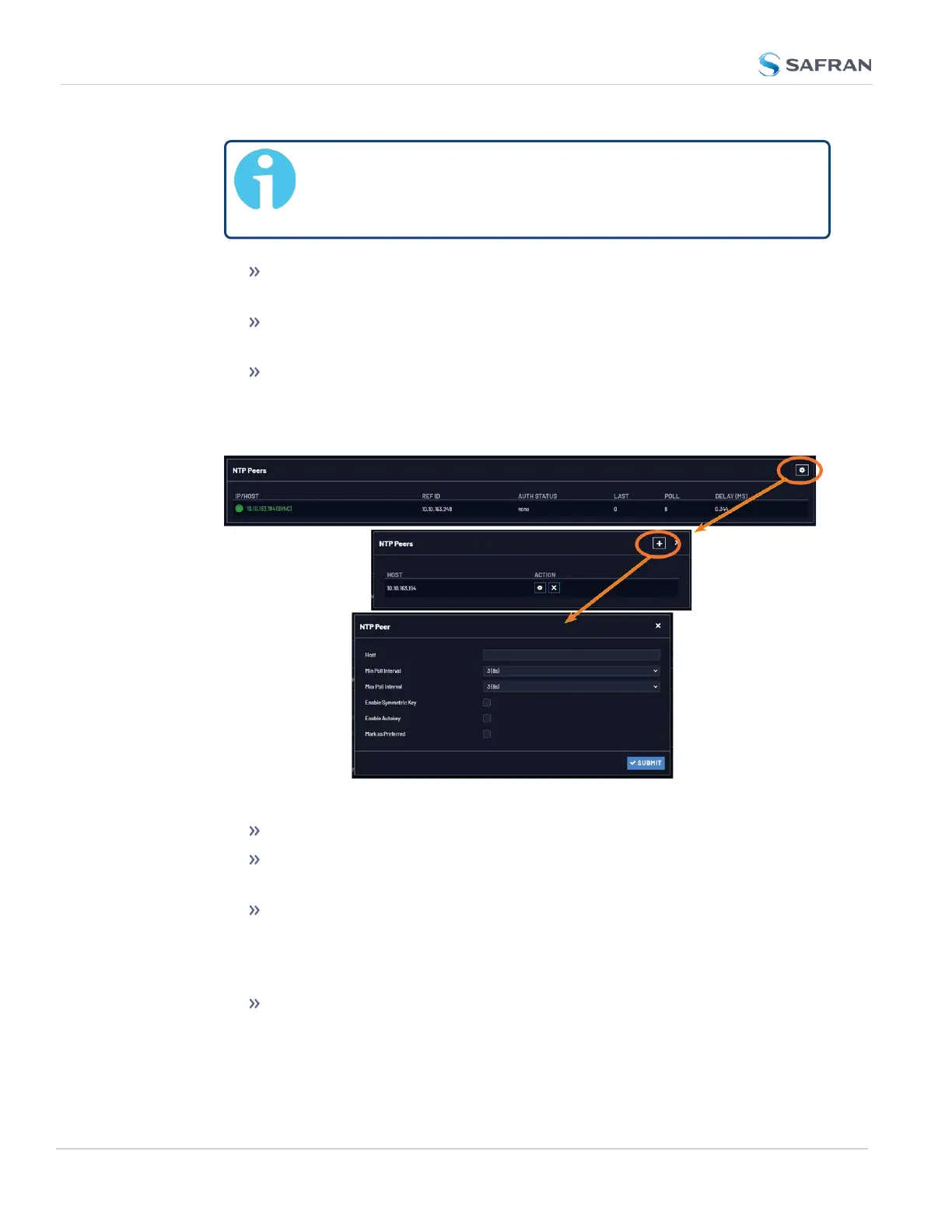
To EDIT the settings of an NTP Peer, click the GEAR button next to it,
and proceed to Step3 below.
To ADD a new NTP Peer, click the PLUS icon in the top right corner of
the NTP Peers panel.
To REMOVE an NTP Peer (and its associated configurations), click
the X-button next to it.
3. The NTP Peers edit window opens:
4. Enter the required information into the fields:
Host: The IPaddress for the server to be used as host.
Min Poll Interval: Select a value from the drop down (the default is 3
(8s).
Max Poll Interval: Select a value from the drop down (the default is 3
(8s).
For both NTP Peers, and NTP Servers the Minimum and Maximum Poll
rate for NTP packets can be configured.
Enable Symmetric Key: Click the checkbox to enable/disable Sym-
metric Key. See also: "Configuring NTP Symmetric Keys" on page131.
124
CHAPTER 2 • VersaSync User Manual Rev. 12
2.8 Configuring Network Settings



 To Next Page