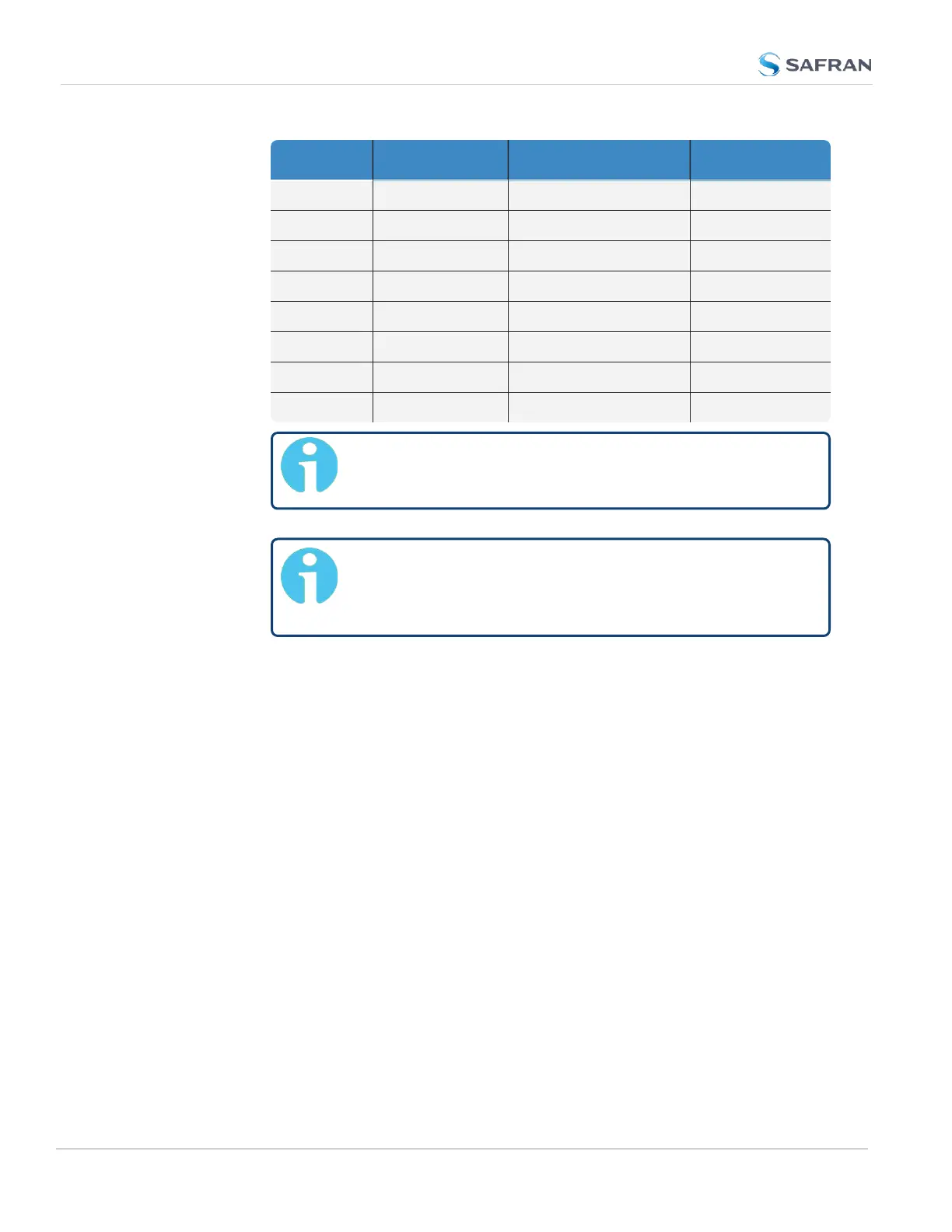
GPS Galileo GLONASS BeiDou
X X – –
X X X –
X X – X
X – X –
X – – X
– X X –
– X – X
– – X X
Note: The augmentation system SBAS and QZSS can be
enabled only if GPS operation is enabled.
Note: Should you select more than 3+QZSS con-
stellations, you will receive a Constellation Error once
you click Submit (ConstError).
About QZSS
QZSS is enabled by default if GPS is enabled. To avoid cross-correlation issues, u-
blox recommends that GPS and QZSS are always both enabled or both disabled.
While it is possible to enable GPS without QZSS, the reverse is not recommended
and not possible through the Web UI.
QZSS is not considered a standalone, global system, but is instead a regional sys-
tem (Japan). You must be located in Japan (or using a GNSS simulator) to prop-
erly receive QZSSsignals.
About SBAS
Satellite Based Augmentation Systems (SBAS) is an augmentation technology
for GPS integrity. To use SBAS correction, you must enable GPS tracking.
Determining Which GNSS Satellites Are Received
To see which GNSS satellites your VersaSync is currently receiving:
214
CHAPTER 3 • VersaSync User Manual Rev. 12
3.3 Managing References



 To Next Page