Default User Group: Select your preferred default user permissions level
(Admin or User).
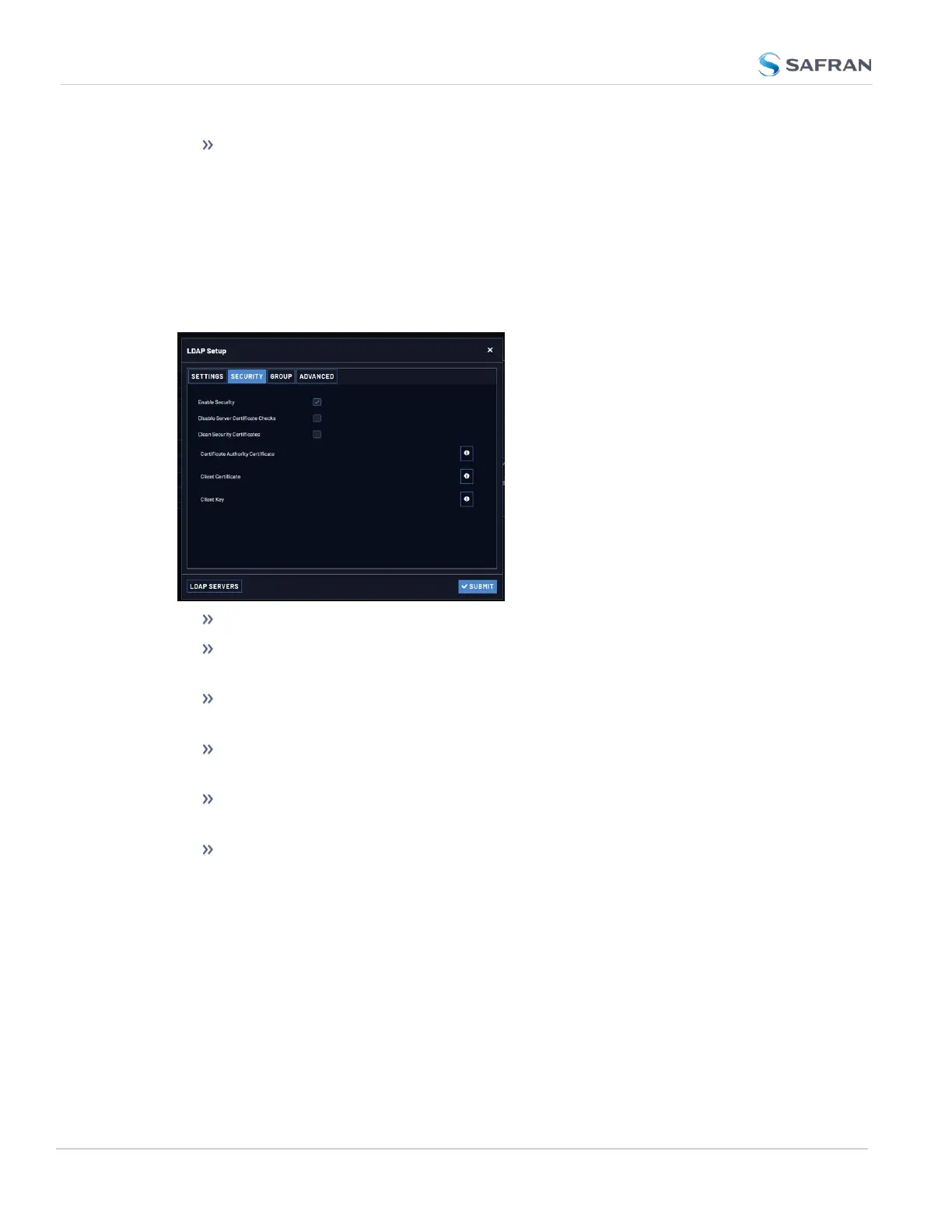
LDAP Security Settings
Under the LDAP Security tab, you can upload and install the SSL and TLS
required certificates and client key. Selecting the INFO icon next to a certificate
or key will open a dialog that allows you to view a currently installed certificate or
key, and to upload a new item. Certificates/ keys must be in PEM or DER format.
Select Enable Security to enable LDAP SSL/ TLS (default is ON).
Select Disable Server Certificate Checks to disable verification of the cer-
tificate presented by the server.
Select Clean Security Certificates to remove all certificates currently stored
on VersaSync (e.g., to eliminate expired certificates).
Certificate Authority Certificate: The Server Certificate. Required if Enable
Security is checked and Disable Server Certificate Checks is unchecked.
Client Certificate: Required if the LDAP server requires client authen-
tication.
Client Key: The private key that pair with the client certificate. Required if a
Client Certificate is uploaded.
To upload a certificate or client key:
a. Click the INFO icon for the certificate you wish to upload.
b. In the Certificate window, click the Choose File button.
254
CHAPTER 4 • VersaSync User Manual Rev. 12
4.4 Managing Users and Security



 To Next Page