3. Add a pin configuration by clicking the PLUS icon in the top-right corner.
The Add Pin window will display.
4. Start with the Type Filter drop-down menu (second line in the window) and
select a signal type.
5. From the Signal drop-down menu, select a signal.
6. From the Pins drop-down menu in line 3, select the pin pair you chose in
Step 2. (Note that you will need 4 pins if you selected a RS485 signal Type.)
7. Click Submit.
8. In the Actions panel, click Apply Changes.
Restoring the Default I/O Configuration
VersaSync is shipped with a default I/O configuration that you can be cus-
tomized. However, if required you can restore the default configuration at any
time after applying changes.
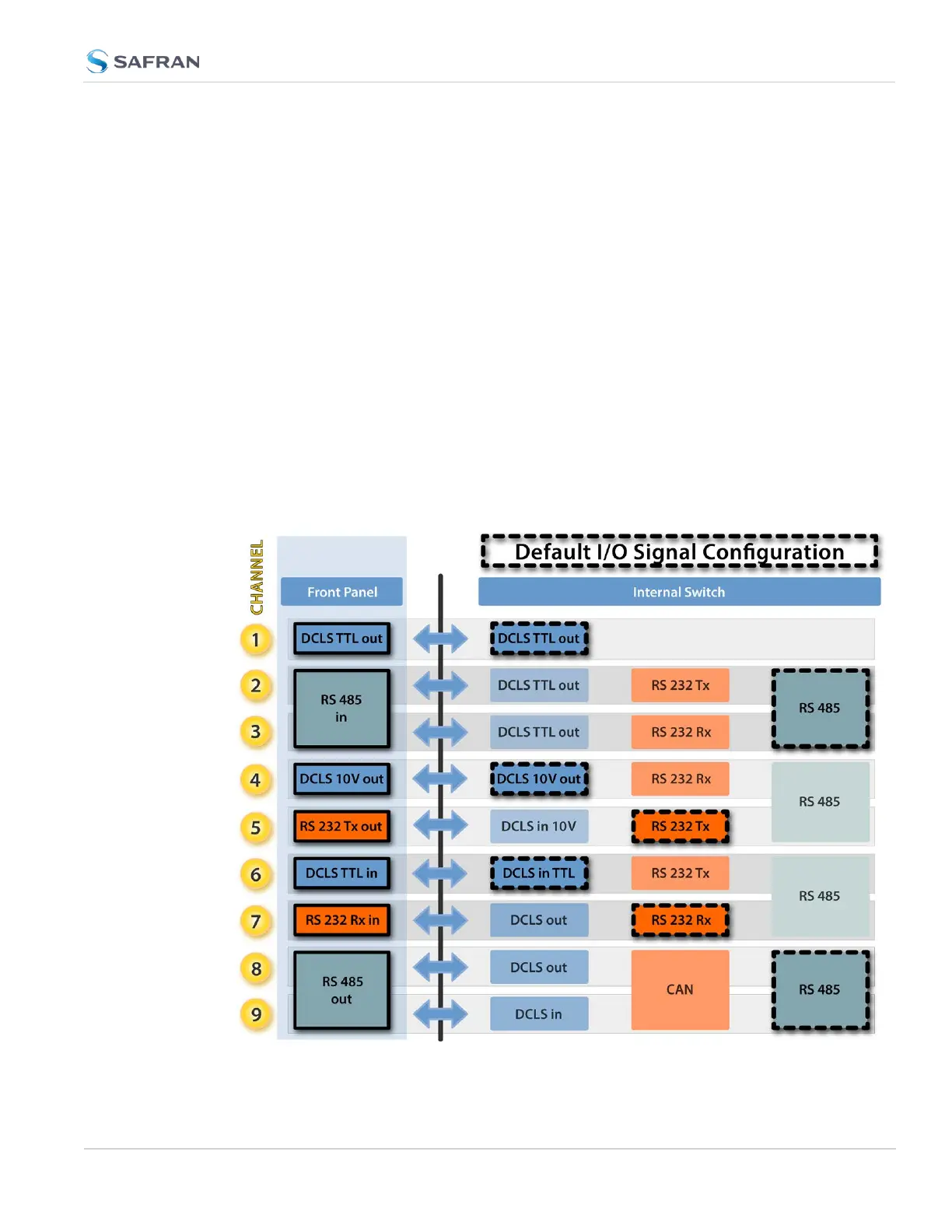
The following illustration shows the default I/O pin configuration:
Figure 2-4: Default I/O configuration
2.7 Configuring Inputs/Outputs
CHAPTER 2 • VersaSync User Manual Rev. 12
47



 To Next Page