63 22 726 D3561
D3561.201.01.03.02 05.2012
159
Sirona Dental Systems GmbH 4 Operation
Operating Instructions SINIUS / SINIUS CS 4.13 Configuration of the treatment center (setup)
båÖäáëÜ
4.13.3 Setting the date and time
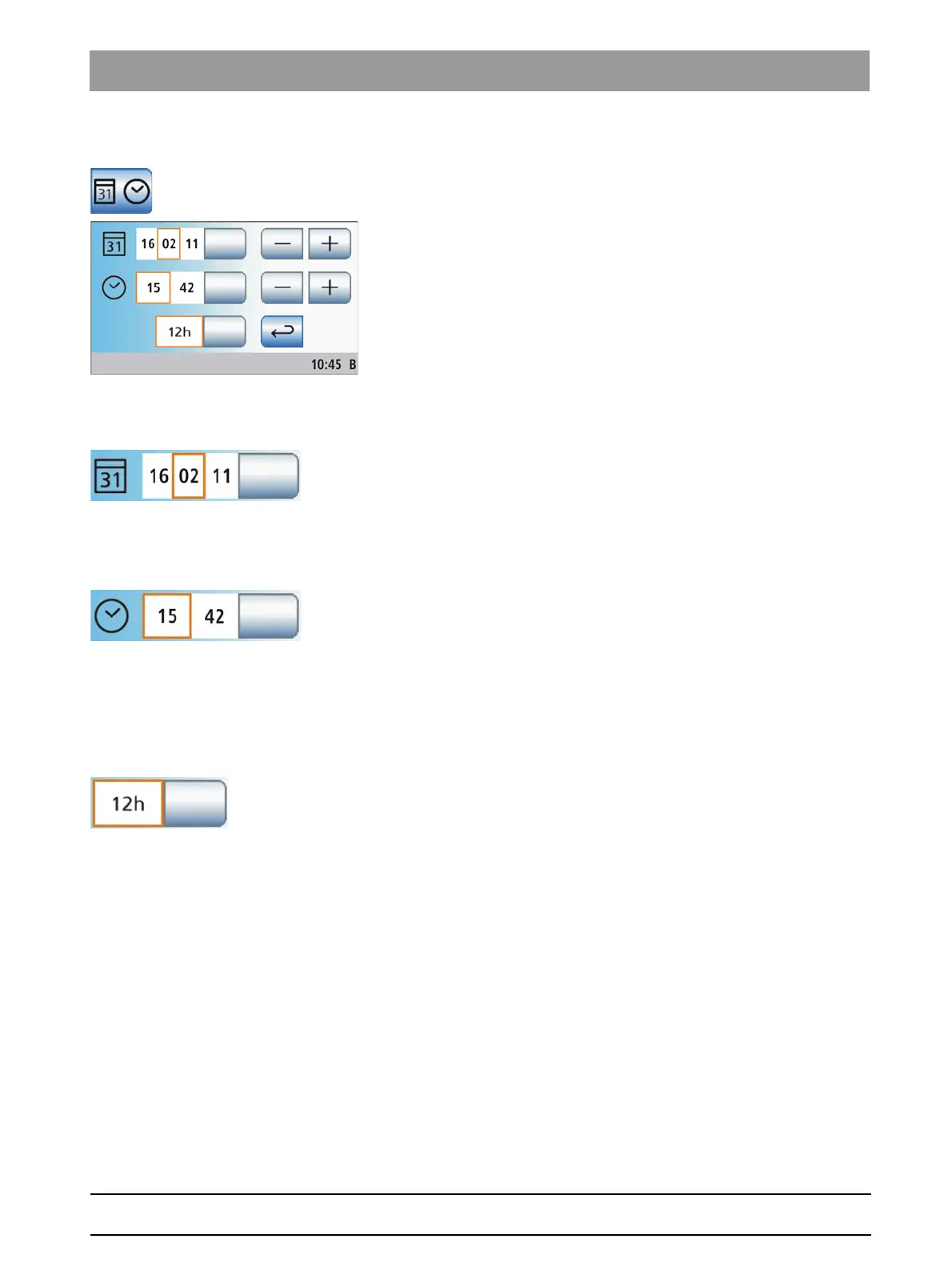
Setting the dat e and time
➢ Touch the
Date and time
key in the setup program.
The sub-screen opens.
Setting the date
The date is displayed in the format day/month/year.
1. Use the – and + keys to set the day.
2. Touch the
Date
key.
The month field is highlighted orange.
3. Repeat this procedure for the month and year.
Setting the time
1. Use the – and + keys to set the hour.
2. Touch the
Time
key.
The minutes field is highlighted orange.
3. Use the – and + keys to set the minutes.
12/24 hour display changeover
The 12-hour display is changed in the footer of the touch screen only. The
setup program will continue to display a 24-hour system.
➢ Touch the
12/24 hour display
key.
If the field is highlighted orange, the 12-hour display is set.















 To Next Page