7 — Routine Maintenance
135
Operator Manual
Vision® 1300 Series
920515770_J
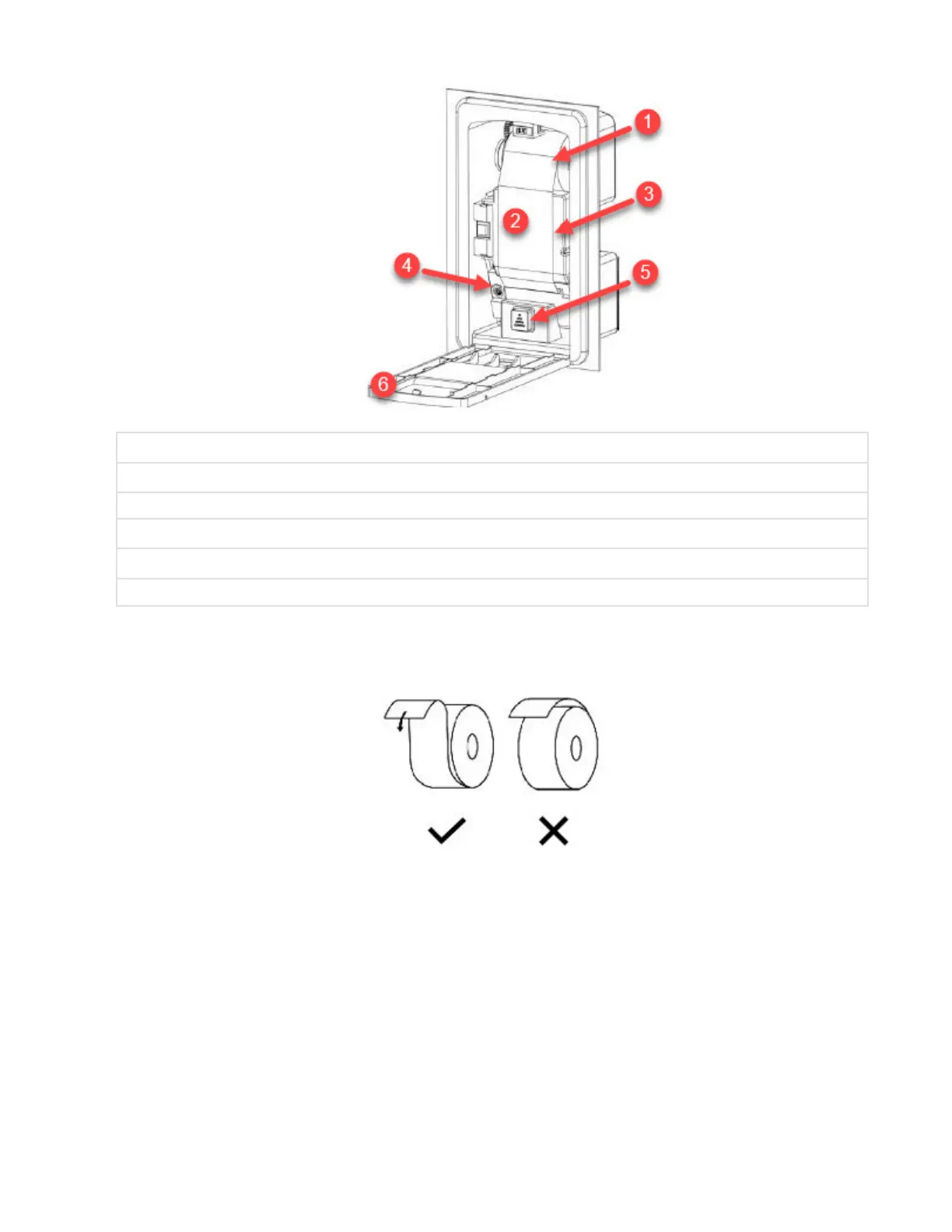
1 Take-Up Spool
2 Paper
3 Inner Printer Door
4 Ink Cartridge
5 Paper Feed Button (Includes LED if Feature is Present)
6 Printer Door
.
6. Insert new paper roll.
7. Slightly fold end of paper and insert end of paper into printer roller mechanism, just behind ink cartridge.
8. Press paper feed button on printer until paper advances through printer mechanism and ink cartridge, exiting
through front.
9. Continue pressing paper feed button (or pull paper gently) until about 18” (46 cm) of paper hangs out of printer.
Insert end of paper into slot of take-up spool.
10. Coil paper around take-up spool until secure.
11. Reinstall take-up spool in bracket. Manually roll up slack paper.
12. Close printer door.
13. If LED is present on Paper Feed Button,, check LED light. It should be OFF.












 To Next Page