MAINTENANCE PROCEDURES : COLOR FILTER REPLACEMENT
02.9678.0010 F 23
2
Color Filter Replacement
WARNING: Remove power from luminaire before performing maintenance. Filters may be HOT
after operation. Allow to cool before replacing.
Repair/Replacement Procedure
Step 1. Remove power from luminaire.
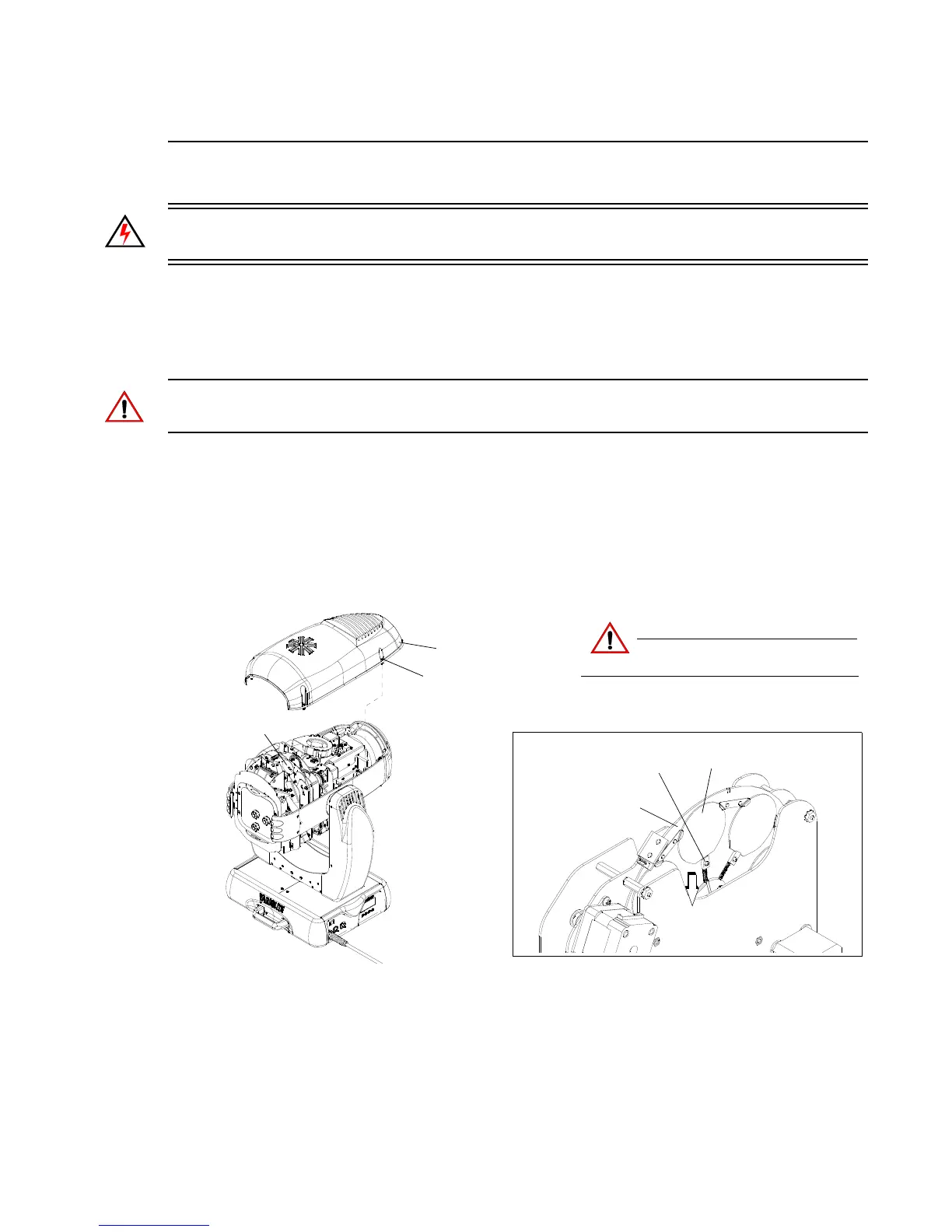
Step 2. Remove top head cover by loosening four 1/4-turn screws as shown in Figure 2-5.
CAUTION: Do not touch filters with bare fingers. Wear cotton gloves or other covering while
replacing. Clean with isopropyl alcohol and soft cloth if required.
Step 3. Rotate color wheel until required filter position is accessible.
Step 4. Press spring lock back until color filter is free and remove filter.
Step 5. Install new filter (coated side must be oriented towards lamp) ensuring that it is securely in
position.
Step 6. Replace head cover.
Figure 2-5: Color Filter Replacement
Top Head Cover *
1/4-Turn Screw
Color Wheel
(see detail)
CAUTION:
Do not touch filter with bare fingers.
Wear cotton gloves.
Color Filter
Spring Lock
Color Wheel
Push spring lock back
to release color filter
* Head covers are attached by tethers.


 To Next Page