192
Accutome B-Scan Plus User Guide
Archive
Screen
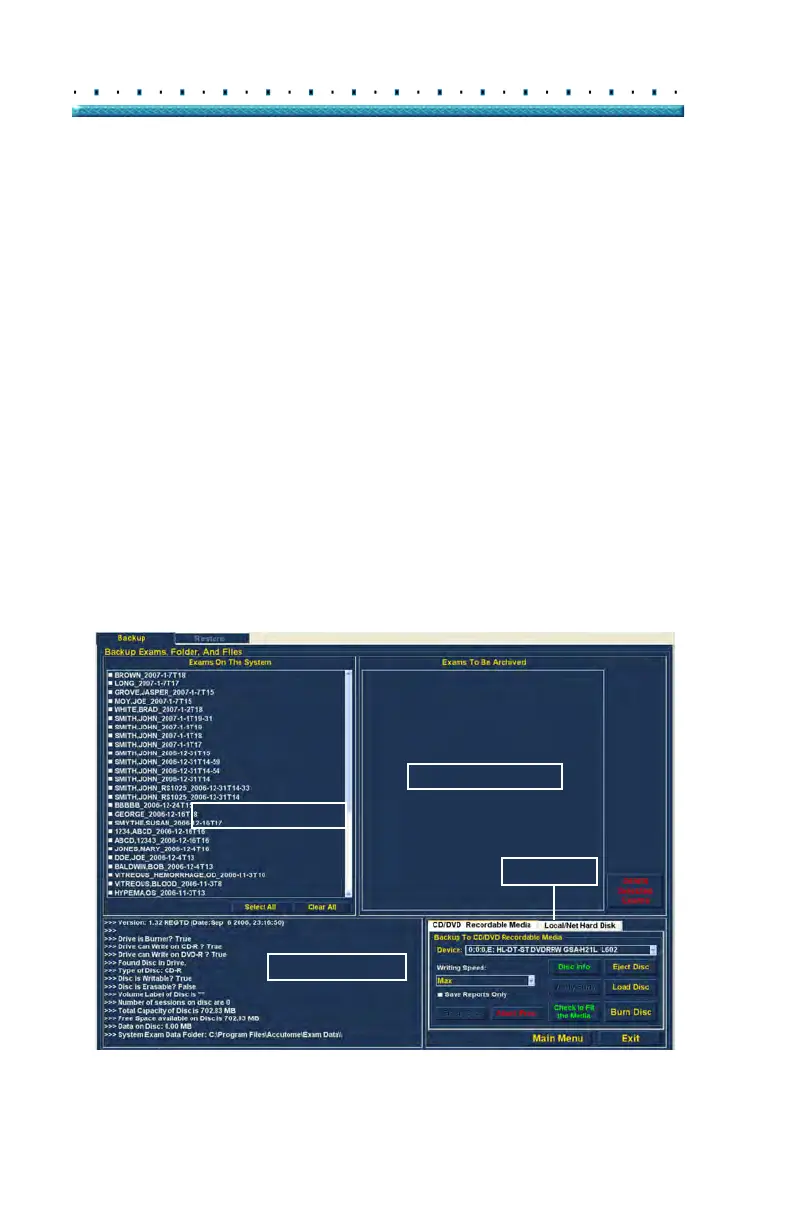
The Accutome B-Scan Plus will launch the Archive
screen shown below with two tabs; Backup and Restore.
The default is Backup. On this screen you can select
multiple patient exams and burn them to a CD or DVD.
You can also backup selected exams to a location your
computer or network.
The Archive Screen is divided into four major sections:
1. Exams o
n the System - displays all available
exams
2. Exams
to Be Archived - after selecting exams for
burning to a CD/DVD or for backup they will be dis-
played in this area
3. Process Informatio
n Area - provides live feedback
as text for any selected archive activity. When you
first start the Archive function this area displays
information about the CD/DVD drive and disc.
4. T
ool Palettes - contains tools for checking and
burning CD/DVDs and tools for archiving (backup)
to a local or network hard disk. There are two
tabs: CD/DVD Recordable Media and Local/Net
Hard Disk
Figure 150 Archive Screen
Exams On The System
Exams To Be Archived
Process Information
Tool Palettes



 To Next Page