54
Accutome B-Scan Plus User Guide
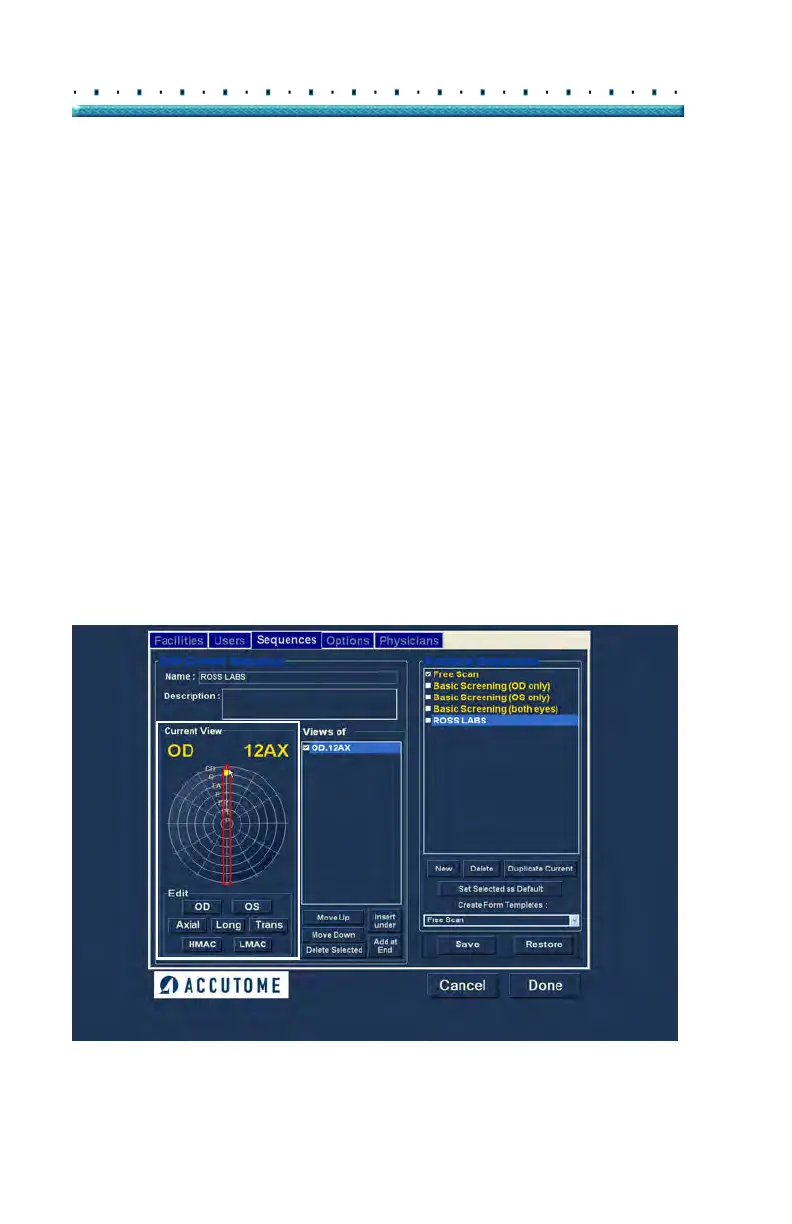
2. Probe positioning for a scan is illustrated
graphically by a wheel, representing the hours of
the clock. There is an indicator with an arrow at
one end which indicates the position and can be
dragged to edit the probe position. When you
initially select the position wheel to edit the current
view the first scan defaults to the 12AX (Axial)
probe position, with 12 being the 12:00 position as
shown in
Figure 35 below.
3. If you would like to change the probe position for
the scan select the tip of the position indicator and
drag the indicator around the position wheel until it
as at the appropriate position or hour on the clock.
4. If you woul
d like to change the method of scanning
from AX (Axial - the default) select either or Long
(Longitudinal) or Trans (Transverse).
5. If you wou
ld like to identify the scan for scanning
the macula, select either HMAC (Horizontal
MACula - used with Axial method) or LMAC
(Longitudinal MACula - used with Longitudinal
method).
Figure 35 First Scan Editing View
Edit
Current
View
Selections



 To Next Page